
Repurpose a Blog Post into a Short Video: Step-by-Step Guide
Your blog is sitting on a pipeline asset you have not activated yet. When you repurpose a blog post into a short video, you take research that is already done, a structure that already converts, and an argument that already resonates, and you push it into the format that gets the most reach. Short-form video is the top-performing content format in 2026, delivering the highest ROI of any content type. For B2B SaaS founders and growth teams, that means one underused blog post can become the buyer education engine you have been looking for.
TL;DR
- Pick one idea from one post, not the whole article.
- Strip it to a 130–150 word script using the hook-insight-CTA structure.
- Shoot a talking head or build a no-face slide video in vertical format (9:16).
- Distribute to LinkedIn, YouTube Shorts, Instagram Reels, and TikTok simultaneously.
Why B2B Teams Need to Repurpose a Blog Post into a Short Video Right Now
Most B2B SaaS teams are sitting on a library of high-quality blog content that drives zero pipeline. The problem is not the content, it is the format. Buyers on LinkedIn and TikTok are not opening links to read 2,000 words. They are stopping on videos that answer their exact question in 45 seconds. 78% of B2B marketers currently use video in their programs, and almost half say short-form social video content delivers the highest ROI, according to the 2025 B2B Marketing Benchmark Report from LinkedIn and Ipsos.
That number reflects what we see in practice at Komet Media: the teams winning on social media right now are the ones treating every strong post as raw material for short-form video. Video is growing 1.6 times faster than all other content types across professional networks. If your product explanation lives only in a blog post, you are leaving the majority of your potential buyers unreached.
The content atomisation logic is straightforward: cross-platform content atomisation involves deconstructing a single substantial piece of pillar content into smaller, bite-sized assets, each tailored for distribution on different platforms to maximise reach and impact.
For founder-led teams, this is your fastest path to inbound demand. A post your team spent two hours writing can become five short videos in an afternoon. Each one educates a buyer, surfaces your positioning, and drives them back to the original article, creating a compounding content distribution loop that compounds monthly. A single blog post contains multiple video-ready insights. You are not repurposing content. You are distributing your thinking to the platforms where your buyers already are.
What Parts of a Blog Post Should You Use for a Short Video?
Not everything in your post belongs in a video. Most blog posts contain one strong short-form idea buried inside a lot of supporting context. Your job is to find it fast.
Sort posts by social shares as a secondary metric, posts with high shares already have proven emotional or informational value. Read each post and circle the one sentence that is most surprising, most actionable, or most counterintuitive. That sentence becomes the core of your short script.
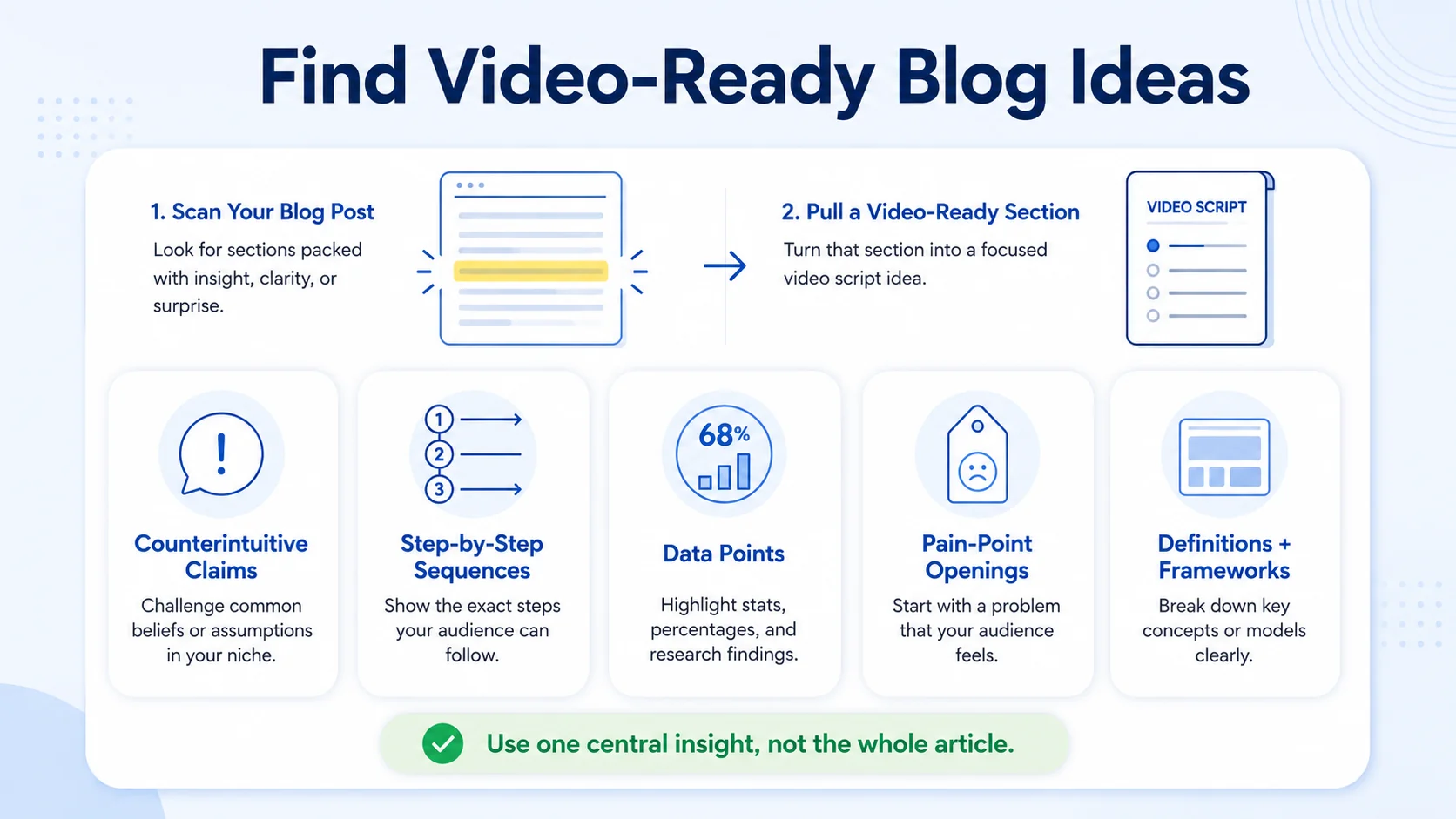
The sections of a blog post that translate best to short-form video:
- Counterintuitive claims: Any sentence that starts with "Most people think X, but actually Y" is a hook waiting to happen.
- Step-by-step sequences: A numbered list in your post becomes a 3-point breakdown on screen.
- Data points and stats: One strong statistic with a clear implication drives more retention than a three-paragraph explanation.
- Pain-point openings: If your intro articulates a problem your buyer feels, lift it verbatim and open the video with it.
- Definitions and frameworks: Original frameworks your team has developed work particularly well for founder-led brand storytelling.
What to leave behind:
- Long-form qualifications and caveats
- Internal links and supporting examples
- Background context assumed by a reader but unnecessary for a viewer
The process starts with identifying the most compelling hook in your article, typically a counterintuitive statistic, a relatable pain point, or a surprising framework. For platforms like TikTok, Instagram Reels, and YouTube Shorts, extract one central insight. The structure that consistently performs is: hook in the first two seconds, one concrete data point or claim, two to three supporting examples presented quickly, and a clear call to action. Apply this filter to a 2,000-word post and you typically surface three to five distinct short-video ideas, each one clean, standalone, and ready to script.
How to Condense a 2,000-Word Blog Post into a 60-Second Video Script
Scripting is where most teams stall. They try to summarise the whole post and end up with a 400-word script that runs for four minutes. That is not a short video. That is a long video with bad pacing. A 2,000-word blog post should condense into a 150–300 word video script. If your script is longer than 300 words, you are trying to include too much. Video is a lossy compression of your written content, and that is fine.
Use this script structure for every 60-second video:
- Hook (0–3 sec): One sentence. State the counterintuitive claim or the problem. No preamble.
- Setup (3–8 sec): Confirm the pain. One line that makes the viewer say "yes, that's me."
- Core insight (8–45 sec): Deliver your two to three supporting points. Keep each point to one sentence plus one example.
- CTA (45–60 sec): Tell them exactly what to do next, comment, follow, click the link, or watch the next video.
With limited time, every word in your script must add value. Edit ruthlessly to ensure brevity and clarity. For B2B SaaS, write the script the way a sharp colleague explains something in a Slack message, direct, no filler, assuming the reader is smart. Avoid feature language. Stick to outcomes your buyer cares about: pipeline, time to close, buyer trust, demo demand. Read it aloud before you record. A 60-second video requires roughly 130–150 words spoken at a natural pace. If you hit 180 words, cut a point, do not speed up your delivery.
Blog Post to Video Conversion Tools (Free and Paid)
You do not need Adobe Premiere Pro or a production house to repurpose a blog post into a short video. The right tool depends on your format, budget, and whether you are comfortable on camera.
Descript is the best free option for editing talking-head video by deleting words in a transcript. For teams building a repeatable short-form video editing workflow, it eliminates the need to scrub timelines manually, cut the word in the transcript, and the clip disappears. Canva includes pre-set aspect ratio options optimised for Instagram Reels, TikTok, and YouTube Shorts, which saves you from manual cropping. It is the fastest path for no-face, slide-style content.
CapCut offers full-featured mobile and desktop editing at $0 , making it the default starting point for most teams. Its auto-caption feature alone justifies using it; burned-in captions are non-negotiable for audience retention on silent-scroll feeds.
For teams at scale that need consistent output without building an in-house production function, Komet Media's video editing services handle the full repurposing workflow, script, edit, captions, and distribution-ready exports across formats.
How to Repurpose Blog Posts for TikTok, YouTube Shorts, and Instagram Reels
The same base video does not get posted identically across every platform. Each algorithm and audience rewards slightly different behaviour. YouTube Shorts currently handles 70 billion daily views, and TikTok holds 40% of the short video platform market. Both are worth prioritising for B2B SaaS teams targeting younger buyers and technical decision-makers.
Platform-specific adjustments when you repurpose a blog post into a short video:
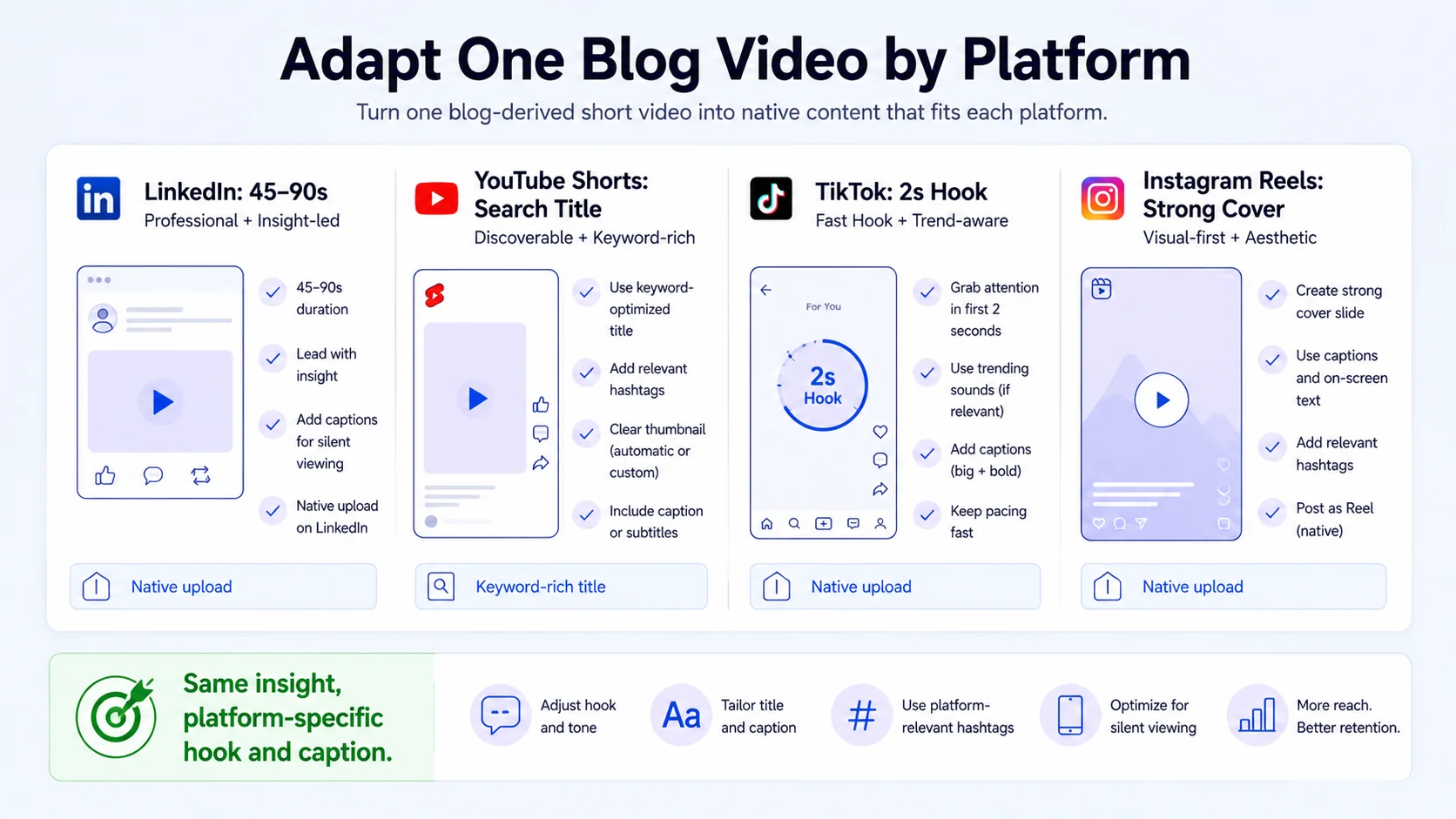
LinkedIn:
- Lead with the professional outcome, not the tactic.
- Captions are critical, most LinkedIn video plays without sound.
- Post natively; do not share a TikTok link.
- Ideal length: 45–90 seconds for talking-head content.
YouTube Shorts:
- Video SEO matters here. Write a keyword-rich title separate from your blog title.
- Upload to YouTube Shorts, then embed the YouTube Short into your original blog post. Add a line under the embed: "Watch the 60-second summary above or read the full guide below."
TikTok:
- Hook must land in the first two seconds or the algorithm kills distribution.
- Use trending audio where relevant, but never at the expense of your spoken insight.
- Text overlays and fast cuts perform above average in B2B SaaS categories.
Instagram Reels:
- Instagram Reels holds around 20% market share in the short video platform landscape.
- Cover frame (thumbnail) carries significant weight on Reels, designed intentionally.
- Captions and on-screen text hooks drive saves, which the algorithm rewards heavily.
Cross-promote your repurposed content across different channels, including email lists, blogs, and newsletters to maximise reach from each video produced.
How to Repurpose Written Content into Video Without Showing Your Face
Not every founder or marketing lead wants to be on camera. That is not a barrier. Converting a blog post into video content does not require a film crew or expensive production setup. Three no-face formats that perform well for B2B SaaS:
- Screen recording with voiceover: Walk through your product dashboard, a case study result, or a slide deck while narrating the key insight from your post. Tools like Descript handle recording and editing in one window.
- Slide-based video: Use Canva to turn your blog's key points into animated text slides. Add a strong voiceover and captions. Canva Video is excellent when you want to create animated, slide-based videos without appearing on camera, and works particularly well to turn list posts or infographic-style content into engaging visual videos.
- Text-on-screen video: Strong typography on a clean background with a single visual and voiceover. This format thrives on LinkedIn and YouTube Shorts where clear value delivery outperforms high production value.
For all three formats, the script discipline from the previous section still applies. In narrated video formats, audio does 60–70% of the storytelling work. If your narration is flat, monotone, or too fast, the video will underperform regardless of how good it looks.
If you want to build a no-face video system at scale, particularly from webinar recordings, podcast episodes, or demos, that is exactly what we build at Komet Media. The content is already there. The production workflow is the gap we close.
Building a Content Repurposing Strategy That Compounds Over Time
A single blog post turned into one video is a tactic. A system that turns every post into five distribution-ready assets is a strategy. The most efficient B2B teams start with a single, insight-dense "anchor" asset, then break it into smaller, platform-ready pieces that keep the conversation going long after the original launch.
Here is the repeatable framework we recommend:
- Audit your top 10 posts by pageviews and time-on-page in Google Analytics, prioritise posts that already engage readers.
- Extract three video angles per post, one counterintuitive claim, one step-by-step process, one outcome story.
- Script in bulk, batch three to five scripts in a single session before recording anything.
- Record and edit, use Descript for talking-head, Canva for no-face, CapCut for social-ready exports.
- Distribute in a content distribution framework, post natively to LinkedIn, YouTube Shorts, Instagram Reels, and TikTok within 48 hours.
- Embed back to the blog, link each video to its source post to create a Video SEO loop that captures both Google and YouTube search.
A single blog post can become a YouTube video, a series of short-form clips, and an embedded asset that boosts on-page SEO. That is a compounding content engine, not a one-time tactic. For teams running video marketing at scale, particularly SaaS teams using webinars and product demos as anchor content, the output should be ten to fifteen short videos per month minimum, all traceable back to existing long-form assets already in your library. If you are creating new content every week from scratch, you are working harder than your competitors, not smarter. Repurpose first. Create second.
Conclusion
- Repurpose a blog post into a short video by extracting one strong idea, scripting it in 130–150 words, and building for vertical format (9:16).
- Use Descript for talking-head editing, Canva for no-face slides, and CapCut for fast social exports.
- Distribute natively across LinkedIn, YouTube Shorts, Instagram Reels, and TikTok, and embed each video back into its source post for compounding Video SEO.
- Treat every post as three to five videos, not one. A content repurposing strategy compounds; a one-off video does not.
- If you want a done-for-you system, Komet Media's short-form video editing service turns your existing content library into a pipeline-driving distribution engine.
Frequently Asked Questions
Q1: How long should a short video made from a blog post be?
For TikTok, Instagram Reels, and YouTube Shorts, target 30–60 seconds. LinkedIn performs well at 45–90 seconds for B2B audiences. Anything over 90 seconds should have a clear reason to exist, most blog-derived short videos do not need more than 60 seconds to land a single insight effectively.
Q2: Do I need to show my face to repurpose a blog post into a short video?
No. Slide-based videos using Canva, screen recordings with voiceover, and text-on-screen formats all perform well without a talking head. For B2B SaaS teams, a clean slide deck with strong narration often outperforms on-camera content, particularly on LinkedIn and YouTube Shorts.
Q3: How many videos can I get from one 2,000-word blog post?
Most 2,000-word posts contain three to five distinct short-video ideas: a counterintuitive claim, a step-by-step process, a key stat with implications, a definition or framework, and an outcome story. Batch-scripting all five in a single session is the most efficient way to build volume.
Q4: What is the best free tool to repurpose a blog into a short video?
CapCut is the strongest free all-in-one option in 2026, it exports clean 1080p without a watermark, includes auto-captions, and works on both mobile and desktop. Canva Video is the best free tool for slide-based, no-face content. Descript offers a limited free tier that suits occasional talking-head editing.
Q5: How do I write a video script from a blog post without it sounding robotic?
Read your script aloud before recording. If you would not say it in a conversation, rewrite it. Strip out passive voice, jargon, and qualifier phrases. Aim for the tone of a sharp Slack message: direct, outcome-focused, one idea per sentence. A 60-second script needs only 130–150 words, less is always better.
Q6: Should I post the same video on TikTok and Instagram Reels?
Yes, but with light adjustments. The same video file works across both platforms, but captions, hashtags, and the first-line text hook should be tailored per platform. On TikTok, trending audio can extend reach. On Reels, a strong cover frame matters more. Post natively to each, never share a cross-posted link or a video with a TikTok watermark on Instagram.

