
Repurpose a Webinar into a Highlight Reel: Step-by-Step Guide
Most B2B teams run a webinar, send the replay link, and move on. That's leaving a serious pipeline on the table. When you repurpose a webinar into a highlight reel, you turn one 60-minute session into a short-form asset that educates buyers, builds founder trust, and keeps working for months.
About 65% of marketers recycle webinar material into social media clips and other formats, but most are doing it inconsistently. This guide shows you the exact process we use at Komet Media to do it right.
TL;DR
- Pull your highest-value moments first: key insights, sharp takeaways, strong questions from the audience.
- A webinar highlight reel should run 60–120 seconds for LinkedIn and under 60 seconds for Reels or Shorts.
- Tools like Descript, Adobe Premiere Pro, CapCut, and Canva handle 90% of the workflow.
- Distribute within 48 hours of the live session to catch peak interest.
Why B2B SaaS Teams Should Repurpose a Webinar into a Highlight Reel
Most webinars have a shelf life of about one week. After that, the recording sits in a Zoom folder and nobody touches it. That's a content asset problem, and for SaaS teams focused on pipeline and buyer education, it's also a revenue problem. Every webinar is evergreen content that can be repurposed into clips, shorts, reels, blogs, and on-demand content.
The highlight reel is the anchor of that entire repurposing chain. It's the asset that drives people back to the full recording, feeds your LinkedIn Video Content strategy, and gives your sales team something to drop into a follow-up email instead of a 47-minute replay. High-performing webinars can see a 64% average engagement rate, and hosts extended audience engagement by up to 50% when adding interactive elements. That engagement doesn't disappear after the live session, it transfers to short clips when the content is strong.
Here's the business case for B2B SaaS specifically:
- Buyer education: A 90-second clip showing your product solving a real pain point does more pipeline work than a landing page.
- Founder-led growth: Clips of a founder answering hard questions build trust faster than case studies.
- Sales enablement: Short videos give your SDRs something shareable that prospects will actually watch.
- Inbound demand: Short-form video on LinkedIn and YouTube Shorts surfaces your brand to buyers who never attended the live session.
The most popular approach for repurposing webinars is adding on-demand recordings to landing pages, followed by creating social clips, with nearly half of teams also including recordings in email campaigns. A well-built highlight reel plugs into all three channels simultaneously. This is exactly the kind of content repurposing system we build for growth teams, one asset, multiple distribution points.
What Clips Should You Pull from a Webinar for a Highlight Reel?
Not every minute of a webinar deserves to be in the reel. The goal is to find moments that communicate value in under 30 seconds, standalone, without context.
Four moment types to prioritize:
- Sharp insight moments: The speaker says something counterintuitive or specific. These perform best on LinkedIn because they spark comments.
- Proof moments: A stat, a case study result, or a customer story referenced in the session. Buyers trust specifics.
- Question-driven moments: Strong audience Q&A clips work because they mirror exactly what your buyers are thinking.
- Tension moments: Any moment where a real problem is named clearly. "Here's why most SaaS demos fail" lands harder than "here's our product."
What to avoid: Intro segments, sponsor reads, technical troubleshooting, and anything that requires 30 seconds of setup before it makes sense.
A practical scoring method for clip selection:
From a 60-minute webinar, you should be able to pull 5–8 viable moments. Three of those will become your primary social clips. One will anchor the highlight reel. The rest feed your short-form video editing pipeline for the following weeks.
Step-by-Step: How to Repurpose a Webinar into a Highlight Reel
This is the exact video editing workflow we run at Komet Media. Follow it in sequence.
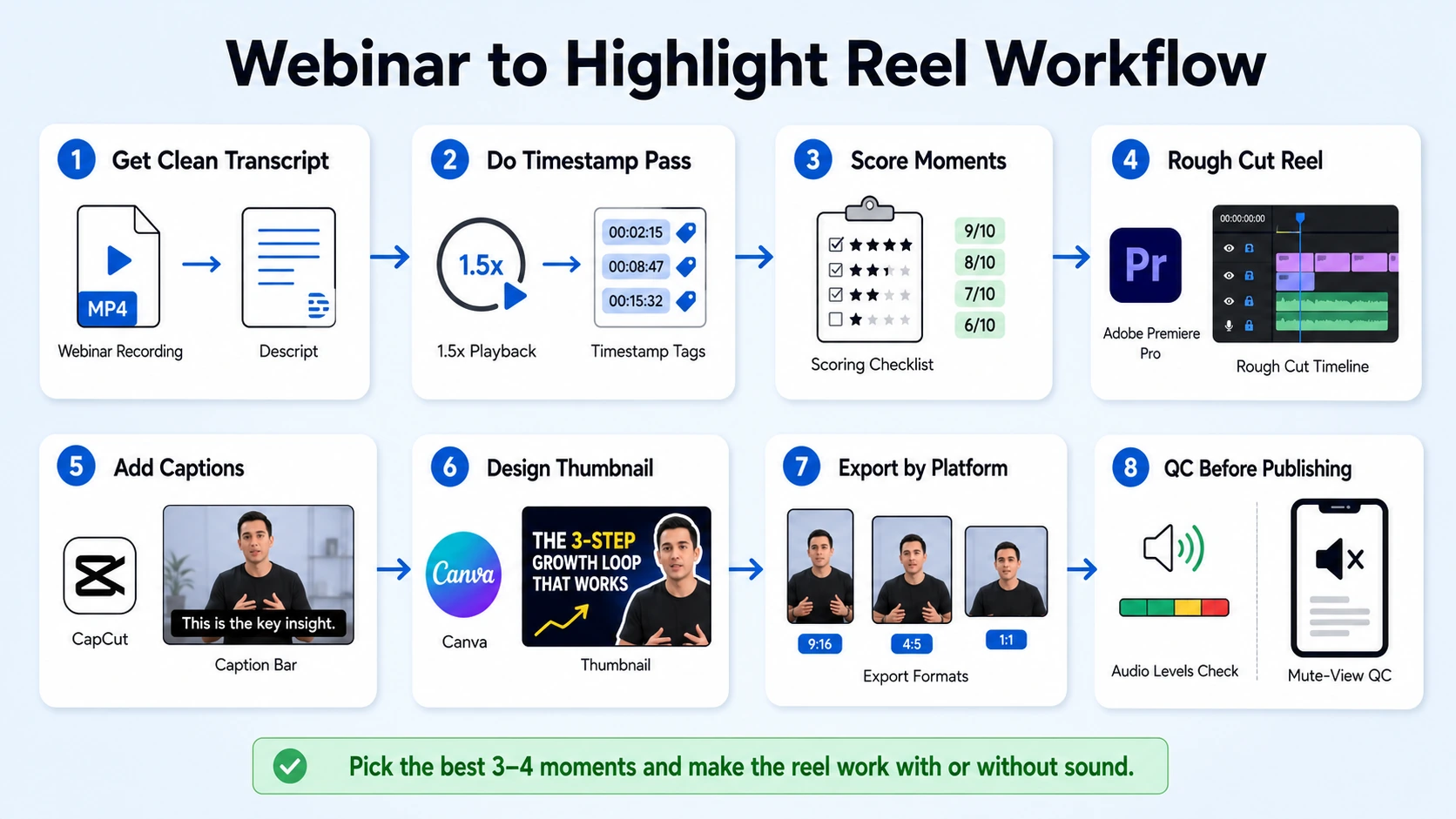
- Get a clean transcript: Upload your webinar recording to Descript or a similar tool. Generate an auto-transcript and clean up any major errors before editing.
- Do a timestamp pass: Watch the recording at 1.5x speed and mark every moment that fits one of the four clip categories above. Note the exact timecodes.
- Score your timestamps: Rank each moment on three factors, standalone clarity, emotional pull, and relevance to your ICP. Keep your top 5–8.
- Rough cut the highlight reel: In Adobe Premiere Pro or CapCut, sequence your top 3–4 moments back-to-back. Aim for a 60–120 second total runtime. Include transitions only if they're invisible.
- Add captions: Generate captions using Descript or auto-caption in CapCut. More than 80% of social video is watched without sound, so accurate captions are non-negotiable.
- Design a thumbnail: Build a thumbnail in Canva using a high-expression frame from the video. Add a short text overlay, the hook phrase from your best clip.
- Export for each platform: LinkedIn (1080x1920 vertical or 1920x1080 horizontal), YouTube Shorts (1080x1920), Instagram Reels (1080x1920), TikTok (1080x1920).
- QC before publishing: Watch the final cut without sound to verify captions are accurate. Watch with sound to check audio levels.
How Long Should a Webinar Highlight Reel Be?
Length is the most debated question in highlight reel creation, and the answer depends on where you're distributing. Videos under 90 seconds retain approximately 50% of viewers on average, and 59% of short videos are watched for 41%–80% of their duration. That's your benchmark for platform-first clips.
For B2B SaaS, LinkedIn is your primary distribution channel. Build the 90-second version first, then trim down for Reels and Shorts.
One common mistake: building a long highlight reel that tries to summarize the entire webinar. That's a recap, not a highlight reel. A real highlight reel is a sales asset, it makes the viewer want to watch the full recording or request a demo. Every second should be doing one of those two jobs.
For a webinar repurposing workflow that outputs platform-ready cuts without your team spending hours in the edit, this length framework is how we scope the work before we touch a single clip.
Tools to Edit Webinar Footage into a Highlight Reel
The right tool depends on your team's editing skill and the volume of content you're producing.
Teams are using AI in every stage of the video workflow, from planning to repurposing, and more than a third already use AI in their workflow with nearly a quarter more planning to start soon. Descript is the fastest entry point for teams who aren't video editors. You upload the recording, delete filler in the transcript, and the video edits itself. For teams that want polished output, motion graphics, branded lower thirds, B-Roll footage, Adobe Premiere Pro gives you full control but requires editing experience or a dedicated editor.
CapCut sits in the middle: fast, AI-assisted, and capable of producing social-ready clips without a learning curve. It handles caption generation natively, which saves significant time in the video editing workflow. If you want someone to handle this end-to-end rather than DIY, our hire video editor service is built specifically for SaaS teams running regular webinars who want a consistent output without adding headcount.
Content Distribution: How to Get Your Highlight Reel in Front of Buyers
Editing is 40% of the job. Distribution is the other 60%. A highlight reel sitting in a Google Drive folder isn't a pipeline asset, it's a file.
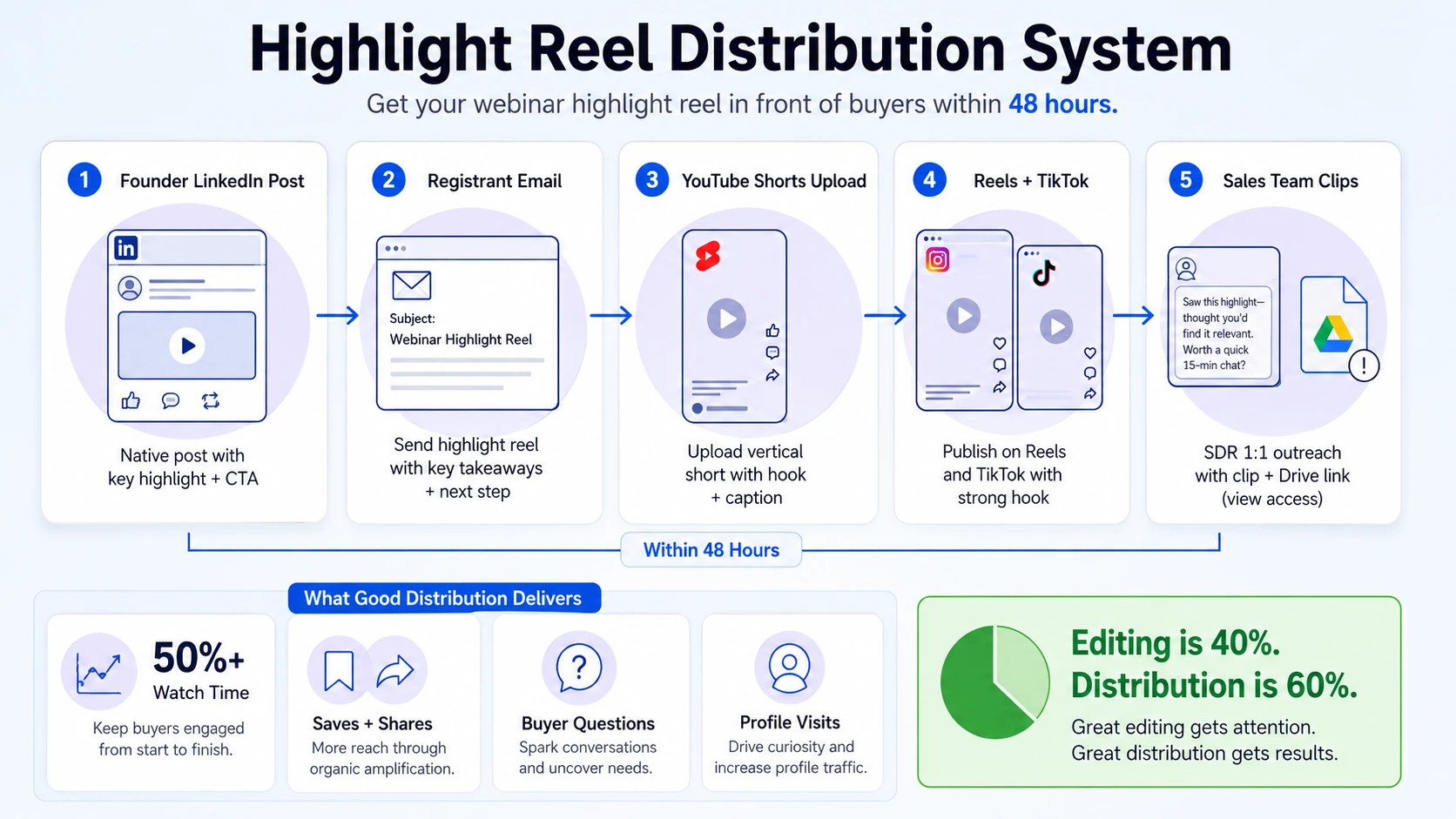
Distribution sequence (run this within 48 hours of the live webinar):
- Post the reel natively on LinkedIn, founder or speaker page first, company page second. Native posts outperform link posts significantly.
- Send to registrants via email with a subject line referencing the best insight from the reel, not "Webinar Recap."
- Upload to YouTube Shorts with a keyword-optimized description for Video SEO.
- Publish to Instagram Reels and TikTok if your ICP is active there.
- Give individual clips to your sales team with suggested copy for 1:1 outreach.
54% of marketers repurpose webinars into long- and short-form video content to reach wider audiences. The teams outperforming that benchmark are the ones with a distribution plan locked in before the webinar happens, not built afterward.
What good audience engagement metrics look like for webinar clips on LinkedIn:
- Watch time (aim for 50%+ average)
- Saves and shares (signal strong ICP resonance)
- Comments with questions (best indicator of buyer intent)
- Profile visits from the post (top-of-funnel signal)
Repurposing doesn't stop at the highlight reel. The same webinar recording can feed your podcast editing pipeline, individual quote clips, and written content. When you build a system around it, one webinar generates four to six weeks of content.
Conclusion
When you repurpose a webinar into a highlight reel with intention, you don't just extend the life of one event, you build a buyer education engine that runs between webinars.
Key takeaways:
- Pull insight, proof, Q&A, and tension moments. Skip intros and housekeeping.
- Build for 60–90 seconds on LinkedIn; trim to under 60 for Reels and Shorts.
- Use Descript for speed, Adobe Premiere Pro for quality, CapCut for scale.
- Distribute within 48 hours: LinkedIn native, email, YouTube Shorts, sales outreach.
The teams winning on LinkedIn in 2026 aren't producing more content. They're extracting more value from the content they already have. That's exactly what a disciplined repurpose of a webinar into a highlight reel workflow makes possible.
Frequently Asked Questions
Q1: How many clips can I realistically get from one webinar?
From a 60-minute webinar, you can typically pull 5–8 viable moments. Three become primary social media clips, one anchors the highlight reel, and the rest feed your short-form video production calendar over the following two to three weeks.
Q2: Do I need professional video editing software to create a highlight reel?
No. Descript and CapCut handle most of the video editing workflow without prior experience. Adobe Premiere Pro gives you more control for branded, polished output, but for most SaaS teams starting out, Descript's transcript-based editing is the fastest path to a publish-ready reel.
Q3: Should my highlight reel include captions?
Yes, always. The majority of social video is consumed without sound, particularly on LinkedIn. Auto-caption tools in Descript and CapCut handle this in minutes. Accurate captions are a baseline requirement for reach, not an optional polish step.
Q4: What's the best moment in a webinar to open a highlight reel?
Open with your sharpest insight or the most pointed question from the Q&A. Avoid starting with introductions, speaker bios, or context-setting. The first three seconds either stop the scroll or lose the viewer completely.
Q5: How soon after the webinar should I publish the highlight reel?
Publish within 48 hours. Registrant interest peaks in the first two days after the live session. A reel published a week later is competing against a cold audience. Build your post-webinar distribution sequence before the event, so editing is the only step left afterward.
Q6: Is repurposing a webinar into a highlight reel worth it if my webinar had low attendance?
Yes. Low live attendance doesn't reflect the on-demand or social audience. The most popular approach for repurposing webinars is creating social clips and adding recordings to landing pages, both of which reach buyers who never registered. The reel builds visibility for the next webinar while delivering value from the current one.

