
Repurpose a Conference Talk into Social Video: Step-by-Step Guide
You just left the stage. The audience was engaged, the Q&A ran long, and three people asked you to send them resources. But in 48 hours, that moment is gone unless you build a system around it. This guide shows founders, CEOs, and executives exactly how to repurpose a conference talk into social video, so a single keynote becomes weeks of trust-building content on LinkedIn, Instagram, and beyond. No theory. Just the workflow.
TL;DR
- One 45-minute conference talk can yield 10–15 platform-ready clips with the right extraction process.
- Clip length matters: 45–60 seconds for Instagram Reels, 1–2 minutes for LinkedIn thought leadership.
- AI tools handle 70–80% of the cutting; human editorial judgment closes the gap.
- Distribution tied to your personal profile outperforms brand pages by 8x on LinkedIn.
How to Repurpose a Conference Talk into Social Media Videos: The Full Workflow
The core workflow to repurpose a conference talk into social video has five stages. Founders who skip steps one or two are the ones who post one clip and wonder why it didn't land.
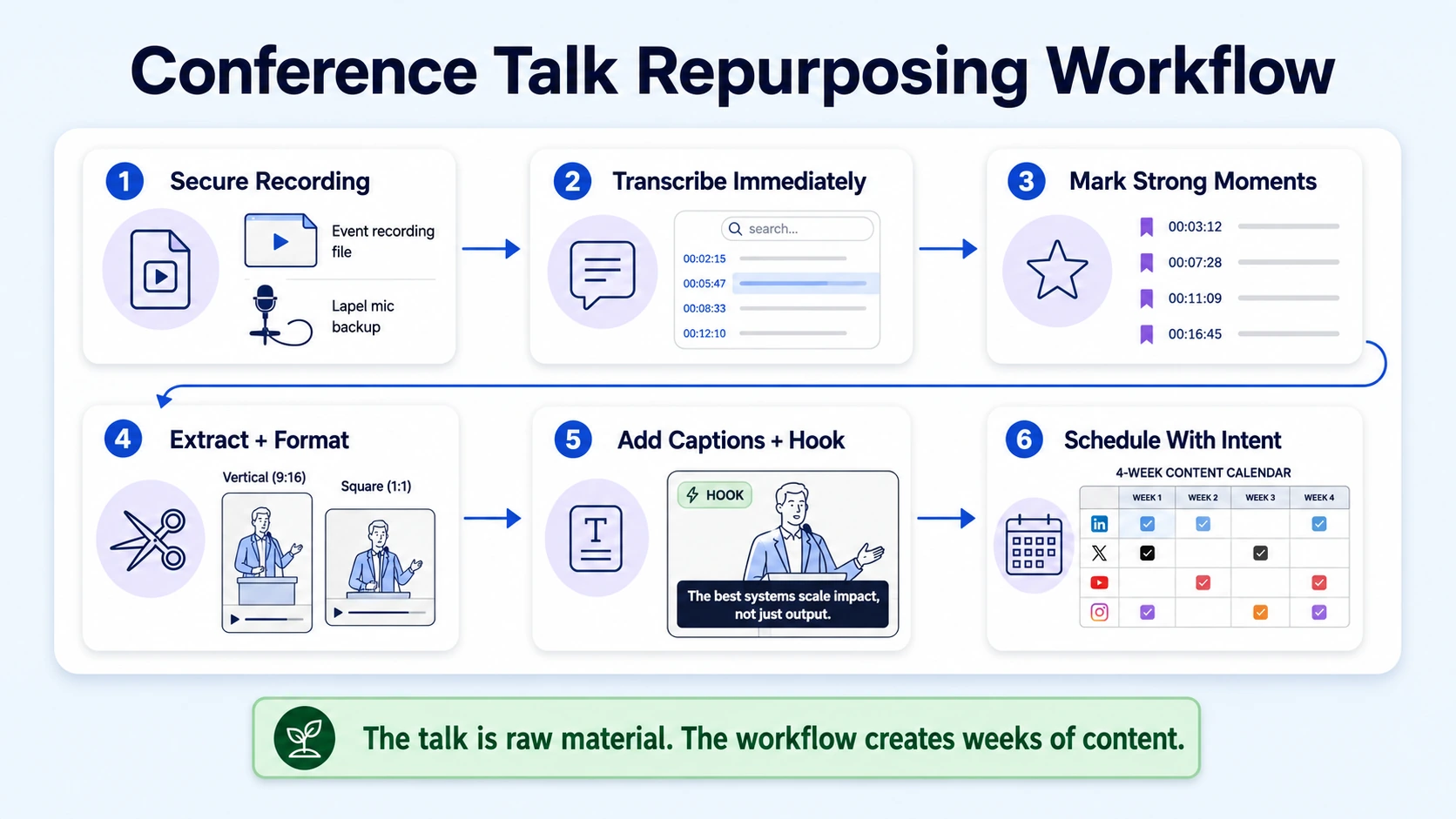
- Secure the recording: Confirm with the event organizer before you speak that you'll receive a high-quality recording within 7 days. Request the original file, not a compressed stream version. If the event won't provide one, run your own backup recording with a lapel mic connected to your phone.
- Transcribe immediately: Upload the raw recording to a transcription tool (Descript, Otter AI, or your AI clipping platform of choice). You need the full transcript before you can identify clip-worthy moments.
- Mark the moments: Read through the transcript and flag every segment where you made a counterintuitive claim, told a specific story, delivered a data point, or got a visible audience reaction. These are your raw clips.
- Extract and format: Pull each flagged segment as a standalone clip. Export in 9:16 vertical format for Instagram Reels and TikTok, and 16:9 or square for LinkedIn native video.
- Add captions and a hook: Burned-in captions are non-negotiable. LinkedIn's own Creative Labs analysis links vertical formats and face-to-camera norms with higher engagement and longer dwell times , and captions are part of that equation since most LinkedIn video is watched on mute.
- Schedule with intent: Space clips across 3–4 weeks. Each post should stand alone with a written caption that frames the clip's takeaway for someone who has never heard of you.
This workflow applies whether you spoke at a 50-person niche summit or a 5,000-person industry conference. The output quality depends on what you said on stage, not the size of the room.
Best Way to Turn a Keynote Speech into Short Clips for LinkedIn
LinkedIn is the primary distribution channel for founders who want to repurpose a conference talk into social video for a B2B audience. LinkedIn is considered the top B2B video channel, with 8 in 10 teams identifying it as their primary medium for sharing video, surpassing even YouTube.
For keynote clips on LinkedIn, three clip types consistently perform:
- The strong opinion clip: Find a moment where you took a clear stance the audience might disagree with. These generate comments, which the algorithm rewards.
- The tactical tip clip: A specific, numbered framework or process you outlined on stage. Founders in your ICP will save these.
- The story clip: The personal story you told to open or illustrate a point. These build the human layer behind your authority.
Personal profiles generate 8x more engagement than company pages on LinkedIn. Posts from individual profiles receive 8x the engagement of identical content from company pages, and this gap is widening, not closing. This means the keynote clips belong on your personal LinkedIn profile, not your company page.
For the written caption, use a 3-line structure: one provocative first line that works as a hook before the "see more" cutoff, two to three lines of context, and a direct CTA (comment, share, or link to the full talk). Pair that with your clip and you have a repeatable LinkedIn post template that can run for the entire post-conference distribution window.
Also worth noting: LinkedIn reported its third straight quarter of double-digit growth in video uploads in Q1 2026 , meaning the feed is getting more competitive. Your clips need editorial discipline, not just speed.
What's the Best AI Tool to Clip Conference Talks into Social Videos?
AI tools have dramatically compressed the time it takes to repurpose a conference talk into social video. Clipping a 60-minute podcast into 15 shareable clips used to take an entire day; AI video clipping tools have compressed that timeline into minutes, automatically identifying your best moments and formatting them for TikTok, Instagram Reels, and YouTube Shorts.
Here's how the leading tools compare for conference talk repurposing specifically:
For talking-head content with a single speaker, Opus Clip tested at 92% accuracy. For multi-speaker content, Descript came in at 72%. Vizard focuses heavily on the professional and corporate market, making it a strong choice for repurposing webinars, conference talks, and educational content, with AI tuned to identify key takeaways and instructional moments.
One critical caveat: the best tools in 2026 handle 70–80% of the work, reducing editing time from hours to minutes. But manual review remains necessary because AI cannot reliably detect context dependencies, narrative pacing, or humor. Use AI to surface candidates. Use human judgment to approve what ships.
At Komet Media, we run a hybrid workflow: AI flags the moments, a human editor shapes the narrative arc, and a strategist approves before anything goes live.
How Long Should Social Videos Be When Repurposing a Conference Speech?
Video length is not a creative preference. It is an algorithmic lever. Get it wrong and even your best conference moment dies at 12% completion.
The optimal video length for LinkedIn falls between one and two minutes. Quick insights and thought leadership clips can work at 30–90 seconds, while detailed industry analysis and case studies can extend to two to five minutes. For Instagram, the data is clear. In Socialinsider's 2026 analysis of roughly 140,000 Reels from business accounts, the 45-to-60-second bracket posted the highest engagement rate of any length group and the highest median views, around 10,374, roughly twice what Reels under 30 seconds or over three minutes managed.
Video length directly affects two things that matter to algorithms: completion rate and watch time. Completion rate measures what percentage of viewers watch your entire video; watch time tracks the total minutes people spend viewing your content. A tight 55-second clip with 85% completion rate will beat a 3-minute clip with 25% completion rate on every platform, every time. A conference talk clip should feel like it ended at exactly the right moment, not like it was cut short.
What Parts of a Conference Talk Perform Best as Social Video Clips?
Not every moment in your talk is clip-worthy. Most founders make the mistake of extracting clips chronologically or by what they personally liked saying. The audience does not care about your structure. They care about their problems. The highest-performing segments for founders who want to repurpose a conference talk into social video fall into these categories:
- Counterintuitive claims: "Most [common belief] is wrong, and here's why." These stop scrolls because they challenge assumptions your ICP already holds.
- Named frameworks: If you introduced a 3-step model or gave a process a name, that 90-second explanation is your highest-value standalone clip.
- Specific data points: A stat from your own experience or research that the audience reacted to visibly. Original data is the highest-trust content format.
- Audience tension moments: If you asked the audience a question and paused, or if there was audible reaction, that organic energy translates on video.
- The stakes opener: The first 60–90 seconds of your talk where you defined the problem. This works especially well as a LinkedIn thought leadership clip because it frames authority without requiring context.
Videos that position expertise generate 150+ meaningful comments from industry professionals. Video success depends heavily on the first three seconds, hook viewers immediately with a bold question, surprising statistic, or direct statement.
What to avoid: transitions between sections, long preambles before a point lands, and any moment that only makes sense with slide context the camera didn't capture. If the clip needs the slide to make sense, it is not a clip, it's an excerpt that requires editing to work.
Step-by-Step: Turning a 45-Minute Conference Talk into Instagram and LinkedIn Content
Here is the production sequence we use at Komet Media to turn a single 45-minute keynote into a full distribution batch:
- Transcribe the full recording on day one. Export the transcript as a text document.
- Highlight 12–18 candidate moments using the criteria above (counterintuitive claims, frameworks, data, tension, opener).
- Run the transcript through an AI clipping tool (Opus Clip or Vizard for single-speaker keynotes). Cross-reference the AI's selections with your manual highlights. The overlap is your priority batch.
- Export 8–10 clips at platform-specific lengths. For LinkedIn: 60–120 seconds. For Instagram Reels: 45–60 seconds. For YouTube Shorts: 50–58 seconds.
- Add burned-in captions to every clip. Use high-contrast text, sentence case, and place captions in the lower third so the speaker's face stays visible.
- Create a caption template for each platform. LinkedIn captions should start with the insight, not "I recently spoke at..." Instagram captions can be shorter, the video carries the weight.
- Build a 4-week post calendar. Post 2–3 clips per week on LinkedIn and 3–4 per week on Instagram. Repurpose the same clip across both platforms with platform-native captions.
- Repurpose the full talk as a long-form asset. Upload to your events page or YouTube, and link to it from your LinkedIn profile as a Featured item.
The smartest brands in 2026 use a "waterfall" strategy to turn one video asset into a month's worth of content, starting with a deep-dive master asset in landscape format for YouTube or LinkedIn. One conference talk, executed this way, fills an entire content calendar.
Mistakes Founders Make When Repurposing Conference Talks for Social Media
Most founders who try to repurpose a conference talk into social video make the same five mistakes. Each one kills reach before the content even has a chance.
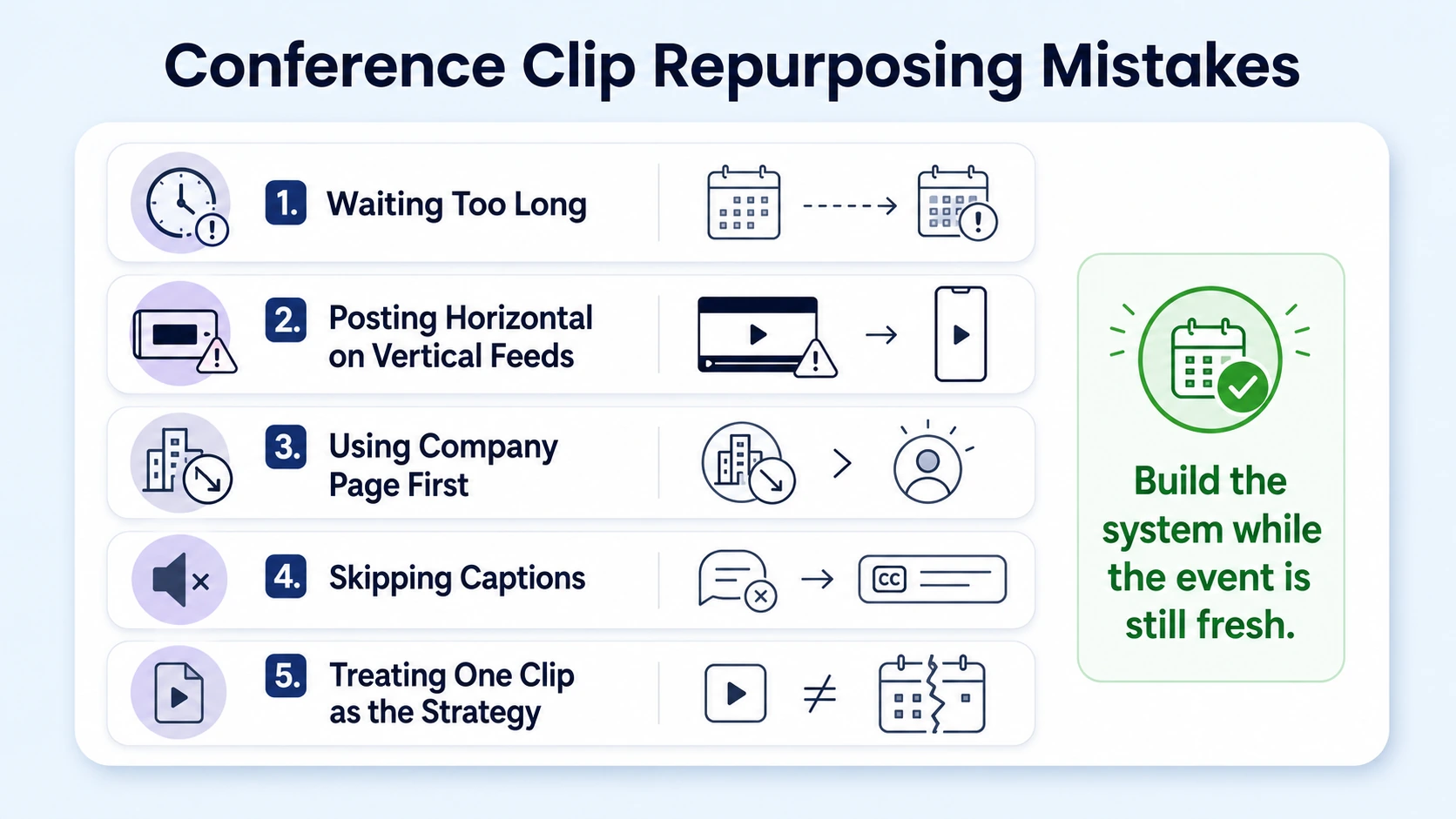
Mistake 1: Waiting too long. The post-event window is the highest in the first 72 hours. Your name is still in the feed, the event hashtag is still active, and attendees are sharing. Waiting two weeks to post your first clip means starting from zero reach.
Mistake 2: Posting horizontal video on vertical-native platforms. Design video for mobile-first consumption. LinkedIn's own Creative Labs analysis links vertical formats and face-to-camera norms with higher engagement and longer dwell times. A letterboxed horizontal clip on Instagram Reels is dead on arrival.
Mistake 3: Posting from the company page instead of the personal profile. This is the single most expensive mistake in founder content. Organic company page content makes up just 1 to 2% of the LinkedIn feed, while personal profiles account for 65% of feed content. Post from your profile.
Mistake 4: Skipping captions. Most LinkedIn videos are consumed on mute. A clip with no captions loses the majority of potential viewers in the first 2 seconds.
Mistake 5: Treating the clip as the whole strategy. One clip is not a system. The only video types that consistently outperform are repurposed clips from live sessions. Build a repeatable workflow tied to every event on your speaking calendar, so your conference appearances compound into a content library rather than isolated posts.
The founders who build authority on LinkedIn in 2026 are not posting more content. They are extracting more value from what they have already said on stage.
Conclusion
- Repurposing a conference talk into social video is the highest-ROI content move available to founders who speak.
- Use AI tools to identify clips, human editors to shape them, and your personal profile to distribute them.
- Match clip length to platform: 45–60 seconds for Reels, 60–120 seconds for LinkedIn.
- Build a 4-week distribution calendar from every single talk, not just the big stages.
- The system compounds: each clip builds trust with buyers, investors, and future hires who will never attend a conference to see you live.
If you want this done for you, Komet Media's short-form video production service handles the entire post-talk workflow, from raw recording to a full distribution batch.
Frequently Asked Questions
Q1: How many clips can I get from a 45-minute conference talk?
A 45-minute keynote typically yields 8–15 usable clips depending on the density of your content. Plan for roughly one clip-worthy moment every 3–5 minutes of talk time. Panels with strong exchanges can yield more; dense slide-heavy presentations usually yield fewer standalone clips.
Q2: Do I need professional video editing software to repurpose a conference talk into social video?
No. AI tools like Opus Clip, Vizard, and Descript handle the initial clip extraction and caption generation. You need human editorial review to approve the final output, but you do not need a full video editing suite to start. A professional editor becomes valuable when you need consistent branding, motion graphics, and scale.
Q3: Should I post the full conference talk or only short clips?
Both, in sequence. Post short clips first during the 72-hour post-event window. Then publish the full recording as a long-form asset (YouTube, your website, or your events page) and link to it from your profile. Clips build awareness; the full talk builds depth for buyers doing research.
Q4: What's the right caption strategy for LinkedIn conference clips?
Lead with the insight, not the event name. The first line must work as a standalone hook before the "see more" cutoff. Avoid: "I spoke at [Conference] last week and learned..." Prefer: "Most founders misread this signal until it costs them a deal." The clip provides context. The caption creates urgency to watch.
Q5: How often should I post clips from a single conference talk?
Two to three times per week on LinkedIn, spaced at least 48 hours apart. This gives the algorithm time to distribute each post before the next one reduces its reach. A single 45-minute talk should fuel 3–4 weeks of LinkedIn content without the feed feeling repetitive.
Q6: Can I repurpose a conference talk from two years ago?
Yes, if the insights are still relevant. Re-edit the clips with current captions and context. Add a caption note like "I said this in [year] and it's even more true now" to frame the timestamp as social proof rather than stale content. Evergreen frameworks, predictions that came true, and foundational advice all repurpose well regardless of recording date.

