
A LinkedIn Video Posting Checklist: Step-by-Step Guide
Most founders I talk to are sitting on hours of recorded meetings, panels, and podcasts, and posting nothing. The problem isn't a lack of content. It's a lack of process. A reliable LinkedIn video posting checklist is the difference between showing up consistently and going dark for weeks. This guide covers every step: format, hooks, captions, caption copy, timing, and the analytics that tell you whether it's working. If you're a founder, CEO, or executive who wants buyers, investors, and future hires to trust you before they ever book a call, this is your starting point.
TL;DR
- Native video is one of the highest-performing formats on LinkedIn right now, with video watch time up 36% year-over-year.
- Keep videos between 60–90 seconds, shoot in 9:16 or 4:5 vertical, and always burn in captions.
- Strong hooks, a clear CTA, and posting at the right time matter more than production budget.
- Use this LinkedIn video posting checklist before every upload, consistency compounds.
Why LinkedIn Video Is the Most Underused Asset in a Founder's Toolkit
Founders tell me they don't have time to create content. What they really mean is they haven't built a system. Once you see the numbers, the urgency becomes hard to ignore. LinkedIn reported 154 billion video views in 2024, with video viewership up 36% and video impressions rising 73.39% year-over-year. In Q4 of 2025, video uploads on LinkedIn had increased by 20% year-over-year. The platform isn't slowing down, it's doubling down on video as a distribution surface.
Here's why this matters for founders specifically. According to LinkedIn Marketing Solutions, 4 out of 5 LinkedIn members drive business decisions at their organizations, including direct decision-makers, buying committee members, C-suite executives, and business owners. The audience is already there. The competition for their attention is mostly text posts and carousels. Posts with video generate 3.2x more reactions compared to image-only posts on LinkedIn. And native video specifically outperforms shared links in reach, because the LinkedIn algorithm penalizes posts that push traffic off-platform. Every link-in-post video from YouTube you're sharing is leaving distribution on the table.
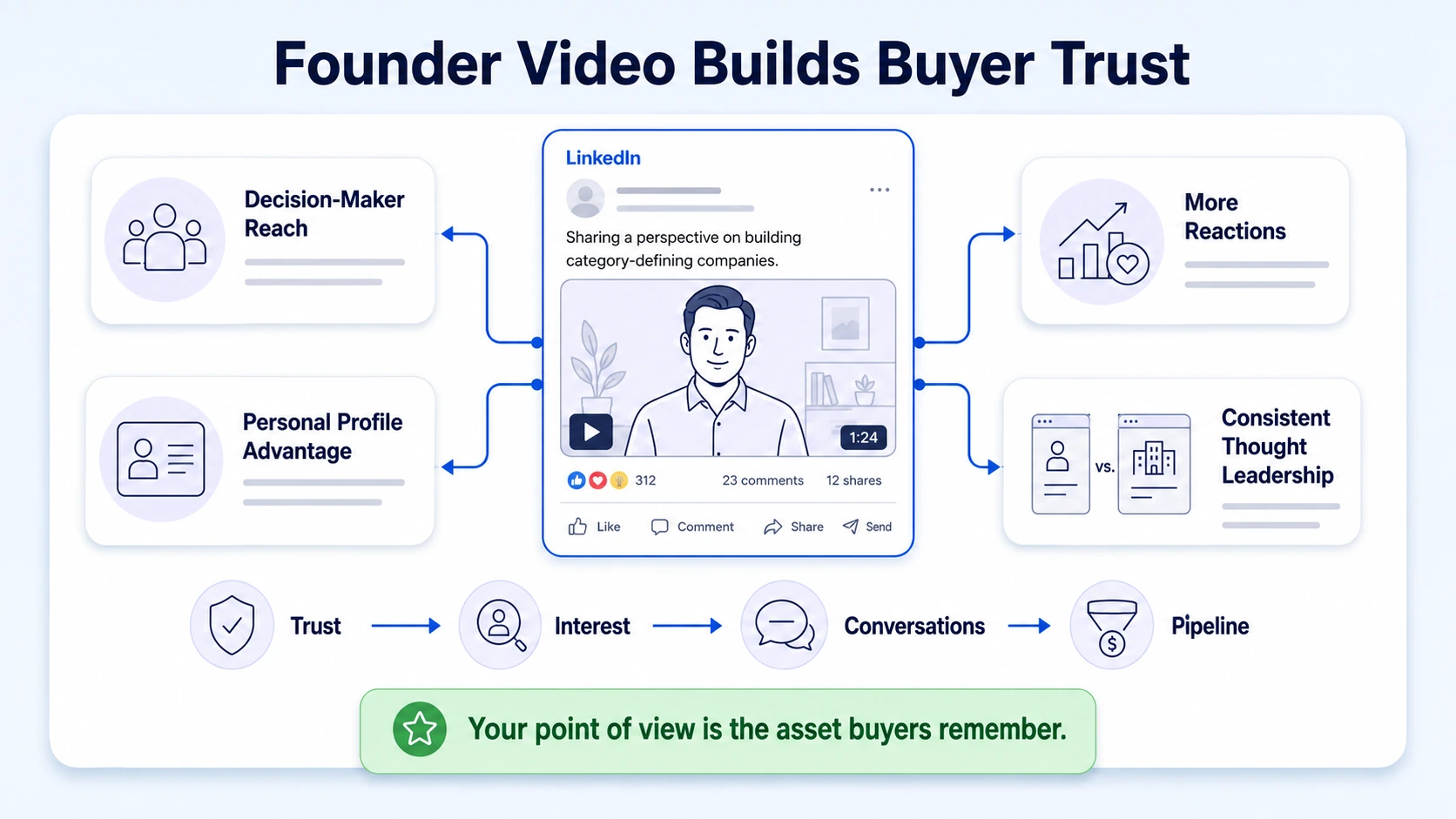
At Komet Media, the founders and executives we work with have one thing in common: their buyers, investors, and potential hires are active on LinkedIn. The problem is that most executives show up only when they have "something big" to announce. Thought leadership doesn't work like that. The LinkedIn algorithm rewards consistent, valuable content, and it rewards personal profiles far more than company pages. Content structured around a personal story or a lesson learned generates 38% more engagement than promotional posts on LinkedIn.
That means your real competitive advantage isn't a polished brand page, it's your authentic point of view delivered consistently through video. That's what our short-form video editing service is built to systematize for busy executives. The opportunity is clear. The question is whether you have a reliable process to capture it. That process starts with a LinkedIn video posting checklist you run every single time you hit publish.
LinkedIn Video Posting Checklist: Pre-Production (Before You Record)
Every great video starts with decisions made before you press record. Skipping this phase is why most founder videos feel vague, forgettable, or rambling.
Step 1: Define the one point this video makes. Not three points. One. Every video should answer a single question your ideal buyer is asking. Write it out as a sentence before you film.
Step 2: Write your hook. Hook viewers in the first three seconds with a pattern interrupt or a compelling promise. Options that work: a counterintuitive statement, a direct question, or a bold claim that earns the next 30 seconds.
Step 3: Structure your content in three beats:
- The setup (5–10 seconds): state the problem or premise
- The insight (40–60 seconds): deliver the core idea with specificity
- The payoff (10–15 seconds): summarize and lead into your CTA
Step 4: Choose your format based on content type.
Step 5: Choose your filming environment. Stable camera, eye-level lens, natural or ring-lit face, clean background. Bad audio kills trust faster than a shaky camera. Use an external lavalier mic if you're serious.
Step 6: Confirm your profile is content-optimized. Features that used to be part of LinkedIn Creator Mode, like the Follow button, advanced analytics, Newsletters, and LinkedIn Live, still need to be confirmed or enabled. Make sure your "Follow" button is live so new viewers can subscribe without needing to connect first.
LinkedIn Video Format and Technical Specs: What the Algorithm Rewards in 2026
Getting the technical side wrong doesn't just look unprofessional, it actively hurts your distribution. Here are the specs that matter. LinkedIn accepts file formats including MP4, ASF MPEG-1, MPEG-4, MKV, H264/AVC, VP8, VP9, WMV2, and WMV3. Resolution can range from 256x144 to 4096x2304 pixels. Supported aspect ratios are landscape (16:9), square (1:1), and vertical (9:16).
Vertical video (9:16) at 1080x1920 takes up more screen real estate on mobile, where over 60% of LinkedIn usage happens. It's more immersive and harder to scroll past. The rule of thumb: produce your video with sound, but design it to be understood without it. Around 85% of social media videos are watched on mute. That makes burned-in captions non-negotiable, not optional.
One technical note most founders overlook: export at a higher bitrate than you think you need. LinkedIn recompresses every upload. Giving their algorithm a cleaner source file results in noticeably sharper playback in the feed.
How Long Should a LinkedIn Video Be for Maximum Engagement?
Length is the question I get most from the founders we work with, and the answer is more nuanced than "short is always better." AuthoredUp analyzed 36,946 personal-profile video posts from March 2025 through February 2026. Longer videos consistently reached more people, not fewer. Videos over 3 minutes achieved a 1.21x reach multiplier, while 30–60 second clips achieved just 0.95x.
That said, reach isn't the only metric. LinkedIn videos under 60 seconds have a 26% higher completion rate than longer videos. And completion rate is what the algorithm uses to decide whether to expand your distribution. A video with 1,000 views but a 10% average completion rate underperforms one with 500 views and a 60% completion rate. Quality of attention matters more than raw numbers.
Here's how I think about it for the founders and CEOs we produce content for:
- 30–60 seconds: Single hot take, quick insight, event teaser. Highest completion, lowest reach ceiling.
- 60–90 seconds: Framework, opinion piece, or nuanced point. The sweet spot for most thought leadership content.
- 90–150 seconds: Case study, story-driven content. Reach grows if retention stays above 50%.
- 3+ minutes: Earned only when you have an established audience and a compelling narrative. Reaches the most, but requires the most production quality.
The optimal LinkedIn video length for maximum retention is 30–90 seconds, with completion rates above 60% in this range. The real mistake isn't being too long or too short, it's being vague. A rambling 45-second video will lose the audience before the CTA. A focused, story-driven 2-minute video will hold attention and drive comments.
The LinkedIn Video Posting Checklist: What to Review Before You Hit Publish
Run through every item below before every post. This is the LinkedIn video posting checklist I use with every client.
Video quality:
- [ ] Thumbnail is clear, faces are visible, text is legible at small size
- [ ] No awkward freeze frame at the start or end
- [ ] Exported at full HD (1080p minimum)
- [ ] Aspect ratio matches intended format (9:16 for mobile feed)
Captions and on-screen text:
- [ ] Captions are burned in or LinkedIn auto-captions have been reviewed and corrected
- [ ] Key phrases are emphasized on screen visually, not just spoken
- [ ] No spelling errors in any on-screen text
Caption copy (the post text):
- [ ] First line creates curiosity or states a clear value prop, this is what shows before "see more"
- [ ] Asking a question in the caption increases comment volume by 33%, so consider ending with a direct question
- [ ] 3–5 hashtags that match your topic (not generic ones like #leadership)
- [ ] No external links in the post body (add to first comment instead)
Call to action:
- [ ] Videos with direct CTAs in the final 10 seconds get 27% more likes and comments, include one every time
- [ ] CTA is specific: follow, comment with an answer, DM for the resource, visit the link in comments
Timing:
- [ ] Post 2–5 times per week on personal profiles, focused on Tuesday–Thursday mornings (8–9 AM)
- [ ] Schedule your engagement window: plan to respond to every comment within the first 60 minutes
Distribution:
- [ ] Share to relevant LinkedIn groups after posting
- [ ] Repurpose the video to your podcast or webinar workflow if the content fits
The Biggest LinkedIn Video Mistakes CEOs and Founders Make
Knowing what not to do is half the checklist.
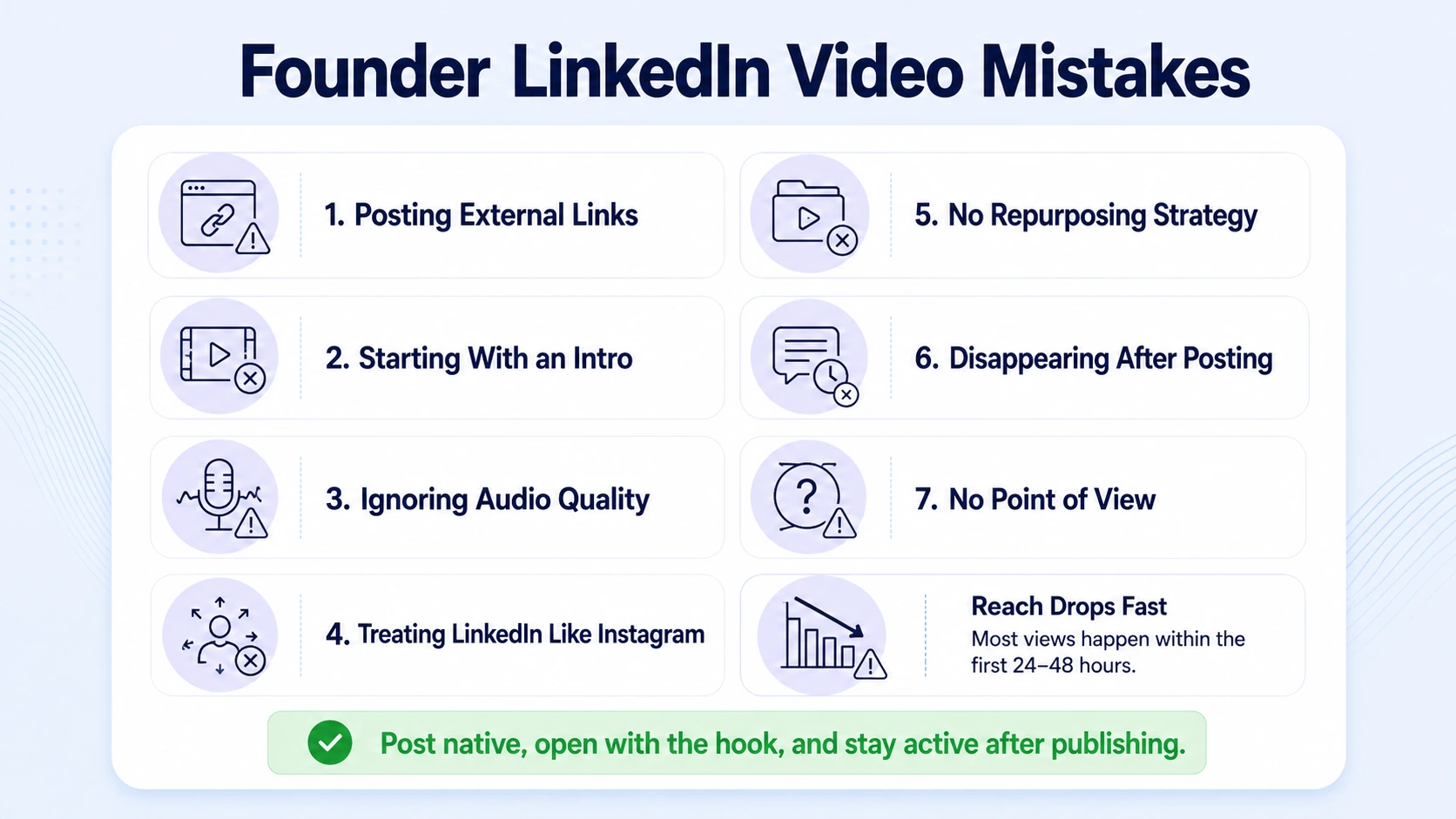
Posting external links instead of native video. Sharing a YouTube link instead of uploading the file directly crushes reach. LinkedIn's algorithm deprioritizes any post that pulls users off the platform. Always use native video upload.
Starting with "Hi, I'm [Name] and today I want to talk about..." You've lost 60% of your audience in the first three seconds. You have about three seconds to earn their attention. Open with the hook, not the introduction.
Ignoring audio quality. Viewers will watch a slightly shaky video. They will not sit through muffled or echo-heavy audio. A $40 lapel microphone solves this entirely.
Treating LinkedIn like Instagram. LinkedIn's professional audience wants substance. LinkedIn's professional audience expects more substance than casual social platforms, and users are often willing to invest time in content that delivers genuine value. Talking about your morning routine doesn't build B2B authority.
No content repurposing strategy. Every long-form piece, a podcast episode, a panel talk, a webinar recording, contains 5–10 short-form video clips. Executives who don't repurpose are recreating from scratch every time, which makes consistency impossible. This is exactly the gap our video marketing service closes.
Disappearing after posting. The first 60–90 minutes after posting remain critical. Strong early engagement triggers expanded distribution to second and third-degree connections, while posts receiving fewer than 500 impressions in the first hour rarely gain significant traction. Block 30 minutes post-publish to respond to every comment.
Posting without a point of view. Safe content doesn't build authority. Buyers trust founders who have a distinct perspective on their market, not those who post generic industry recaps.
How Founders Use LinkedIn Video to Build Audience, Trust, and Pipeline
The strategic frame matters as much as the tactical checklist. LinkedIn video isn't just a content format, it's a B2B content marketing channel for founder-led marketing that compounds over time. Here's how the executives with the strongest LinkedIn presence think about their content:
Pillar content creates repurposable assets. One 45-minute podcast episode becomes 8–10 short-form clips, each addressing a specific buyer question. Our content repurposing workflow is designed to extract maximum volume from minimum recording time.
Consistent posting creates algorithmic momentum. Posting consistently 2–3 videos per week and engaging with comments in the first 60 minutes boosts algorithmic reach. Founders who post irregularly reset their momentum every time they go dark.
Video builds the trust that written content can't. Buyers don't just evaluate your ideas, they evaluate you. Do you communicate clearly? Do you have conviction? Video answers those questions in 60 seconds in a way no text post can.
Executives drive more reach than company pages. The performance gap between personal profiles and branded company pages has widened in 2026. Personal profiles consistently outperform on organic reach. Founder-led marketing is a growth lever most B2B teams still underutilize.
Executive visibility creates a hiring advantage. 93% of B2B marketers use LinkedIn, and 40% rate it as the most effective channel for quality leads. But it's not just buyers watching, your next senior hire is watching too. The founders who show up consistently attract top-tier candidates who already understand and believe in their vision.
Use your video content strategically: address buyer objections, share hard-won lessons from your market, and take clear positions on trends. That's the content that builds brand authority building over time, not content about what you had for breakfast.
Conclusion
A LinkedIn video posting checklist isn't optional for serious founders, it's the difference between publishing with intention and posting and hoping. Here's what to hold onto:
- Native video is the highest-leverage format on LinkedIn right now, with watch time and impressions both accelerating into 2026.
- Keep videos between 60–90 seconds, shoot vertically (9:16 or 4:5), burn in captions, and post natively every time.
- Your hook, your CTA, and your post-publish engagement window matter more than production value.
- Repurpose relentlessly, one recorded conversation is ten LinkedIn videos waiting to be clipped.
If you want a system that turns your existing content into consistent video assets without adding hours to your schedule, talk to the team at Komet Media.
Frequently Asked Questions
Q1: How many times per week should a founder post a video on LinkedIn?
Post 2–5 times per week on personal profiles, focused on Tuesday–Thursday mornings (8–9 AM). Two consistent videos per week outperform five inconsistent ones. Start with two and build from there once your production workflow is dialed in.
Q2: Should I upload a video directly to LinkedIn or share a YouTube link?
Always upload natively. LinkedIn's algorithm actively reduces distribution for posts containing external links that pull users off-platform. A native upload will reach 3–5x more people than the equivalent YouTube link post in most cases.
Q3: Do I need captions on every LinkedIn video?
Yes, without exception. Always add captions since 75–85% of social media videos are watched with sound off. Use LinkedIn's auto-caption tool as a starting point, but review it manually before publishing, auto-captions commonly misread proper nouns and industry terms.
Q4: What is the best LinkedIn video format for thought leadership content?
The 30–60 second length is ideal for a single tip, a quick story, or a concise perspective, and is the highest-performing length for the vertical video feed. For deeper frameworks or nuanced takes, 60–90 seconds with a 4:5 vertical format performs best for thought leadership.
Q5: How is a LinkedIn video posting checklist different from just "posting consistently"?
Consistency tells you how often to post. A checklist tells you what to check every time you post. Without a checklist, you'll publish videos with missing CTAs, incorrect aspect ratios, or weak opening hooks, and wonder why engagement is flat. The checklist eliminates avoidable errors before they cost you.
Q6: Can I repurpose podcast or webinar recordings for LinkedIn video?
Absolutely, and this is the highest-ROI content move most founders aren't making. A single podcast episode or recorded webinar contains multiple standalone insights, each of which can become a 60–90 second LinkedIn clip. Our podcast editing and short-form video service is built specifically for this workflow.

