
How to Find a Video Editor for Youtube: Step-by-Step Guide
Finding the right editor is one of the most consequential hires a YouTube channel makes. The wrong person kills momentum; the right one compounds it. This guide walks you through exactly how to find a video editor for YouTube, covering where to look, what to pay, what skills actually matter, how to vet candidates, and when a specialist agency beats a freelancer. Skip the guesswork and hire with clarity.
TL;DR
- The best places to find a YouTube video editor are Upwork, Fiverr, LinkedIn, niche communities, and specialist agencies.
- Freelance rates in 2026 range from $25 to $150 per hour, with typical YouTube project fees running $300 to $1,500.
- Always run a paid trial edit before committing to any editor long-term.
- For B2B, SaaS, or founder-led content, prioritize editorial judgment and pipeline thinking over basic cut skills.
Where to Hire a YouTube Video Editor: Best Platforms Compared
YouTube's creative ecosystem now supports over 540,000 full-time equivalent jobs and contributes over $60 billion to U.S. GDP , which means the talent pool for editors has never been larger. The challenge is not scarcity, it is finding signal through the noise. You can find freelance video editors on platforms such as Upwork, Fiverr, Freelancer, PeoplePerHour, and Contra.
Each platform serves a different buyer profile:
Upwork is one of the largest freelance marketplaces, offering access to video editors across all experience levels and price points. It works best for clients who want flexibility and are willing to manage the vetting process themselves, allowing you to post a job, review proposals, and assess editors using detailed profiles, portfolios, and client feedback.
Fiverr's starting price is misleading. The real working range for YouTube long-form is $50 to $150 per video once you add subtitles, motion graphics, and a 48-hour rush fee. Use Fiverr to test style, not to build a production pipeline.
For serious B2B teams, LinkedIn and niche Discord servers often surface editors with domain-specific experience: finance, SaaS, or executive thought leadership, where editorial judgment matters far more than speed.
What Skills Should You Look for in a YouTube Video Editor?
Knowing how to find a video editor for YouTube means knowing precisely what you are hiring. Technical software competency is the floor, not the ceiling.
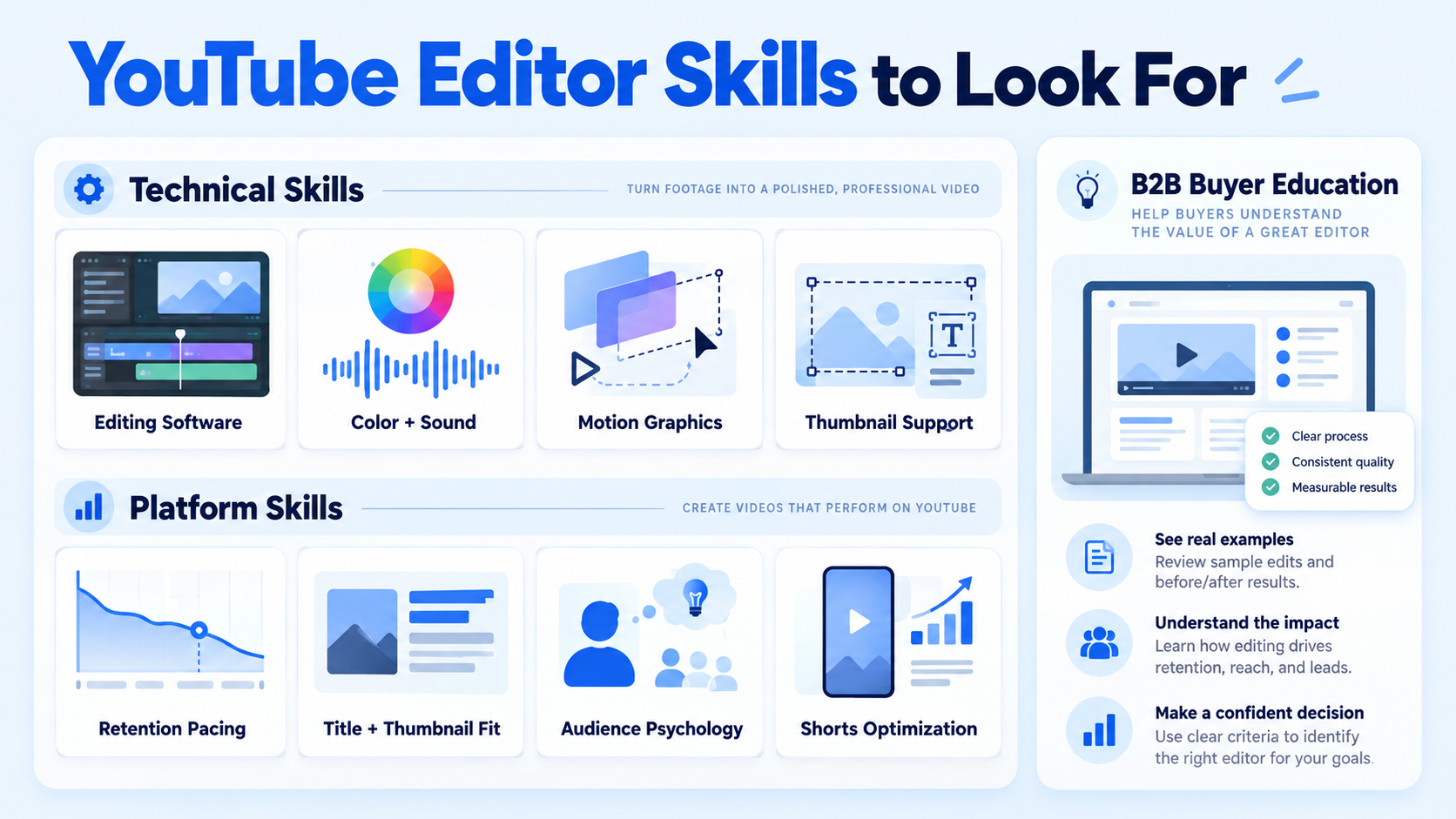
Non-negotiable technical skills:
- Proficiency with industry-standard editing software is non-negotiable. Essential tools include Adobe Premiere Pro, Final Cut Pro X, DaVinci Resolve, and After Effects for motion graphics.
- Color grading, sound design, and audio mixing for a polished final output.
- Strong knowledge of post-production workflows, including color grading, sound design, and visual effects, plus proven experience in thumbnail creation using tools like Adobe Photoshop or Canva.
Platform-specific skills that separate good from great:
- Not all editors understand YouTube's pacing and retention needs. Look for portfolios with videos designed specifically for YouTube, especially in niches similar to yours.
- Retention tactics like cutting dead air, thumbnail and title synergy, current platform trends, and audience psychology to keep viewers engaged throughout.
- Demand for editors who specialize in AI workflows, Shorts optimization, and faceless YouTube channels has grown sharply. Hiring platforms now highlight AI-tool proficiency in tools like Descript, Runway, and DaVinci Resolve Neural tools directly on editor profiles.
For B2B SaaS and founder-led channels specifically, add one more layer: the editor needs to understand buyer education, not just entertainment. They should recognize a product demo's key proof point, know when to cut to a customer testimonial, and understand why a clear CTA at minute 8 matters more than a snappy intro. That is a different capability set than editing vlogs. A talking head video for a SaaS founder should feel like a board presentation, not a podcast clip. If an editor's portfolio is all lifestyle or gaming content, keep looking.
How Much Does It Cost to Hire a YouTube Video Editor in 2026?
Cost is one of the top questions anyone researching how to find a video editor for YouTube will hit. Here is the honest landscape: In 2026, most freelance video editors charge $25 to $150 per hour depending on experience, and $300 to $1,500 for a typical YouTube video project. Agencies bill $100 to $250 per hour.
Long-form video pricing runs between $200 and $1,200 per video for most professional editors, with specialists exceeding $2,000 per video.
Key insight: A retainer arrangement almost always produces better output than per-video freelancing because the editor learns your voice, your product, and your buyers over time. For SaaS and founder content, that institutional knowledge compounds.
In 2026, the average YouTube video editing cost is approximately $305 per video, representing a slight decrease from $325 in 2024. That average, however, blends entry-level offshore work with premium B2B production. For a SaaS channel building pipeline, budget for the mid-level band minimum.
How to Vet a Video Editor Before Hiring Them for YouTube
Most hiring mistakes happen here. Someone sends a polished portfolio sample and you assume capability. The portfolio shows what they can do under ideal conditions. Vetting reveals how they work.
Follow this process:
- Define your content brief: Specify format (talking head, webinar clip, demo walkthrough), target length, publish cadence, and one example video you want them to match in energy and pacing.
- Request a portfolio review: Look specifically for YouTube content in your niche or adjacent niches. Gaming reels do not predict SaaS video performance.
- Assign a paid trial edit: Send 10–15 minutes of raw footage and pay them to edit it. This is non-negotiable. A trial edit reveals turnaround reliability, communication style, and whether they watch your content or just execute instructions.
- Evaluate the output against your brief: Does the pacing feel right? Does the color grading match your brand? Did they catch the key message or bury it under B-roll?
- Run a revision round: Send one round of specific feedback. How they respond to direction matters as much as the first cut.
- Sign an NDA and scope agreement before sharing proprietary content: For B2B SaaS teams, demos, pipeline data, and unreleased product footage need contractual protection from day one.
- Set up a shared workflow: Agree on tools before week one. Asana or Notion for task management, Slack for async communication, Frame.io or Google Drive for footage handoff.
Test the candidate's deadline-meeting skills by discussing the typical turnaround times for their work and the editing workflow upfront. Editors who cannot give clear turnaround commitments will miss them.
Freelance Video Editor vs. Agency: What's the Real Difference for YouTube?
This is the decision that determines your production pipeline's stability. Knowing how to find a video editor for YouTube is only half the equation. Knowing which model to use is the other half.
Freelancers make sense when volume is low (one to four videos per month), the content is relatively simple, and you have bandwidth to manage the relationship and feedback loops yourself.
Agencies make sense when video is a strategic growth channel, not a marketing line item. For B2B SaaS founders using video to drive demo demand and support sales cycles, a specialist agency brings more than editing: it brings a content production system. At Komet Media, that system means turning product demos, webinars, and founder conversations into structured video assets built around the buyer journey, whether editing existing recordings or building a complete video creative library from scratch through research, scripting, recording guidance, and post-production.
The mistake most SaaS teams make is treating YouTube video like a social media task and hiring accordingly. The right frame is sales enablement. An agency that understands that distinction produces content that shortens sales cycles. A freelancer with no B2B context produces content that looks good but converts nothing.
For short-form video editing specifically, the agency advantage compounds: the best short-form content for SaaS is repurposed long-form, not created from scratch. That requires an editor who understands the source material at the strategic level, not just the clip level.
How to Find an Affordable Video Editor for a YouTube Channel as a Beginner
Budget is tighter at the start. That does not mean settling for poor quality. It means being smarter about scope and sourcing.
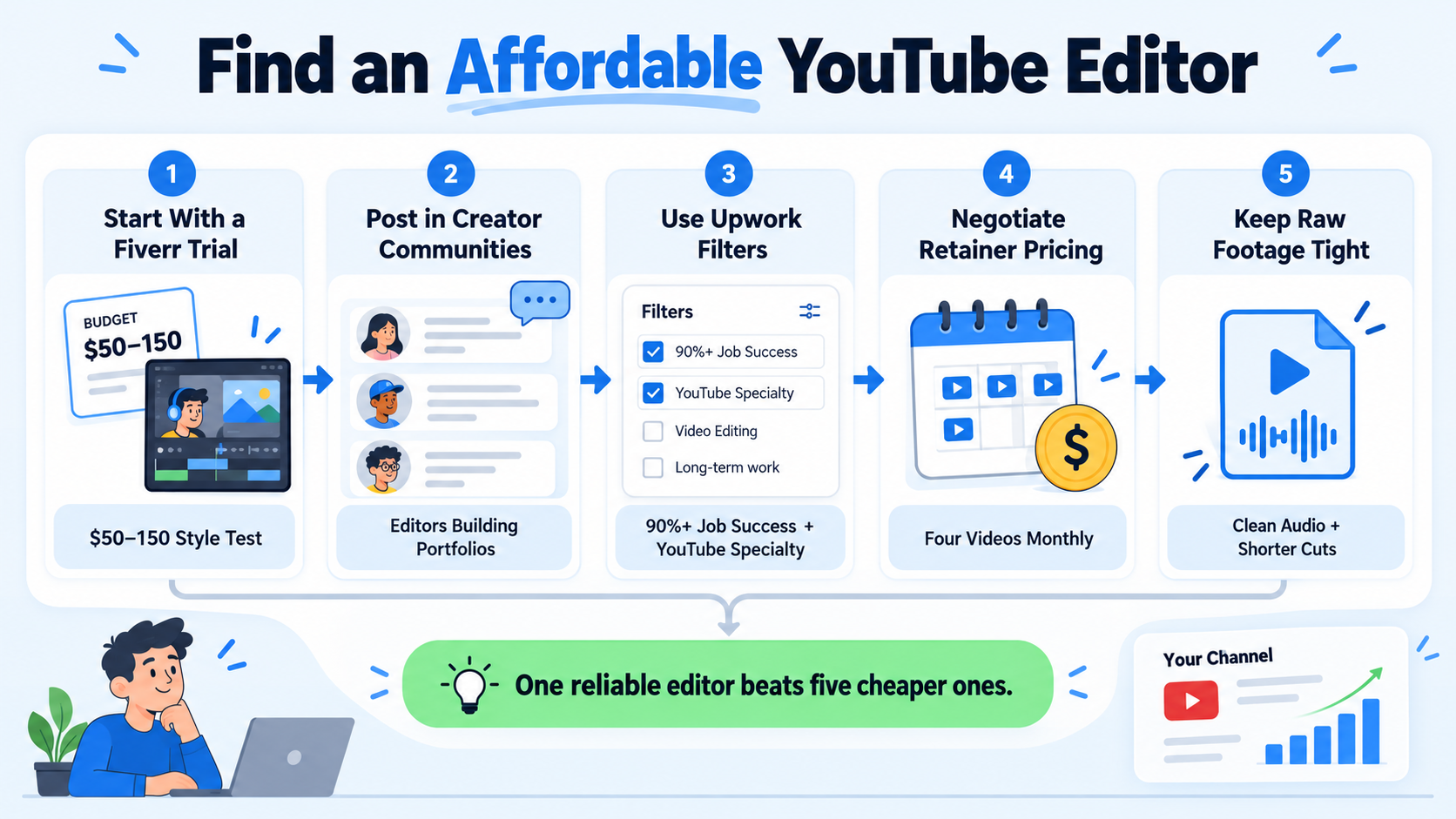
If you are launching a YouTube channel and your editing budget is under $500 per month, here is how to find a video editor for YouTube without overspending:
- Start with a Fiverr trial: A $50 to $150 stylistic test on Fiverr before committing longer term works well for a one-off Short with a hard deadline, or a simple talking-head cut where you provide tight raw footage.
- Post in creator communities: Facebook Groups, Reddit (r/editors, r/NewTubers), and YouTube-specific Discord servers surface editors actively building their portfolios who will take on starter work at reduced rates in exchange for consistent volume.
- Use Upwork filters strategically: Filter by Job Success Score (90%+), filter for editors who explicitly list YouTube as a specialty, and review their work history for channel size and content type.
- Negotiate retainer pricing: Even with a mid-level editor, committing to four videos per month rather than one-off pricing often drops per-video cost by 20–30%.
- Keep raw footage tight: The more work you do in pre-production, the less editing time you pay for. A clean talking-head recording with good audio cuts editing hours in half.
For beginners, the most important rule is this: one reliable editor at a modest rate beats cycling through five cheaper ones. Consistency of style builds channel identity faster than production polish.
As volume grows and the channel starts generating pipeline value, the video editing services conversation shifts from cost-per-video to ROI-per-video. That is when upgrading to a specialist becomes the obvious move.
Conclusion
Finding the right editor is a hiring decision, not a task assignment. Treat it that way. Key takeaways:
- Match the hiring model to your stage: Fiverr for tests, Upwork for vetted freelancers, agencies for pipeline-driven content strategies.
- Always run a paid trial edit with a real brief before committing.
- For B2B SaaS, prioritize editorial judgment and buyer-stage awareness over pure technical speed.
- Budget to the output you need: 300–600 per video gets you consistent mid-level quality; $1,500+ buys you strategic storytelling.
If your video content should be generating pipeline, not just views, talk to Komet Media about building a system that works—whether you have existing footage to repurpose or need full production from scratch.
Frequently Asked Questions
Q1: What is the fastest way to find a video editor for YouTube today?
Post on Fiverr or Upwork with a clear brief, specific examples, and a defined budget. Both platforms surface proposals within 24 to 48 hours. Fiverr is faster for one-off tests; Upwork is better for ongoing work. Always assign a paid trial edit before committing.
Q2: How many hours does it take to edit a YouTube video?
A single 10-minute video typically takes an experienced editor 8 to 12 hours to edit. Complex videos with motion graphics, color grading, and sound design take longer. Factor this into your turnaround expectations when setting deadlines.
Q3: Should I hire a freelance editor or a video agency for my YouTube channel?
Freelancers work well for low-volume, simple content. Agencies are the better choice when video is a strategic growth channel, you need consistency across a content pipeline, and you want editorial strategy included alongside execution. For B2B SaaS, the agency model typically outperforms freelance at scale.
Q4: Do I need to sign an NDA with my video editor?
Yes, especially for B2B teams. Before sharing unreleased product footage, demo recordings, internal webinars, or proprietary customer conversations, a Non-Disclosure Agreement protects your content and your buyers. Make this part of your standard onboarding before any footage is handed off.
Q5: What's the difference between Adobe Premiere Pro, Final Cut Pro, and DaVinci Resolve for YouTube editing?
All three are industry-standard tools. Adobe Premiere Pro integrates with the broader Adobe Creative Suite, making it strong for motion graphics-heavy content. Final Cut Pro is Apple-native and optimized for speed on Mac workflows. DaVinci Resolve leads on professional color grading. Most YouTube editors proficient in any one of these can deliver strong results.
Q6: How do I know if a video editor understands B2B content?
Ask them to walk you through their editing decisions on a past video. If they talk about hook strength, viewer retention, and messaging clarity, they get content strategy. If they only talk about transitions and color, they are a technician. For video marketing that drives pipeline, you need the former.

