
LinkedIn Video Format and Spec Guide: Step-by-Step Guide
If your LinkedIn videos are blurry, getting rejected on upload, or simply not reaching the right buyers, the problem is almost always a spec issue. This LinkedIn Video Format and Spec Guide covers every technical requirement you need to post correctly in 2026, file format, resolution, aspect ratio, audio codec, and file size, so your videos play flawlessly and the algorithm treats them well. Getting this right is the baseline. Everything else is strategy.
TL;DR
- Use MP4 with H.264 video codec and AAC audio for guaranteed compatibility on every upload type.
- Organic posts allow up to 5 GB and 15 minutes; video ads cap at 200 MB and 30 fps.
- 4:5 (1080x1350) is the strongest aspect ratio for mobile feeds; 1:1 is the safest all-around choice.
- Always upload natively, native video gets 3.5x more reach than a YouTube link.
What Are the LinkedIn Video Format Requirements?
The LinkedIn Video Format and Spec Guide starts here: file format is the most critical decision before upload. Get it wrong and LinkedIn either rejects your file outright or degrades its quality during compression. LinkedIn supports several file formats, with MP4 being the recommended choice and MOV acceptable for regular posts. For video ads specifically, MP4 with H.264 codec is a hard requirement, not a suggestion, it provides universal compatibility across all ad placements.
The file format is the container that holds all your video and audio data. MP4 is the gold standard for all LinkedIn videos. While you might get away with other formats like ASF or FLV for organic posts, sticking to MP4 guarantees compatibility. For video ads, it is a hard requirement. The codec inside that container matters just as much as the container itself:
- Video codec: H.264 (preferred) or VP8
- Audio codec: AAC (Advanced Audio Codec)
- Frame rate: 30 fps recommended, up to 60 fps supported for organic; 30 fps maximum for ads
Always use the MP4 format with the H.264 video codec and AAC audio for maximum compatibility across all post types.
One more practical rule: if your video is not already an MP4, use a free online converter to switch it to MP4/H.264 format to avoid upload errors. For B2B teams repurposing long-form content, webinars, podcasts, product demos, exporting from your editing suite in MP4/H.264 with AAC audio covers every LinkedIn placement, from organic feed posts to paid video advertising campaigns. Do this once in your export template and you will never hit a format rejection again.
LinkedIn Video Size Limit, Duration, and Dimensions
Specs for organic posts and paid ads are very different. Treating them as the same is how teams end up with rejected ad submissions or unnecessarily bloated organic files.
The 200 MB limit for video ads is significantly smaller than organic video at 5 GB, so plan your compression workflow accordingly. For organic posts, staying under 1 GB is recommended for faster uploads even though the platform technically allows up to 5 GB. A frame rate of 30 fps is recommended, with up to 60 fps supported.
On duration: native videos can be up to 10 minutes when uploaded from mobile, or 15 minutes from desktop. However, videos under 60 seconds typically see the highest engagement rates. Videos under 30 seconds will loop until there are at least 30 seconds of total playback , which is useful for tight product teasers or short thought-leadership clips that you want viewed fully.
For short-form video editing built specifically for LinkedIn, keeping clips between 30 and 90 seconds hits the sweet spot between format requirements and what the algorithm rewards.
LinkedIn Video Aspect Ratio Requirements
Aspect ratio determines how much screen space your video claims, and on a mobile-dominant platform, that directly affects watch time. LinkedIn accepts aspect ratios from 9:16 (0.563) to 16:9 (1.778) , giving you genuine flexibility across vertical, square, and landscape formats. Here is how each performs in practice:
In 2026, mobile consumption on LinkedIn is at an all-time high. The 4:5 vertical ratio at 1080x1350 pixels has emerged as the optimal standard for the mobile feed. It takes up nearly the entire vertical screen without triggering the full-screen immersive mode, meaning your post copy and comment section remain visible.
The 1:1 square aspect ratio at 1080x1080 pixels is widely considered the safest, most versatile option. It performs well across both desktop and mobile feeds, for teams that want a consistent format, square guarantees the video will not be awkwardly cropped regardless of the device.
On resolution: whatever aspect ratio you choose, hold 1080p. A 16:9 video should be 1920x1080; a 9:16 should be 1080x1920. Upscaling a small source adds no detail, and uploading below 1080p leaves your video at the mercy of LinkedIn's compression.
Rule of thumb: Default to 4:5 for founder-led and thought-leadership content. Use 16:9 only when desktop viewers are the primary audience, product walkthroughs, webinar clips, or demo recaps.
LinkedIn Native Video Upload vs. YouTube Link: Which Performs Better?
This is one of the most common questions I get from B2B teams, and the answer is unambiguous: native video wins on LinkedIn, and it is not close. LinkedIn's algorithm penalizes posts with external links because they pull users away from the platform. This is the core reason native video outperforms YouTube links in reach.
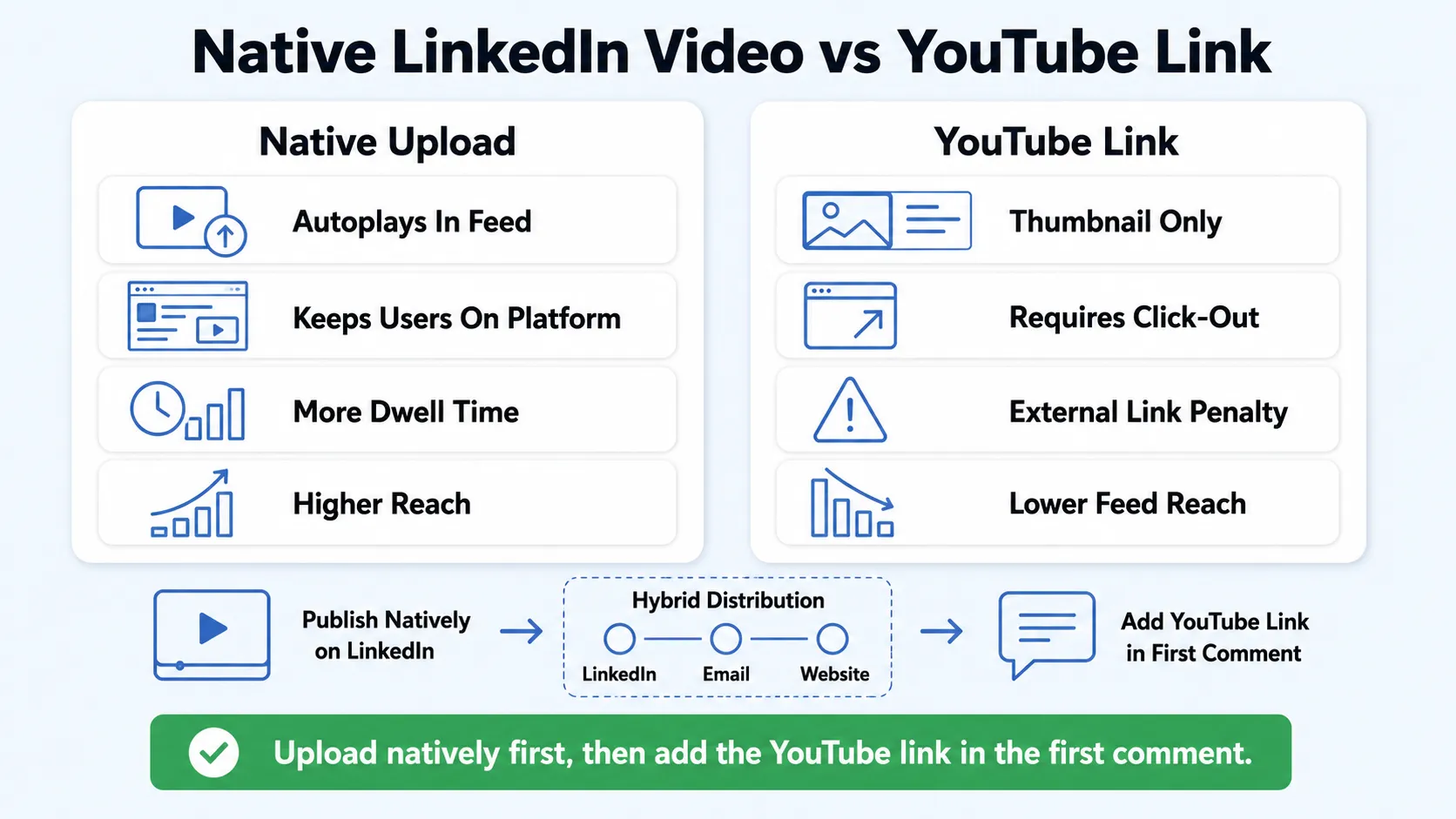
Native video uploads get 3.5x more reach than YouTube link posts on LinkedIn, according to Richard van der Blom's 2025 algorithm research. Native videos autoplay in the feed and get 5x more engagement than external video links. The mechanics behind this gap are straightforward:
- Native video: Autoplays in-feed, keeps the user on LinkedIn, generates dwell time, signals engagement to the algorithm.
- YouTube link: Displays as a thumbnail, requires a click, routes the user off-platform, and is penalized because LinkedIn wants users on-platform. Links in posts are algorithmically suppressed.
The practical workflow for content repurposing: upload natively to LinkedIn first, then add the YouTube link in the first comment for anyone who wants to watch there. You get the algorithm lift on LinkedIn and maintain your YouTube SEO footprint. This is exactly the kind of system we build for B2B teams at Komet Media, repurpose once, distribute smartly.
Native video uploads consistently and dramatically outperform shared YouTube links in on-platform reach. However, a native-only strategy sacrifices the compounding SEO authority that only YouTube provides. A hybrid distribution strategy is not optional but an essential evolution for any brand seeking to maximize the total business impact of its video marketing.
How to Optimize Video for the LinkedIn Feed
Getting the specs right gets you in the door. Optimizing for the feed is what gets you distribution. This LinkedIn Video Format and Spec Guide would be incomplete without the performance layer. Short native videos between 30 and 90 seconds are growing 2x faster than other formats on LinkedIn.
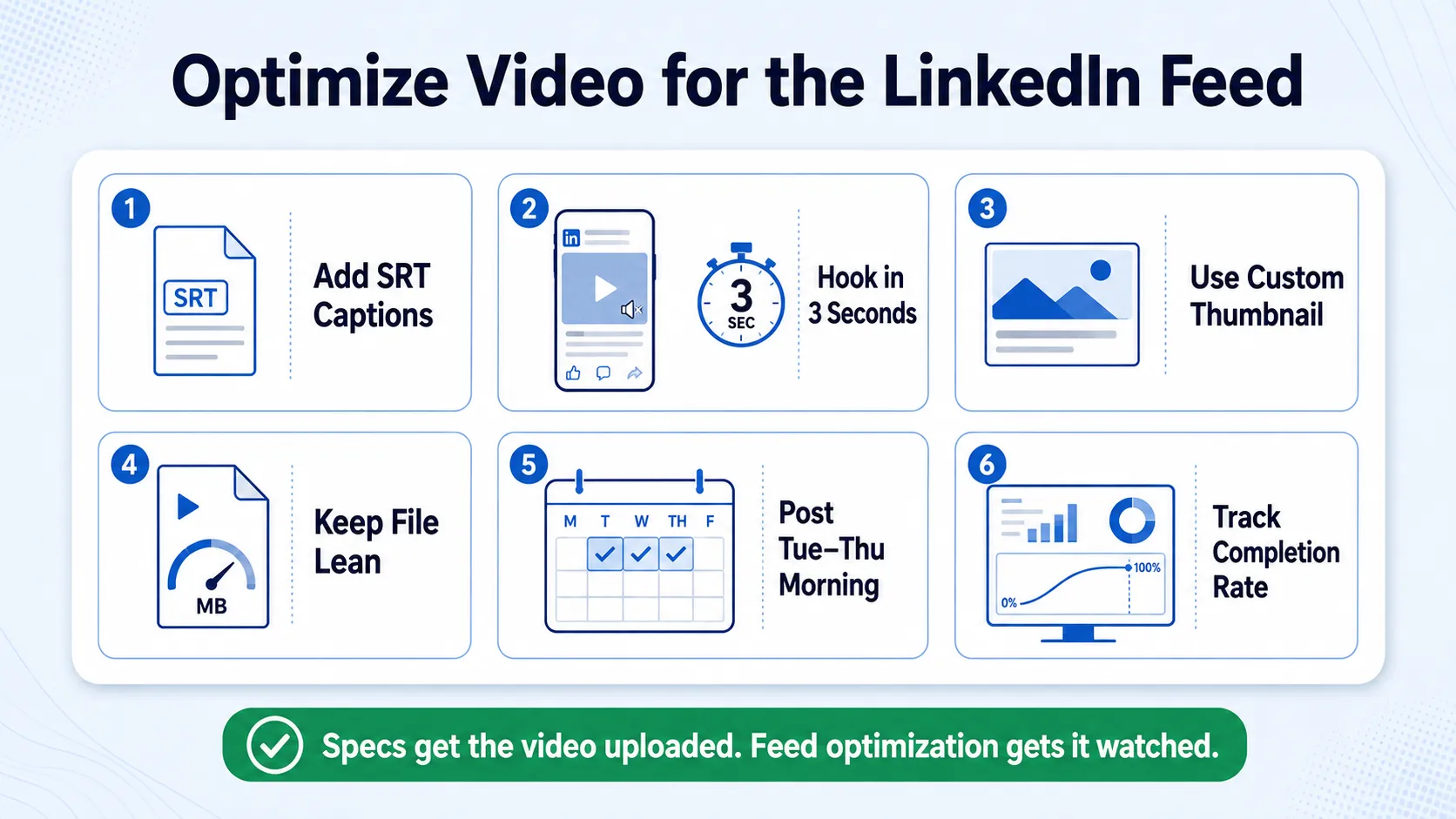
Here is how to optimize each element:
1. Add captions using an SRT file. Captions reach the 85% of users who watch without sound. LinkedIn's native SRT upload makes this a simple step, no excuses for skipping it.
2. Hook in the first three seconds. Videos that auto-play with captions capture attention in silent-scroll mode. Under 90 seconds, with a clear hook in the first three seconds, performs best.
3. Upload a custom thumbnail. A strong video thumbnail is what viewers see before autoplay triggers on slower connections. Use a frame with a legible text overlay or a clear, forward-facing face shot.
4. Keep file size lean for faster load. Compress to under 1 GB for organic posts even though 5 GB is the ceiling. Faster load times reduce drop-off in the critical first few seconds.
5. Post on the right schedule. Publish during decision-maker planning windows: 8 AM EST on Tuesday through Thursday.
6. Monitor completion rate, not just views. Track completion rates in LinkedIn analytics, not just view counts, completion is the signal the algorithm weights most heavily for continued distribution.
Format selection has become one of the most controllable levers for organic reach in 2026. The algorithm heavily favors formats that generate extended dwell time, and the performance gaps between formats have widened compared to previous years.
For teams building a video marketing strategy around product education and pipeline, these six steps compound quickly when applied consistently.
How to Format a Video for LinkedIn: Step-by-Step Workflow
This is the production-to-publish workflow every B2B team should standardize. Follow it exactly and you will never deal with upload errors, quality degradation, or algorithm penalties from wrong specs.
- Record or source your content: Capture at 1080p minimum. Webinar recordings, podcast sessions, founder interviews, and product demos all work as source material for content repurposing.
- Edit to your target length: Aim for 30 to 90 seconds for thought leadership and awareness content. Keep product education clips under 3 minutes.
- Choose your aspect ratio: Default to 4:5 (1080x1350) for feed-first content. Switch to 16:9 (1920x1080) only for desktop-primary presentations.
- Export settings, use these exactly:
- Container: MP4
- Video codec: H.264
- Audio codec: AAC
- Frame rate: 30 fps
- Resolution: 1080p for your chosen ratio
- Bitrate: 10–20 Mbps for 1080p (higher for motion-heavy content)
- Compress to under 1 GB for organic posts. Use HandBrake (free) or your editing suite's compression settings. For video ads, compress below 200 MB.
- Prepare your caption file: Export an SRT file from your editing tool or generate one via auto-captions. Review it for accuracy, AI transcription errors in captions damage credibility with professional audiences.
- Upload natively to LinkedIn: Go to "Start a post," select the video icon, upload your MP4, add your SRT file, set your thumbnail, and write your post copy before hitting publish.
- Paste any external links in the first comment, not in the post body, to avoid algorithmic suppression.
This workflow applies equally whether you are posting from a personal founder profile or a company page. If you want this built as a repeatable system for your team, our video editing services handle every step from export to publish-ready file. Book a Call Now!
Conclusion
Every spec decision in this LinkedIn Video Format and Spec Guide connects directly to reach, watch time, and buyer trust. Getting the technical layer right is non-negotiable before any distribution strategy matters.
Key takeaways:
- MP4 + H.264 + AAC is the only export preset you need for all LinkedIn video types.
- 4:5 (1080x1350) at 1080p is the highest-performing format for mobile-first feeds in 2026.
- Native upload always beats a YouTube link for algorithmic reach, the gap is 3.5x or more.
- Captions, a strong hook, and a custom thumbnail are the three cheapest performance upgrades available.
Frequently Asked Questions
Q1: What video file types does LinkedIn accept?
LinkedIn accepts MP4, MOV, WebM, ASF, and FLV for organic posts. For video ads, MP4 is the only accepted format. In every case, MP4 with H.264 video codec and AAC audio is the safest, most compatible choice and the one you should standardize on.
Q2: What is the LinkedIn video file size limit?
Organic native video posts allow up to 5 GB, though staying under 1 GB is recommended for faster upload and load times. Video ads have a hard cap of 200 MB with a minimum of 75 KB. Exceeding the ad limit will cause your upload to fail.
Q3: What aspect ratio is best for LinkedIn video in 2026?
4:5 (1080x1350 pixels) is the strongest choice for mobile feeds, capturing nearly full-screen space without triggering immersive mode. 1:1 (1080x1080) is the safest all-device format. Use 16:9 (1920x1080) only when your audience is primarily on desktop.
Q4: How long should a LinkedIn video be?
For organic reach, 30 to 90 seconds performs best with the current algorithm. Mobile uploads cap at 10 minutes; desktop uploads at 15 minutes. For video ads, LinkedIn suggests 15 to 30 seconds for maximum completion rates and engagement.
Q5: Does LinkedIn compress my video on upload?
Yes. LinkedIn re-encodes uploaded files during processing. Uploading at 1080p in MP4/H.264 gives the algorithm the best source quality to work with and minimizes visible quality loss after compression. Uploading below 1080p makes the post-compression degradation more noticeable.
Q6: Should I add captions to LinkedIn videos?
Yes, always. The majority of LinkedIn users scroll with sound off, and captions ensure your message lands regardless of audio. Upload an SRT caption file natively through LinkedIn's post interface rather than burning captions into the video, this preserves flexibility and is accessible to screen readers.

