
X (Twitter) Video Video Format and Spec Guide for B2B SaaS: Step-by-Step Guide
If you're a SaaS founder or marketing lead posting video on X, wrong specs cost you reach before your message lands. This X (Twitter) Video Format and Spec Guide covers every technical requirement, file format, resolution, bitrate, aspect ratio, length limits, and translates them into a practical production workflow for B2B SaaS, AI, and tech startups & teams turning webinars, demos, and founder clips into pipeline-driving content.
TL;DR
- X accepts MP4 and MOV with H.264 video codec and AAC audio codec only.
- Non-premium accounts: max 512 MB and 2 minutes 20 seconds. Premium Plus: up to 16 GB and 4 hours.
- X supports three aspect ratios: 16:9 landscape (1920×1080), 1:1 square (1080×1080), and 9:16 vertical (1080×1920).
- Native video on X earns dramatically more reach than external links, upload direct, every time.
What Video Format Does X (Twitter) Accept for Uploads?
This is the most common spec mistake I see B2B SaaS, AI, and tech startups & teams make: exporting in the wrong container or codec and discovering it only after a failed upload. X supports MP4 and MOV, these are the only two containers X reliably accepts. Within those containers, the codec choice is equally strict. MP4 encoded with H.264 video codec and AAC audio is the most widely compatible and recommended format. H.265 (HEVC) encoding is not reliably supported and may result in upload errors. If your team or editor defaults to HEVC on export from Premiere Pro, DaVinci Resolve, or Final Cut, double-check your export preset, defaulting to HEVC/H.265 is the most common silent failure.
For audio specifically: AAC-LC stereo at 128 kbps or higher is recommended. Videos without audio are supported and will play silently. That said, always include audio. Videos with audio tend to perform better even though they auto-play muted. Users can easily tap to unmute, and the platform may favor videos with audio in its algorithm. Here is the complete format reference:
One more edge case worth flagging: X supports animated GIF uploads with a maximum file size of 15 MB. GIFs are automatically converted to silent MP4 video by X for playback. Despite this conversion, you still upload files in .gif format. For any paid placement, convert and upload as MP4 or MOV, uploading an animated GIF file directly can lead to inconsistent rendering across placements.
Our short-form video editing service (which handles both content repurposing and production from scratch) exports every clip with these codec settings as the default, so nothing gets flagged at upload.
X (Twitter) Video Resolution Requirements and Aspect Ratios
Resolution and aspect ratio are where B2B SaaS, AI, and tech startups & teams leave the most quality on the table. Here is exactly what X supports and what you should target. X supports three video aspect ratios: 16:9 landscape (1920×1080 recommended), 1:1 square (1080×1080), and 9:16 vertical (1080×1920). X supports a maximum resolution of 1920 x 1200 pixels and a minimum of 32 x 32 pixels. The recommended resolution for 16:9 landscape video is 1280 x 720 pixels (HD) or 1920 x 1080 pixels (Full HD).
The vertical format deserves attention from SaaS teams. Upload at 1920×1080 (16:9) for landscape or 1080×1920 (9:16) for vertical, vertical plays full-screen in X's Immersive Media Viewer. That full-screen treatment on mobile creates significantly more attention per impression. Avoid uploading 4K source files. Videos shot in 4K will be downscaled server-side, which means you lose control over the compression, export at 1080p yourself for a cleaner result.
Resolution rule of thumb: Export at 1920×1080 for landscape content. Never upload a file that has already been compressed by another platform, X's re-encoding compounds existing artifacts.
What Is the Maximum Video File Size and Length on X?
The maximum video file size for standard X accounts is 512 MB. That is generous enough for most short-form B2B content if you encode correctly. For teams that need more headroom: Premium Plus subscribers can upload up to 16 GB and 4 hours.
For video length: standard X accounts can upload videos up to 140 seconds (2 minutes 20 seconds). This limit covers videos posted directly to X via the web, mobile app, or API.
Android caveat: Premium subscribers can upload up to 4 hours at 1080p on web and iOS, though Android is currently limited to 10 minutes. For organic B2B content, the 2:20 ceiling rarely matters. What matters is how much of that window you actually need. For organic reach, keep videos under 60 seconds, completion rate is the metric X weights most in feed ranking.
A 45-second founder clip that gets watched to the end beats a 2-minute product demo where 70% of viewers drop off in the first 20 seconds. Keep videos under 60 seconds if you want them to auto-loop in the timeline. Auto-looping extends your impression count without any additional distribution effort, a straightforward reason to keep SaaS clips tight.
Bitrate Optimization: How to Avoid Blurry Uploads
X re-encodes all uploaded videos for its own delivery network. Uploading at a higher quality than necessary does not guarantee better output quality, but staying at or above the recommended specs ensures the re-encoding process has enough source quality to work with. This means your source file quality sets the ceiling for what X can deliver. Export high, even knowing X will compress on delivery. Preferred codec is H.264 with AAC audio. Recommended video bitrate for best quality is between 5,000 and 25,000 kbps, with 8,000–12,000 kbps being a solid target for 1080p at 30 fps. Here is the bitrate guide by content type, based on what we use at Komet Media:
X recompresses every upload, often reducing bitrate to optimize streaming, which causes blur if the source file is low quality or already heavily compressed. Export at a higher bitrate than the platform will ultimately use, and avoid multiple generations of compression, don't download from another platform and re-upload without re-encoding.
For audio: AAC audio at 44.1 kHz or 48 kHz, with 128–320 kbps bitrate, ensures clear speech and music. For B2B SaaS content where a founder or exec is speaking directly to a buyer, audio clarity is non-negotiable. If the words are muddy, the message dies.
X (Twitter) Video Ads Specs for B2B SaaS, AI, and tech startups & teams
Organic and paid video on X share most technical specs, but there are paid-specific rules worth knowing before you push the budget behind a clip. Video ads specs: 16:9, 1:1, or 9:16 aspect ratio, up to 2:20 length (15–30 seconds recommended), 1 GB max file size, MP4/MOV format with H.264 codec. For ads, the 1 GB limit is generous, but the 140-second cap still applies to most promoted video formats.
The performance case for video ads on X is solid for B2B at the right budget level. Costs average $0.50–$2.00 per engagement and $5.80 CPM. Native video content optimized with captions performs 10x better than external links. That is a meaningful cost arbitrage versus LinkedIn's CPM for comparable tech audiences. The winning ad format for B2B SaaS, AI, and tech startups & teams: Promoted Tweets with native video, a 45–60 second product demo, captions on, ending with a "Book a demo" CTA.
Additional paid placement rules:
- For Promoted Video Ads, 9:16 vertical is recommended but 16:9 or 1:1 is also supported. Maximum duration is 2 minutes 20 seconds, though 15 seconds or less is recommended.
- Videos will loop if they are under 60 seconds.
- X recommends 15 seconds or less for Amplify pre-roll.
- The character limit is 280, but a URL gets wrapped as a t.co link that uses roughly 23 characters. Plan on about 257 characters of usable copy once a link is included.
B2B timing insight: Schedule ads for 7–11 AM ET Monday–Thursday, B2B engagement drops 40% on Fridays and weekends. Explore our video advertising services (for both repurposed content and new productions from scratch) if you need paid-ready edits built to these specs from day one.
How to Format Videos for X: A B2B SaaS, AI, and tech startups & teams Production Workflow
Getting the specs right is table stakes. What separates B2B teams that grow pipeline from X from those who post into the void is a repeatable production system. Here is the workflow we use at Komet Media for SaaS clients.
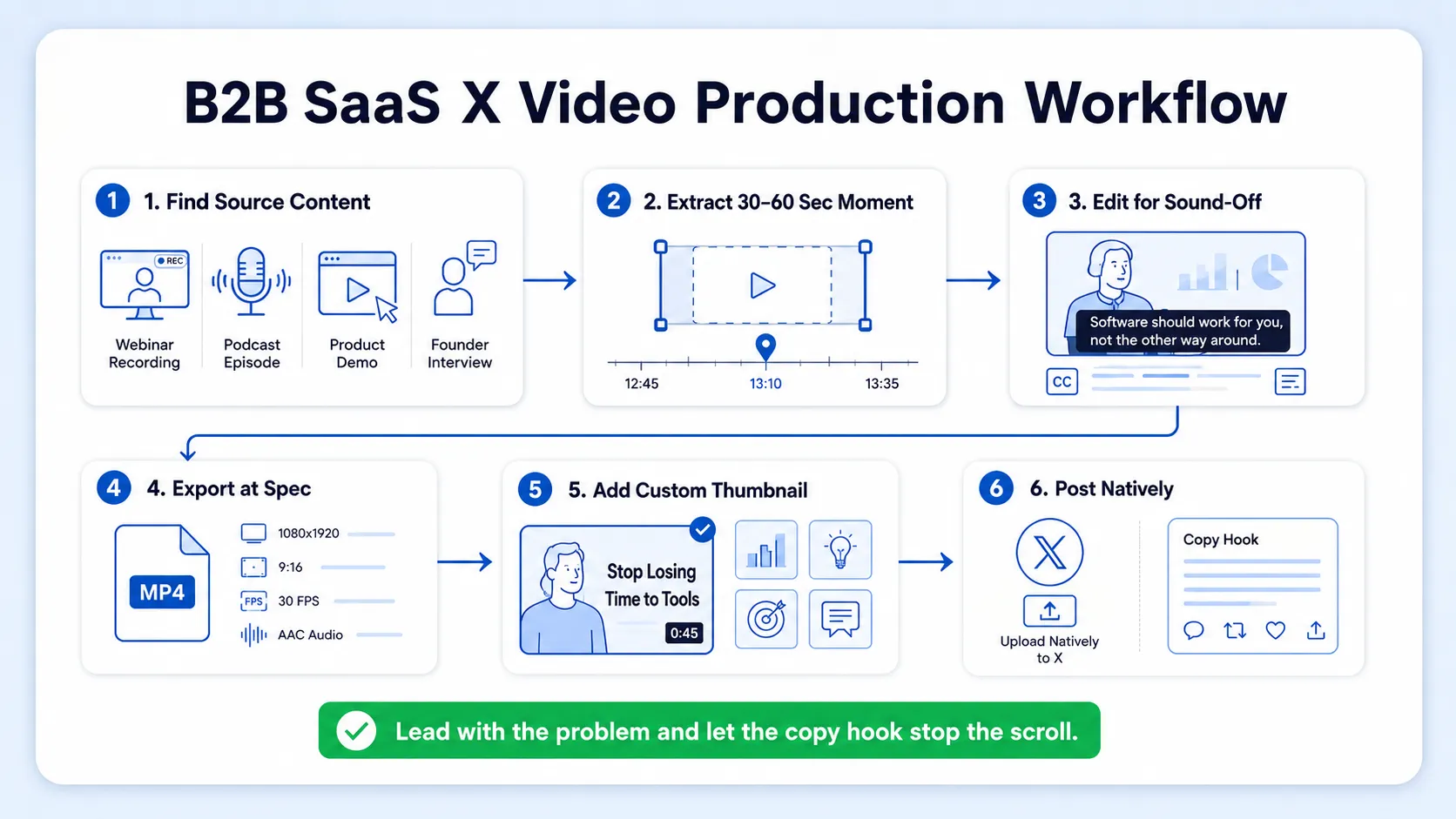
Step 1: Identify your source content. Webinars, podcasts, product demos, founder interviews, and sales call recordings are all viable. You do not need to create from scratch (though we offer services for that too). If you have a podcast or webinar, those are your starting inventory.
Step 2: Extract the highest-signal 30–60 second moment. Prioritize moments where a clear problem is named, a contrarian insight is shared, or a product outcome is demonstrated. These outperform generic brand messaging every time.
Step 3: Edit for sound-off viewing. X auto-plays videos without sound in the feed, so include captions or on-screen text to communicate your message even with audio off. Burn in captions at the editing stage, do not rely on X's auto-caption feature for professional output.
Step 4: Export at spec. Use the table from the bitrate section above. MP4, H.264, AAC, 1080p, 30 fps, 8,000–12,000 kbps for most talking-head content.
Step 5: Add a custom thumbnail. X allows you to select a thumbnail from your video or upload a custom one. Always upload a custom thumbnail, it is the first frame a non-playing feed renders on slower connections.
Step 6: Post natively and write the hook in the copy. X's algorithm currently favors native video over links. Posting a YouTube link gets a fraction of the reach compared to uploading the video directly. The copy hook is equally important, your first sentence determines whether someone stops or scrolls.
Video posts on X receive 10x more engagement than text-only posts. A 15–45 second founder clip embedded in a tweet outperforms a text-only version of the same insight by an order of magnitude. That is the compounding advantage of a content repurposing strategy done at volume.
Best Practices for B2B Video Content on X in 2026
Specs get your video uploaded. Strategy gets it watched and acted on. Here is what works specifically for B2B SaaS and funded tech teams.
- Lead with the problem, not the product. Buyers on X are not in shopping mode. They are scanning for ideas and signals. A clip that opens with "most SaaS onboarding flows lose 40% of users in week one" earns more attention than one that opens with your logo.
- Keep it under 60 seconds for feed distribution. Watch time matters more than views. A 30-second video watched to completion outperforms a 2-minute video where most viewers drop off at 15 seconds. X's feed algorithm rewards completion rate, shorter, denser clips compound over time.
- Use vertical or square for mobile-first reach. Mobile-first vertical clips (9:16) and shorter videos (15–60 seconds) typically deliver better engagement and are easiest to reuse on Instagram Reels and other platforms. Build your master cut at 9:16 and crop to 16:9 for desktop-first formats.
- Post at the right time. The highest-concentration B2B audience on X is active 8–10 AM ET, with top interests including marketing automation, analytics, and SaaS.
- Captions are mandatory, not optional. 80% of X video views occur with sound off. Every word of your founder's insight needs to be visible without audio.
- Publish consistently. For B2B SaaS brands, X is the platform where founders build authority, ideas go viral, and industry conversations happen in real time. One great video once a month does not build a presence. A steady cadence of 3–5 short clips per week does.
- Repurposing multiplier: One 45-minute webinar can yield 8–12 standalone clips at X-ready specs. That is a month of distribution from a single recording session.
Our video editing services and short-form video production workflows (for both repurposing and from-scratch content) are built specifically around this kind of volume for B2B teams.
Conclusion
Here is the complete X (Twitter) Video Format and Spec Guide in four decisions:
- Format: MP4, H.264 video, AAC audio, no exceptions. MOV works, but MP4 is safer across every upload path.
- Resolution and ratio: 1920×1080 for landscape, 1080×1920 for vertical. Export at 1080p even when your source is 4K.
- Length: Under 60 seconds for organic reach. The 2:20 ceiling exists, but completion rate is what the algorithm rewards.
- Production: Native upload always, captions always, custom thumbnail always, then let the copy hook do the rest.
Specs without a repurposing system produce one good post. A system produces a pipeline.
Frequently Asked Questions
Q1: What is the best file format for uploading video to X (Twitter) in 2026?
MP4 encoded with H.264 video codec and AAC audio is the most widely compatible and recommended format. MOV is supported but MP4 is the safer default across web, mobile, and API upload paths. Never upload H.265/HEVC, it will fail silently.
Q2: What is the maximum video file size on X for a standard account?
X supports videos up to 140 seconds long for standard accounts, with a maximum resolution of 1920 x 1200 pixels and a 512 MB file size cap. Premium Plus subscribers get up to 16 GB. For most B2B short-form clips, 512 MB is more than enough at 1080p.
Q3: What aspect ratio should I use for X (Twitter) videos as a B2B brand?
It depends on your goal. X supports 16:9 landscape (1920×1080), 1:1 square (1080×1080), and 9:16 vertical (1080×1920). Landscape is the most common in-feed format. For mobile-first distribution and repurposing to Reels, use 9:16.
Q4: How long should X videos be for B2B SaaS marketing?
For organic reach, keep videos under 60 seconds, completion rate is the metric X weights most in feed ranking. For ads, 15–30 seconds is the recommended target. The 2:20 hard limit for standard accounts exists, but algorithm performance peaks well below it.
Q5: Why does my video look blurry after uploading to X?
X applies its own compression to every upload. To minimize quality loss, export at a bitrate of at least 8,000 kbps for 1080p content. Also avoid re-uploading files downloaded from other platforms, compressing an already-compressed file compounds the quality loss significantly.
Q6: Should I upload video natively to X or share a YouTube link?
Upload natively, every time. X's algorithm currently favors native video over links. Posting a YouTube link gets a fraction of the reach compared to uploading the video directly. Native video earns more impressions, more completions, and more replies, all the signals that compound into the pipeline.

