
Sound Design and Music for B2B Video: Step-by-Step Guide
Most B2B videos get the visuals right and completely blow the audio. Bad music, clashing frequencies, or zero sonic strategy kills trust before your buyer finishes the first 15 seconds. 89% of consumers say video quality affects brand trust, and for B2B brands where credibility closes deals, low-quality video actively damages it. This Sound Design and Music for B2B Video: Step-by-Step Guide exists to fix that problem systematically, so your next product demo, founder clip, or short-form video stops losing buyers at hello.
TL;DR
- Music sets emotional context before a buyer consciously processes your message.
- Keep voiceover at -6 to -12 dB and music at -18 to -25 dB to protect clarity.
- Use royalty-free platforms like Epidemic Sound or Pond5 to stay license-safe.
- Consistent audio branding across video series builds brand identity and buyer recall.
How Music Affects B2B Video Engagement and Conversion Rates
Most marketers treat audio as decoration. It's actually a persuasion mechanism. The brain's auditory cortex processes sound by recognizing and categorizing pitch, rhythm, and timbre, and this triggers neurotransmitters like dopamine and oxytocin, which are intrinsically linked to pleasure and connection.
In plain terms: the music in your product demo is already shaping how a buyer feels about your software before they read a single feature on screen. The psychology of sound design shows that our brains process auditory stimuli faster than visual ones, triggering immediate emotional reactions. That means emotional resonance from a well-chosen track sets the frame for everything that follows. For B2B buyers evaluating complex software, that frame either signals "trustworthy and capable" or "amateur and risky."
About 70% of B2B buyers watch video during their purchasing journey, per Vidyard's Video in Business Benchmark Report, and 96% have watched an explainer video to learn about a product. With that volume of video consumption, buyers are becoming sophisticated. A jarring track or a distracting music bed reads as a production quality signal, not just an aesthetic one. Marketers report that video increases website landing page conversions by an average of 34%. That lift is contingent on the video actually holding attention. Poorly mixed audio is one of the fastest ways to forfeit that gain.
The mechanism worth understanding is what audio does to the B2B buyer journey at each stage:
- Awareness content (LinkedIn clips, founder cuts): upbeat, moderate-tempo ambient soundscapes signal energy and accessibility without overwhelming the hook.
- Consideration content (product demos, explainers): minimal, neutral background music keeps focus on the product and the voiceover.
- Decision content (customer stories, ROI videos): warmer, slightly emotional tracks reinforce the "safe choice" feeling buyers need before signing.
Match the emotional register of the music to the buyer's mental state at that stage. That alignment is what drives demand generation through audio, not just visual storytelling.
What Sound Design Elements Work Best for Corporate Videos
Sound design in B2B video goes beyond picking a background track. It includes every intentional audio layer you place in the edit. The core elements that separate professional from amateur:
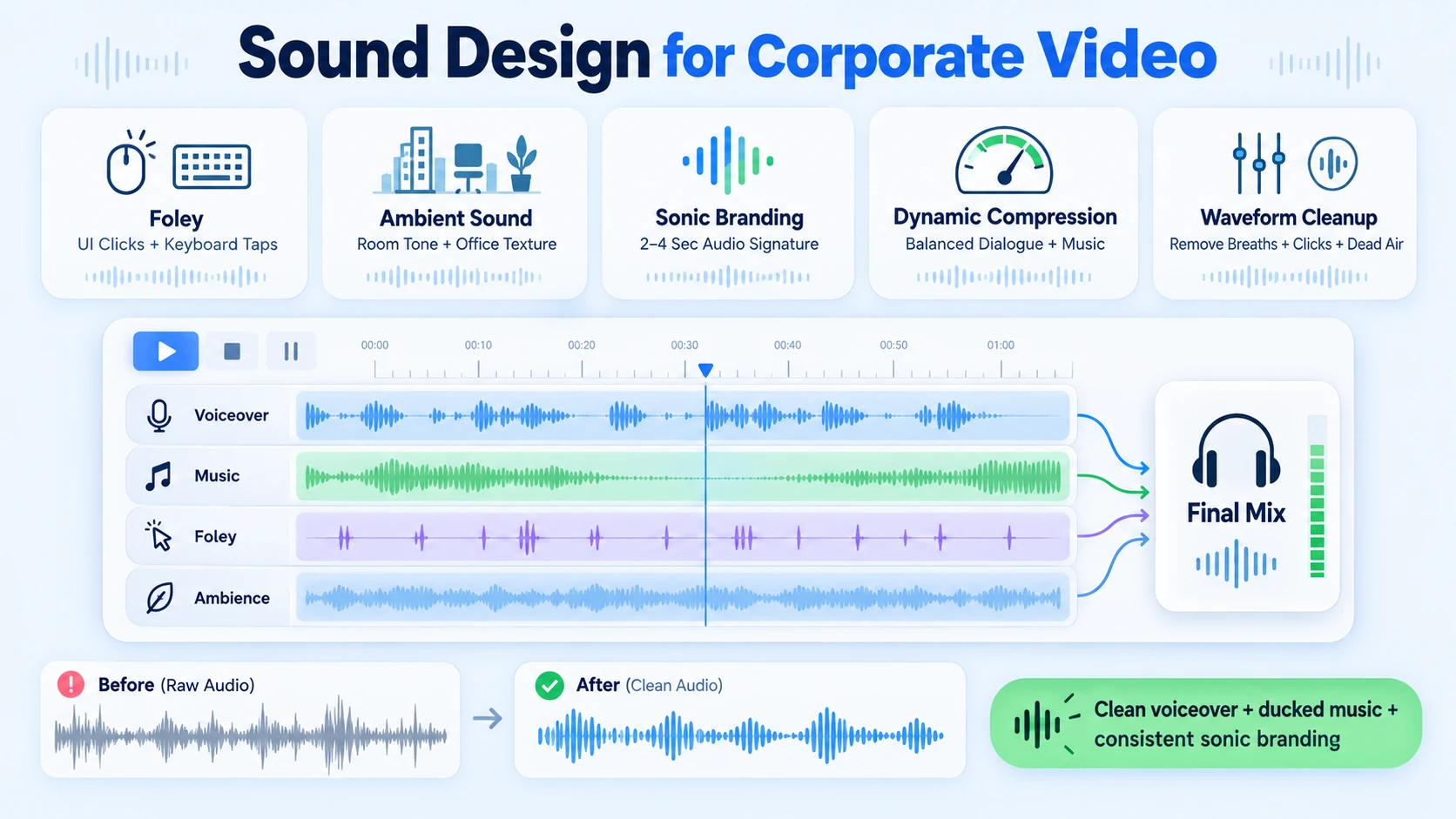
- Foley Art: subtle sounds tied to on-screen action (a click when a UI element appears, a keyboard tap during a screen recording) make abstract software feel tangible and real.
- Ambient soundscapes: low-level environmental textures (soft office ambience, light room tone) fill silence and prevent dead air from creating discomfort.
- Sonic logo: a 2-4 second branded audio sequence at the open or close of every video builds audio branding consistency across your content library. Think of it as a sonic fingerprint for your brand.
- Dynamic range compression: levels out the volume peaks across dialogue, music, and effects so the mix feels controlled across playback environments, whether a buyer is watching on laptop speakers or earbuds.
- Waveform editing: cleaning up the voiceover track removes breath noise, mouth clicks, and dead silence gaps, all of which unconsciously erode perceived production quality.
Sound design is the process of creating and manipulating sound to achieve a specific effect or mood, and sound psychology plays a crucial role in informing the creation of soundscapes that evoke emotions and influence behaviors.
For video editing services built for B2B, the non-negotiables are: clean voiceover, compressed and ducked music, and at minimum one sonic branding element that shows up consistently across your series. A Digital Audio Workstation (DAW) like Adobe Audition gives you the surgical control to handle all of these in one environment, without bouncing between tools and degrading audio quality across exports.
Royalty-Free Music for B2B Video Content: Platform Comparison
Music licensing is where B2B teams get hurt. Using unlicensed music on LinkedIn or YouTube exposes the company to copyright claims, and in client-facing content, that's a credibility problem as much as a legal one. Two platforms dominate serious production workflows:
Epidemic Sound remains the benchmark, with over 50,000 tracks and around 200,000 sound effects. Its stems feature lets you download the melody, drums, bass, and instrument layers of any track separately, so you can build custom arrangements and duck elements under dialogue.
Whereas other libraries claim to be royalty-free then require you to report usage and pay performance royalties, Epidemic Sound packages all the legal rights you could need into one simple license. Pond5 allows for pay-per-item purchases, credit packs, or subscription plans, making it an ideal choice for creators who may only need a single track for a project or prefer not to commit to a monthly fee.
For podcast production and video content that runs across LinkedIn Video Marketing channels, Epidemic Sound's "safelisting" feature (connecting your channels directly to the platform) is the cleanest way to eliminate Content ID conflicts before they become a problem.
How to Choose Music for a B2B Product Demo Video
The demo is where the deal lives. Music here requires the most restraint. Follow this selection process:
- Define the emotional target: Competent? Innovative? Calm? Trustworthy? Pick one primary emotion the demo should leave the buyer with.
- Choose tempo deliberately: 80-100 BPM works for most SaaS demos. It keeps energy present without creating urgency that competes with the voiceover.
- Avoid lyrics at all costs: Lyrics activate language processing in the brain simultaneously with your voiceover. Buyers lose comprehension of both. Stick to instrumental tracks.
- Select minimal arrangements: Piano, light pad synths, or sparse acoustic guitar. Dense orchestral or full-band tracks compete with on-screen information.
- Test for frequency clash: Play the track under your voiceover and listen for frequencies that make the voice feel muddy. Use EQ in Adobe Audition to cut the music's mid-range frequencies where the voiceover sits.
- Loop-check the track: Demos often run long. Confirm the track loops cleanly or has a natural extension to avoid a jarring cut mid-video.
- Match brand identity: A fast-paced EDM track under a compliance SaaS demo signals a brand mismatch that buyers notice unconsciously.
When selecting tracks, consider genre, mood, and the project's theme, and ensure music aligns well with your content for better audience engagement. For teams repurposing webinar content into short demos, the music choice shifts based on clip length. Clips under 60 seconds need a track that opens with energy immediately since there is no build-up time.
How to Balance Voiceover and Background Music in Business Videos
This is the most common execution failure in B2B video. The music is too loud. The buyer can't hear the message. They leave.
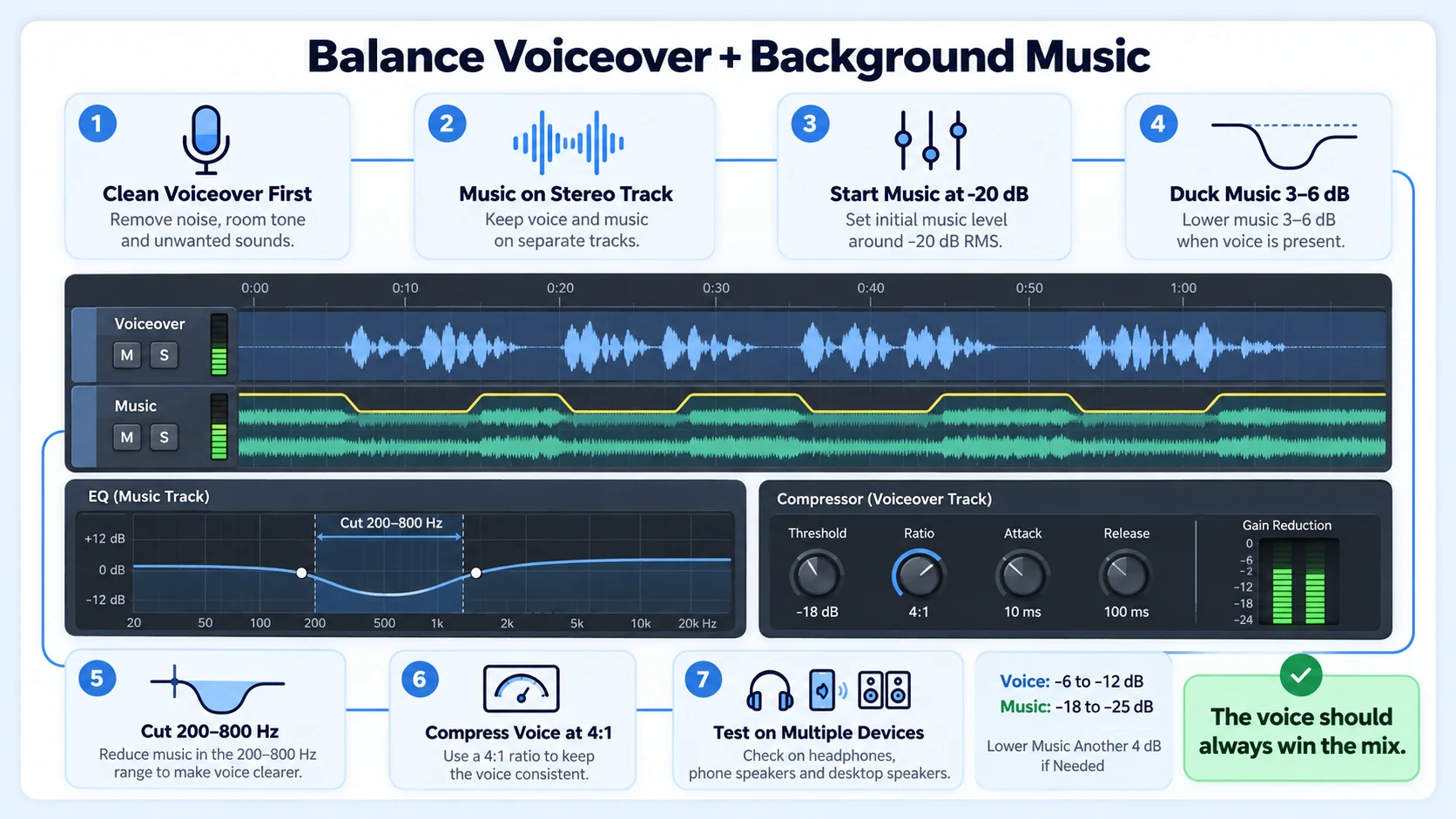
The standard mixing framework: Use audio mixing software like Adobe Audition or Audacity for better control. Set proper volume levels: dialogue at -6 dB to -12 dB, music at -18 dB to -25 dB. Use ducking to lower music volume automatically when someone is speaking. Imbalanced mixes where music overpowers voice loss 40% of viewers.
Step-by-step mixing process:
- Record and clean the voiceover first: Normalize the voiceover track to -6 dB peaks before importing music.
- Import music to a separate stereo track: Adding a stereo music track onto a mono channel clutters the mix and destroys stereo capabilities. Always add music to a stereo track to create space for voiceover layers.
- Set initial music level to -20 dB: This is the working starting point.
- Apply ducking: Automate the music track to drop an additional 3-6 dB during any voiceover section, then return to -20 dB in pauses or B-roll.
- EQ the music mid-range: Cut 200-800 Hz in the music track to carve frequency space for the human voice.
- Apply dynamic range compression to voiceover: Ratio of 4:1 keeps the voice even without pumping.
- Test on multiple devices: Always test audio on headphones, speakers, and phones before finalizing.
The BBC recommends mixing audio as usual, then lowering the music by an additional 4 dB. This method ensures music never overshadows speech and aligns with what audiences find most comfortable.
Common Mistakes When Adding Audio to Corporate Marketing Videos
Sound design mistakes are invisible to the creator and painfully obvious to the buyer. The failures that show up most in B2B video production:
- Unlicensed music: Using a commercial track because "it fits the vibe" results in Content ID takedowns on LinkedIn and YouTube. It signals to buyers that the company cuts corners.
- Inconsistent audio levels: Volume spikes between segments tell the viewer the video was assembled, not produced. Dynamic range compression is non-negotiable.
- No ducking automation: Music that stays at -20 dB during silence but never drops during voiceover still competes with the speaker. Ducking is the fix.
- Choosing music by personal taste: The editor's favorite genre is irrelevant. The buyer's emotional state at that funnel stage is what drives the music decision.
- Ignoring mobile playback: 47% of B2B buyers watch at least one vendor video on mobile devices during their decision process. Mobile speakers compress and distort bass-heavy music. Test every mix on a smartphone before publishing.
- Over-engineering with Foley Art: Excessive sound effects on a corporate explainer feel gimmicky. Foley should be felt, not noticed.
- Skipping a sonic logo: Every video series without a consistent audio branding element is a missed opportunity to build brand identity across the B2B buyer journey.
This Sound Design and Music for B2B Video: Step-by-Step Guide framework prevents all of these by treating audio as a system decision, not an afterthought. Teams that get this right build video marketing assets that compound in trust over time.
Conclusion
Audio is a trust signal. Buyers feel it before they analyze it.
- Match music energy to buyer funnel stage: ambient for awareness, minimal for demos, warm for decision content.
- Keep voiceover at -6 to -12 dB, music at -18 to -25 dB, and always use ducking.
- Source music from licensed platforms like Epidemic Sound or Pond5 to avoid legal and credibility risk.
- Build a consistent sonic logo and audio branding system across all video series for compounding brand identity.
If you need a production partner who builds this into the edit from day one, Komet Media's video editing services are built for exactly that.
Frequently Asked Questions
Q1: What is the difference between sound design and music in a B2B video?
Music refers to background tracks that set an emotional tone. Sound design is the broader system: foley art, ambient soundscapes, transitions, UI click sounds, and audio branding elements. Both work together. Music handles emotion; sound design handles immersion and brand consistency.
Q2: What tempo of background music works best for B2B explainer videos?
80-100 BPM is the working range for most SaaS and B2B explainers. It keeps energy present without creating urgency. Avoid anything above 120 BPM in product-focused content, as fast tempos compete with cognitive load from on-screen information.
Q3: Is Epidemic Sound safe to use for LinkedIn and YouTube B2B content?
Yes. Epidemic Sound packages all the legal rights into one simple license, unlike libraries that claim to be royalty-free but require you to report usage and pay performance royalties separately. Safelisting your channels removes Content ID risk entirely.
Q4: How does a sonic logo help with B2B demand generation?
A sonic logo is a 2-4 second audio branding signature at the open or close of every video. Consistent use across a video series trains buyer recall. Over multiple touchpoints in the B2B buyer journey, that recognition compounds into brand trust without adding any production complexity.
Q5: Can I use a Digital Audio Workstation like Adobe Audition if I'm not an audio engineer?
Adobe Audition has a learning curve, but its "Essential Sound" panel is built for non-engineers. You can classify tracks as dialogue, music, or sound effects and apply automatic leveling. For most B2B video editors, that panel handles 80% of what this Sound Design and Music for B2B Video: Step-by-Step Guide covers.
Q6: How does sound design in B2B video differ from consumer video production?
Consumer video tolerates higher energy music and stylistic audio risks. B2B buyers are evaluating you professionally. Restraint is the design choice: quieter music, cleaner voiceover, consistent sonic identity. The auditory cortex responds the same way, but the stakes of getting it wrong are higher when the buyer is a VP with a budget decision pending.

