
Running an Efficient Video Revision and Feedback Loop: Step-by-Step Guide
If your video production workflow feels like a never-ending game of telephone between editors, stakeholders, and clients, the problem isn't the editing. It's the process. Running an efficient video revision and feedback loop is what separates teams that publish consistently from teams that are still waiting on "one last change" three weeks later. This guide breaks down exactly how we build that system at Komet Media, so B2B SaaS teams, founders, and growth teams can ship video without the chaos.
TL;DR
- Define revision rounds and a creative brief upfront or expect scope creep every time.
- Use timestamp-based tools like Frame.io to replace vague email feedback with precise, actionable comments.
- Consolidate stakeholder feedback before it reaches the editor, not after.
- Track every version in one place, scattered files kill velocity.
What Is a Video Feedback Loop and How Does It Work?
A video feedback loop is the structured cycle through which raw footage or a first cut moves from editor to reviewer and back, incorporating changes at each stage until the final version is approved. It is not just "send a draft and wait for notes." A well-designed loop has defined stages, named stakeholders, and hard limits on revision rounds.
The revision cycle is a core practice in video production, guiding projects from initial concept to final cut. This iterative process involves collecting, evaluating, and applying feedback at each stage, whether in pre-production planning, production, or post-production editing.
Here is how a clean loop works in practice:
- Brief alignment: Editor receives a creative brief with approved direction before any cut begins.
- First cut delivery: A rough assembly is shared with a single internal reviewer, not the full stakeholder group.
- Consolidated feedback round: All stakeholder notes are gathered into one document before being sent to the editor.
- Revision applied: Editor works from that single consolidated list, not from six separate Slack threads.
- Second cut delivery: Revised version goes out for approval, not more notes.
- Final sign-off: One named decision-maker approves or escalates. No new feedback accepted at this stage.
Applying feedback is rarely a one-and-done task, expect to revisit scripts, recut edits, or refine motion graphics as part of a dynamic, ongoing loop. The key is controlling that dynamism with structure, not suppressing it. Two to three structured revision rounds at defined stages is the industry standard: one at script, one at storyboard, and one at the final edit. Teams that skip defining this upfront routinely face five, six, or seven rounds before delivery. A feedback loop without defined endpoints is just an approval process with no finish line.
Running an Efficient Video Revision Process: Step-by-Step
Running an efficient video revision and feedback loop starts before the editor touches a single clip. The setup is everything.
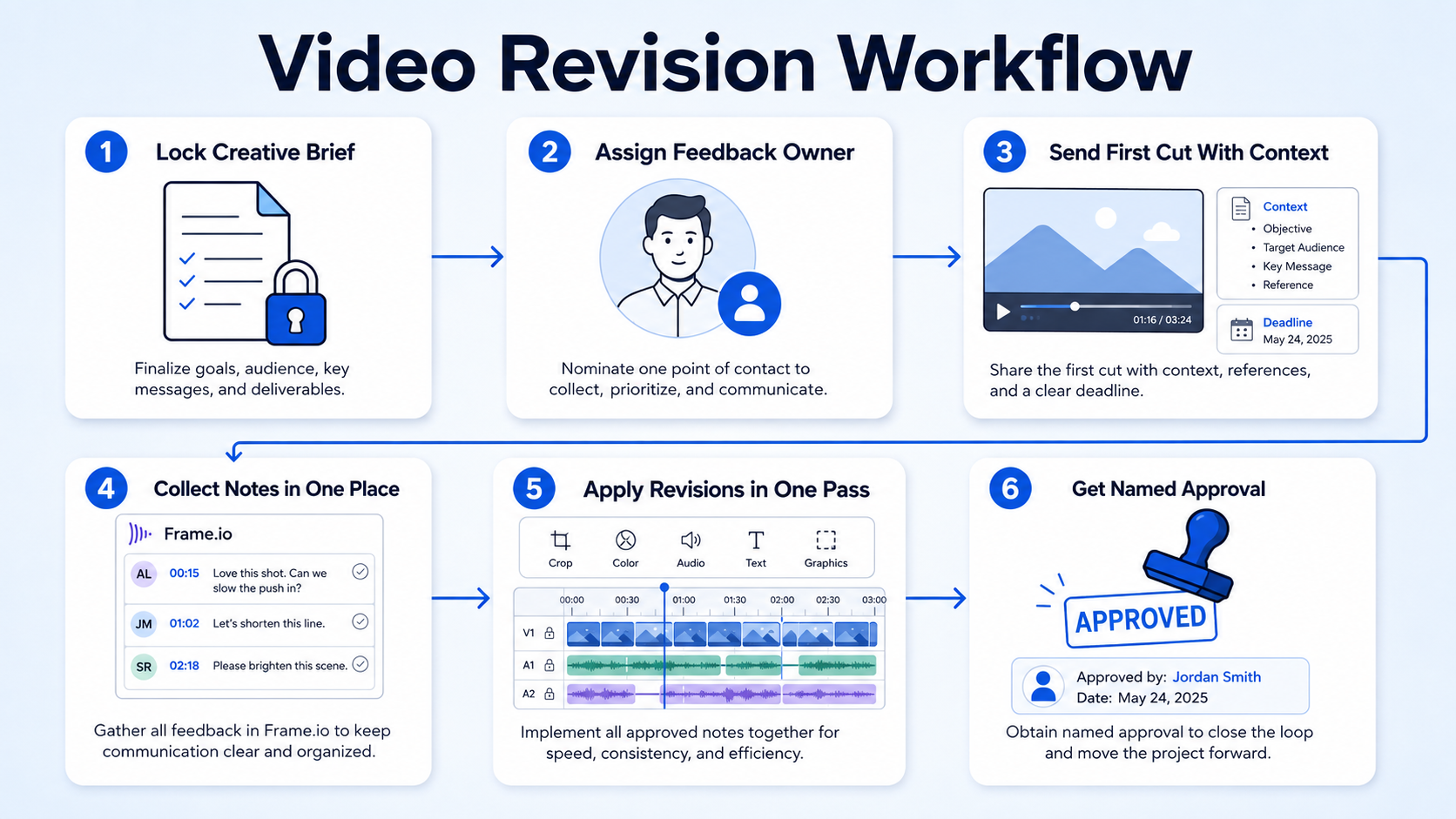
Step 1: Lock the creative brief before editing begins.
Every video that leaves our short-form video editing workflow has a brief that specifies the goal, the audience, the hook, the CTA, the tone, and the maximum revision rounds. No brief, no edit. A well-structured brief alone eliminates most late-stage creative pivots.
Step 2: Assign a single feedback owner per stakeholder group.
B2B productions involve more internal reviewers than consumer work. Legal, compliance, product, marketing, and executive teams may all need to approve a single 90-second script before the edit even moves forward. Designate one person from each group to consolidate notes before they reach your editor. This cuts the volume of contradictory edits in half.
Step 3: Send the first cut with a deadline and a context note.
Don't send a draft cold. Include a one-paragraph context note: what stage this is, what you want feedback on (pacing? messaging? CTA?), and when you need notes back. Open-ended reviews produce open-ended feedback.
Step 4: Collect feedback in a single source of truth.
Use timestamp comments in Frame.io, a structured Notion doc, or a ClickUp task. ClickUp centralizes all production tasks, files, edits, and feedback to eliminate work sprawl from the workflow. No feedback accepted via Slack DM, email chain, or voice note unless it has been transferred to that single source.
Step 5: Apply revisions in one pass, not incrementally.
Editors who receive drip feedback, one note today, two more tomorrow, lose significant time re-exporting. Batch the notes, apply them once, and re-export a clean version.
Step 6: Get a named approval before final delivery.
One person. One decision. Documented in your project management tool. That timestamp is your protection if scope creep surfaces later.
Best Tools for Running an Efficient Video Revision and Feedback Loop
Choosing the right tools is not about picking the most popular platform. It is about eliminating the two biggest killers: scattered feedback and lost version history.
Frame.io is highly regarded for simplifying video review and feedback workflows through timestamped comments and direct integration with editing software. Many appreciate its intuitive interface and the ability for clients to provide feedback without needing an account. The frame-specific commenting feature saves significant time because designers, editors, and stakeholders can communicate clearly without long explanation threads. This is especially powerful for video marketing teams where non-technical stakeholders are reviewing cuts, they don't need to know timecodes, they just click the frame.
Frame.io's commenting system allows reviewers to attach feedback to specific frames in video content, eliminating the guesswork that plagues traditional review processes. Comments include timestamps, visual markers, and threaded conversations that keep discussions organized and actionable.
For project management, ClickUp makes it easy to organize every aspect of video production, from SOPs and documentation to digital assets, tasks, and timelines. It comes with custom statuses that reflect real-world video production stages, all the way from concept through final editing and publication. Notion works best as the home for your creative brief templates, brand voice guidelines, and approval SOPs. It is not a task manager, but as a knowledge base feeding into your revision process, it is hard to beat.
How to Avoid Endless Revision Cycles on Video Projects
Endless revision cycles are a process failure, not a creativity failure. They happen for three predictable reasons: no brief, no revision limits, and no consolidated feedback.
No brief means the editor is guessing at intent. Every guess invites a correction. Guesses compound into five-round edit marathons.
No revision limits mean stakeholders treat every version as an opportunity to revisit earlier decisions. Most production companies offer 1–2 rounds of revisions as part of the project scope. Anything beyond that may require additional revision fees. Setting that expectation in your contract or SOW before the project starts changes stakeholder behavior immediately.
No consolidated feedback is the most common killer. When six people leave notes in six places, the editor either misses notes or receives contradictory directions. The result is more rounds, not fewer.
Three rules that eliminate the loop:
- Cap revision rounds explicitly: State "2 rounds of revisions included" in every project scope. Document this in ClickUp or Notion so there is no ambiguity.
- Require written feedback only: Verbal notes, from a call or Slack voice message, must be transcribed into the project tracker before the editor starts. No exceptions.
- Freeze scope at revision round 2: New creative direction (new CTA, new hook, new music) after round 2 triggers a new scope item. This is not punitive; it is protective of your editorial calendar and your team's capacity.
A well-structured B2B script typically takes 50% fewer revision cycles when writers start with category knowledge rather than discovering it mid-project. The same principle applies to video: the more alignment you build into the brief, the fewer rounds you need to fix it in the edit.
Most Common Mistakes in Video Revision Workflows
Even experienced teams repeat these errors. Knowing them is the first step to designing around them.
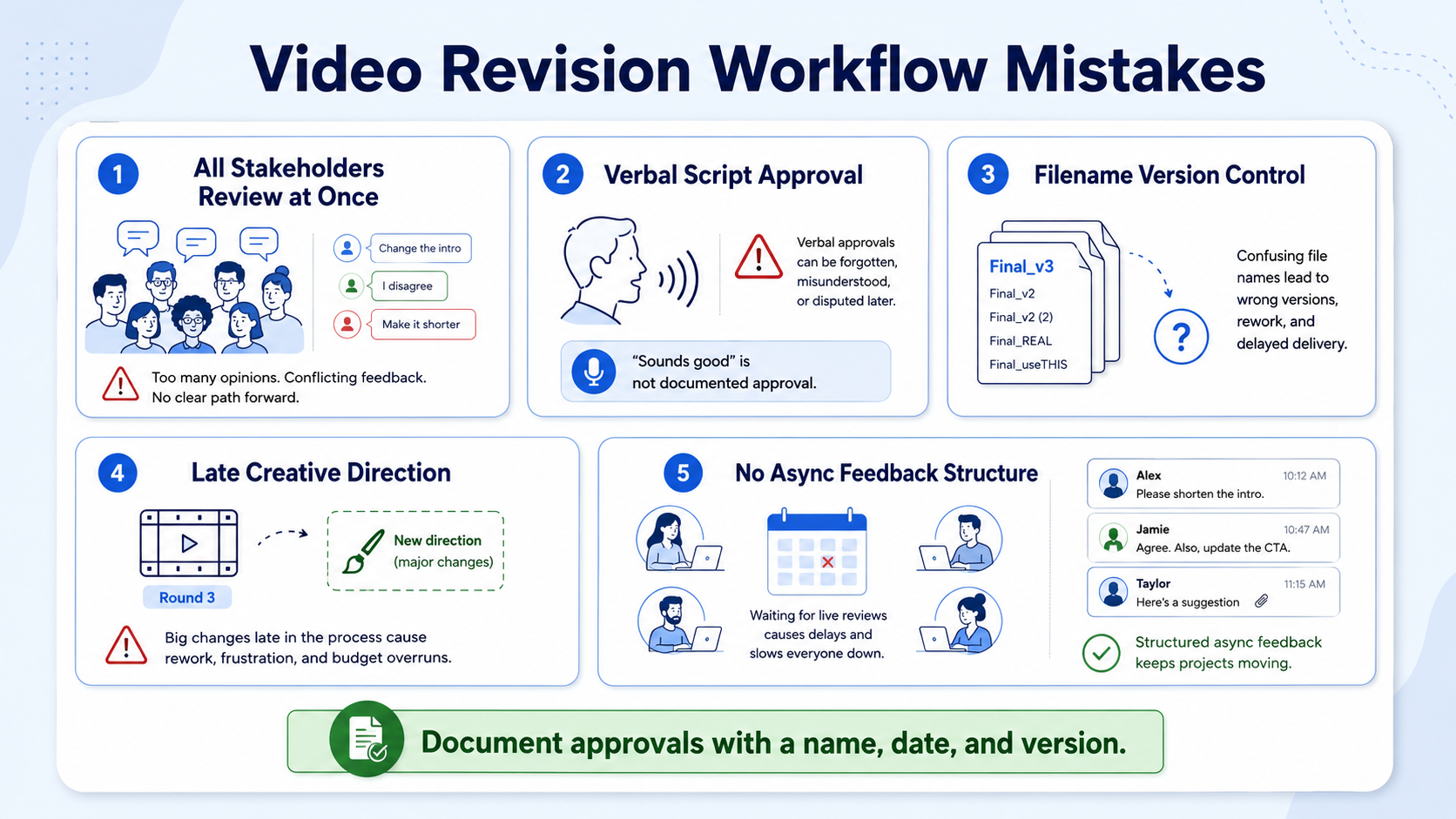
Mistake 1: Sending the cut to all stakeholders simultaneously.
This generates conflicting notes. The product wants more features. Marketing wants a shorter cut. Legal wants a disclaimer. When those notes arrive at the same time without a consolidation step, your editor is now a mediator, not an editor.
Mistake 2: Approving the script verbally but not in writing.
Verbal approval means nothing when a senior stakeholder reviews the first cut and decides the core message needs to change. Every approval, script, rough cut, graphics pass, must be documented with a name and a date in your project management tool.
Mistake 3: Version control by file name.
Files named "Finalv3FINAL_RealFinal.mp4" are a symptom of a broken post-production pipeline. Frame.io includes time-coded commenting, frame-specific annotations, and version control as core features , making filename gymnastics unnecessary.
Mistake 4: Accepting new creative direction in revision round 3 or later.
A studio without structured approval gates, defined revision rounds, and a clear process for managing stakeholder feedback creates expensive delays when the fourth reviewer introduces a fundamental messaging change at the animation or editing stage.
Mistake 5: No asynchronous feedback structure for distributed teams.
With remote collaboration becoming the norm, video feedback platforms offer a seamless way to review, critique, and approve videos asynchronously. If your team is distributed across time zones and you are still scheduling live review calls for every draft, you are adding days to every revision cycle.
How to Set Up a Structured Feedback Loop for Short-Form Video
Short-form video for B2B SaaS operates on a faster production cadence than long-form. A single webinar or product demo repurposed into clips for LinkedIn, sales enablement, or ads needs a leaner version of the same structure. 73% of B2B decision-makers prefer to watch product demo videos rather than read whitepapers or brochures , which means the volume demand for short videos is only increasing. Your feedback loop must be able to handle that throughput.
Here is the lightweight structure we use at Komet Media for short-form production:
- Pre-approved style guide: Colors, fonts, caption style, motion graphics templates, and music genre are locked before production begins. No per-clip creative decisions.
- Batch review, not individual review: Review 5–10 clips at one time in Frame.io, not one clip per session. This respects stakeholder time and compresses the approval cycle.
- Single-round revision rule for clips under 90 seconds: Short clips are not the place for strategic pivots. One round of notes. One final version. Done.
- Async-first feedback: All notes submitted in Frame.io with timestamp comments. No review calls unless the feedback volume is genuinely complex.
- Version labeled by date, not by "final": Use a date-stamp naming convention (YYYYMMDD) so the most recent file is always unambiguous in your shared folder or project management tool.
LinkedIn video experienced a 36% year-over-year increase in watch time and video uploads in 2025 , which means the teams with the fastest internal production loops are the ones building the most visible presence with buyers. A slow revision process is a slow pipeline. For teams running podcast-to-video repurposing or webinar clip production, this same structure scales. Lock the template. Batch the review. Ship the clip.
Conclusion
Running an efficient video revision and feedback loop is not a creative challenge. It is an operational one.
- Lock the creative brief and revision round limits before a single edit begins.
- Use timestamp-based tools (Frame.io, GoVisually) to replace vague email feedback with precise, frame-level comments.
- Consolidate all stakeholder notes into one source of truth before sending to the editor.
- Freeze scope at revision round 2, and document every approval with a name and date.
The teams that ship quality video consistently are not more talented. They have better systems.
Frequently Asked Questions
Q1: How many revision rounds should a video project include?
The industry standard is two to three structured revision rounds at defined stages: one at script, one at storyboard or rough cut, and one at the final edit. Anything beyond that should be treated as a scope change and addressed accordingly.
Q2: What is the best tool for collecting video feedback from multiple stakeholders?
Frame.io is highly regarded for simplifying video review and feedback workflows through features like timestamped comments and direct integration with editing software. GoVisually and ReviewStudio are strong alternatives for teams that need annotation tools beyond video.
Q3: How do I stop stakeholders from sending feedback in too many places?
Designate a single feedback channel before the project starts, Frame.io, a ClickUp task, or a Notion doc. State explicitly that notes sent via email or Slack will not be actioned until transferred to that source. ClickUp centralizes all production tasks, files, edits, and feedback to eliminate work sprawl from the workflow.
Q4: What is the biggest mistake teams make in their video revision workflow?
Sending the first cut to all stakeholders simultaneously without a consolidation step. When stakeholders from different teams provide conflicting feedback without a structured resolution process, it creates expensive delays and rounds that could have been avoided.
Q5: How does asynchronous feedback improve the revision process?
With remote collaboration becoming the norm, video feedback platforms offer a seamless way to review, critique, and approve videos asynchronously , removing the need for live review calls and reducing turnaround time from days to hours on most revision cycles.
Q6: How do I manage version control for video files?
Use a dedicated platform like Frame.io that tracks versions automatically with timestamps. Frame.io includes time-coded commenting, frame-specific annotations, and version control as core features of its video review workflow. If you are working outside a dedicated platform, use a date-stamp naming convention (YYYYMMDD) in your project folder, never "Finalv2REAL."

