
A Reusable Video Brief Template for B2B: Step-by-Step Guide
Most B2B video projects fail not in production but in planning. Teams skip the brief, rely on Slack threads, and end up with a video that impresses no one and moves no pipeline. A solid reusable video brief template for B2B fixes that by giving every project a single source of truth before a single frame is shot or edited. This guide covers every component, common mistakes, and a ready-to-copy structure built specifically for SaaS and funded tech teams that are serious about using video to drive pipeline in 2026.
TL;DR
- A reusable video brief template for B2B documents audience, goal, message, CTA, and distribution in one place, so every team member starts aligned.
- Build it once, clone it per campaign, update only what changes.
- Include KPIs and an approval workflow to eliminate revision spirals.
- The sections below walk through every field with B2B SaaS context baked in.
Why B2B Teams Need a Reusable Video Brief Template in 2026
91% of businesses now use video as a marketing tool in 2026. For B2B SaaS teams, that means your buyers are watching product walkthroughs, founder clips, and demo previews before they ever speak to sales. The race is not just to produce video, it is to produce video that educates buyers at the right stage, with the right message. Most video projects fail before the camera even rolls. Without a well-structured brief, creative teams face budget overruns, production delays, and misaligned expectations. For a SaaS growth team, that waste is compounded: you are not just burning a production budget, you are losing pipeline velocity.
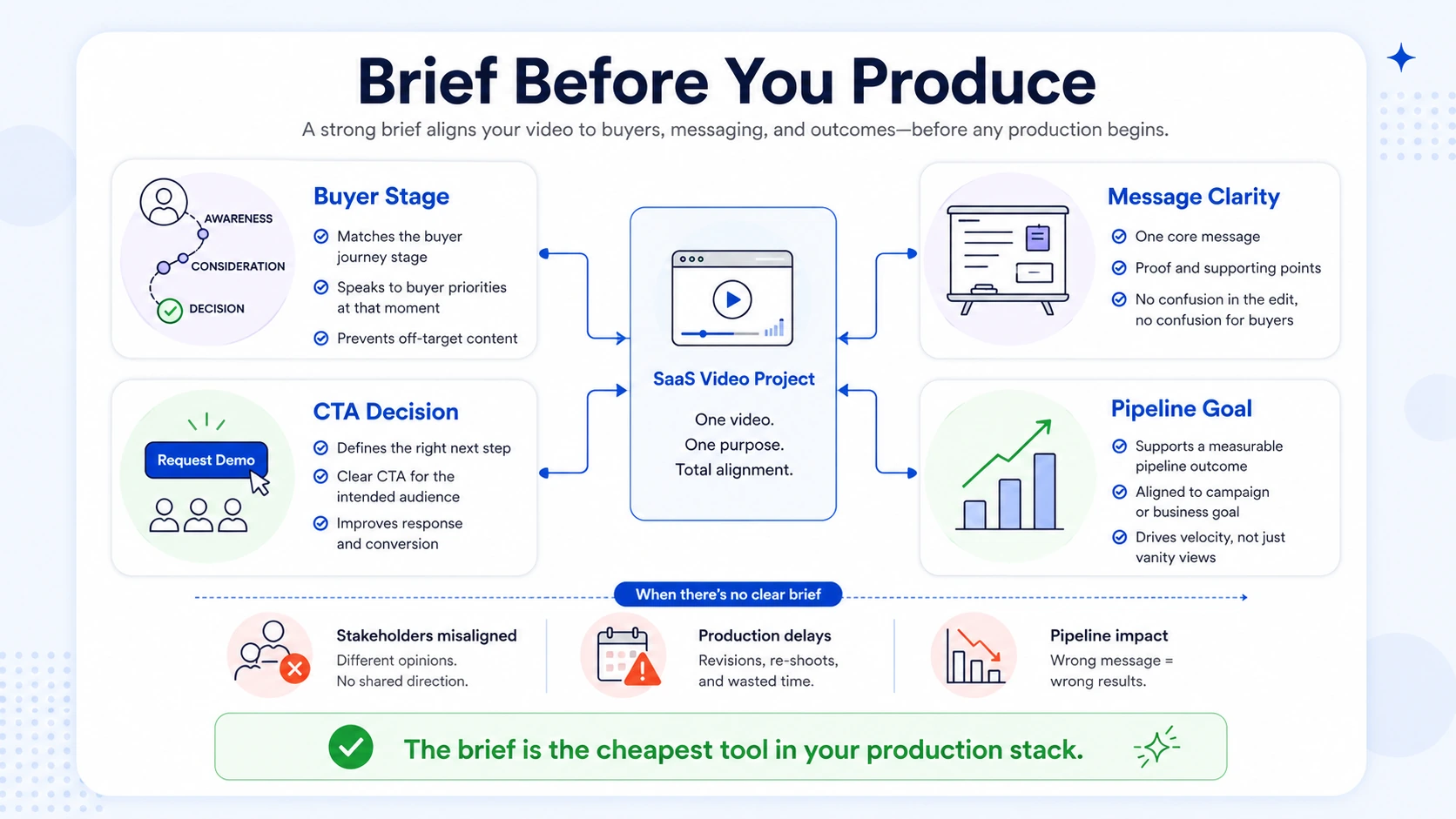
A reusable video brief template for B2B solves this by standardising every decision that does not change campaign to campaign: brand voice, buyer persona, funnel stage, approval chain. The parts that do change (topic, CTA, distribution channel) slot into pre-labelled fields rather than spawning a fresh briefing conversation each time. Short-form video is the top-performing content format in 2025, delivering the highest ROI of any content type and used by 30% of both B2B and B2C marketers. The reason most teams are not capturing that ROI is not a production quality problem, it is a clarity problem. They start shooting without a brief, or they write a one-off brief that gets lost and never reused.
B2B videos with clear calls-to-action generate 42% higher conversion rates than those without. A brief is what guarantees your CTA is decided before the script is written, not debated after the edit is done. At Komet Media, every video we produce for B2B clients starts with a brief, whether we are repurposing a recorded webinar into LinkedIn clips or shooting a net-new founder series. The brief is not overhead. It is the cheapest tool in your production stack.
What a B2B Video Production Brief Must Include
Video assets are only as effective as the creative briefs behind them. You need a clear creative brief to define each video project and keep everyone from team members to stakeholders in alignment throughout video production. For B2B SaaS specifically, a production brief needs fields that a generic template skips entirely. Here is the complete section-by-section breakdown:
Core required sections:
- Project overview: Title, video type (social clip, demo, webinar recap, founder story), campaign name, and due date.
- Campaign objective: Pick one primary goal (demo request, content download, cold outreach support, pipeline nurture).
- Target audience definition: Job title, company size, funnel stage (awareness, consideration, decision), and the one problem this video solves for them.
- Key message: The single takeaway a viewer should leave with. One sentence. Non-negotiable.
- Brand messaging guidelines: Approved tone words, phrases to use, phrases to avoid, and any compliance restrictions.
- Video script template or talking points: Either a full script or structured bullet points the speaker works from.
- Visual and creative direction: B-roll references, motion graphic style, colour palette, on-screen text rules.
- Call-to-action framework: Exact CTA text, destination URL, and whether it appears as a verbal CTA, an end card, or a caption.
- Distribution channels: Which platforms (LinkedIn, YouTube, sales sequences, website landing page), aspect ratios required per platform, and caption requirements.
- Production timeline: Shoot date or source asset delivery, first cut deadline, feedback round deadline, final delivery date.
- KPIs: View-through rate, click-through rate, demo requests attributed, or engagement rate, specified per channel.
- Approval workflow: Who reviews (marketing lead, legal, founder), in what order, and what the turnaround expectation is per round.
The document itself, before anything comes of it, allows you to ponder the purpose of the video before production starts to ensure the final product aligns with your business goals.
The Full Reusable Video Brief Template for B2B (Copy-Ready)
Below is the template our team uses and adapts for SaaS clients. Clone this into Notion, Google Docs, or your project management tool of choice.
Rule: Every field must be completed before production begins. A blank "Key Message" field is a hard stop, not a production team problem to solve.
For teams working with us on short-form video editing, this template travels with every project from kickoff to delivery. It is also what makes repurposing efficient, when we pull clips from a podcast or webinar, the brief tells the editor exactly what the clip needs to say and where it is going.
Video Brief vs. Creative Brief: What Is Different for B2B?
Founders and marketing heads often conflate these two documents. They are related but serve different scopes.
A corporate video brief goes by many names, project brief, creative brief, video production brief, but whatever you choose to call it, it is more than just a style guide for video production work.
For a B2B SaaS team, the video brief is more operationally specific than a creative brief. Where a creative brief asks "what does this campaign make buyers feel?", the video brief asks "what does the editor cut to at 0:08 and what CTA card appears at 0:55?" Both matter. But confusing them leads to creative direction with no production path, or precise production specs with no strategic anchor.
When working with an agency or internal editor on video marketing, pass both: the creative brief for strategic alignment and the video brief for production execution. If you only have bandwidth for one, the video brief wins, it contains enough strategic context to guide execution without becoming a full campaign planning document.
How to Make a Video Brief Template Your Whole Team Can Reuse Across Campaigns
The brief only creates efficiency if the team actually uses it every time. Here is how to make that happen:
- Store it in the tool your team already lives in: Notion, Confluence, ClickUp, or Google Docs. A brief in a tool nobody opens gets skipped.
- Create a "locked" layer and a "campaign" layer: Lock the fields that stay constant, brand guidelines, approved tone words, persona definitions, distribution rules. Only the campaign layer gets edited per project.
- Pre-fill defaults for your most common video type: If 70% of your videos are LinkedIn clips repurposed from webinars, pre-fill aspect ratio (9:16), caption requirement (yes), distribution channel (LinkedIn), and source asset type (webinar recording).
- Build the approval workflow directly into the brief: Name the reviewers, their role, and the turnaround they are expected to meet. Nothing kills momentum faster than a 17-step approval chain. To avoid the death-by-approvals spiral, set up pre-approved brand templates for all the components you can.
- Add a "lessons learned" field at the bottom: After each video ships, note one thing the brief should have captured better. After five projects, the brief becomes self-improving.
- Version-control it: Keep a changelog so the team can see what changed between v1 and v3 of the template and why.
- Run a 10-minute brief review call for every new campaign: Not to fill it out together (that is async work), but to confirm the key message and CTA before production starts.
From one anchor asset, aim to create 10–15 video clips, a handful of static visuals, one short newsletter embed, and a quick sales-enablement reel. A brief built for reuse makes that kind of content multiplication systematic rather than chaotic.
Common Mistakes in B2B Video Briefs (and How to Fix Them)
Most briefs fail in the same predictable ways. Here are the ones I see most often working with SaaS and funded tech teams:
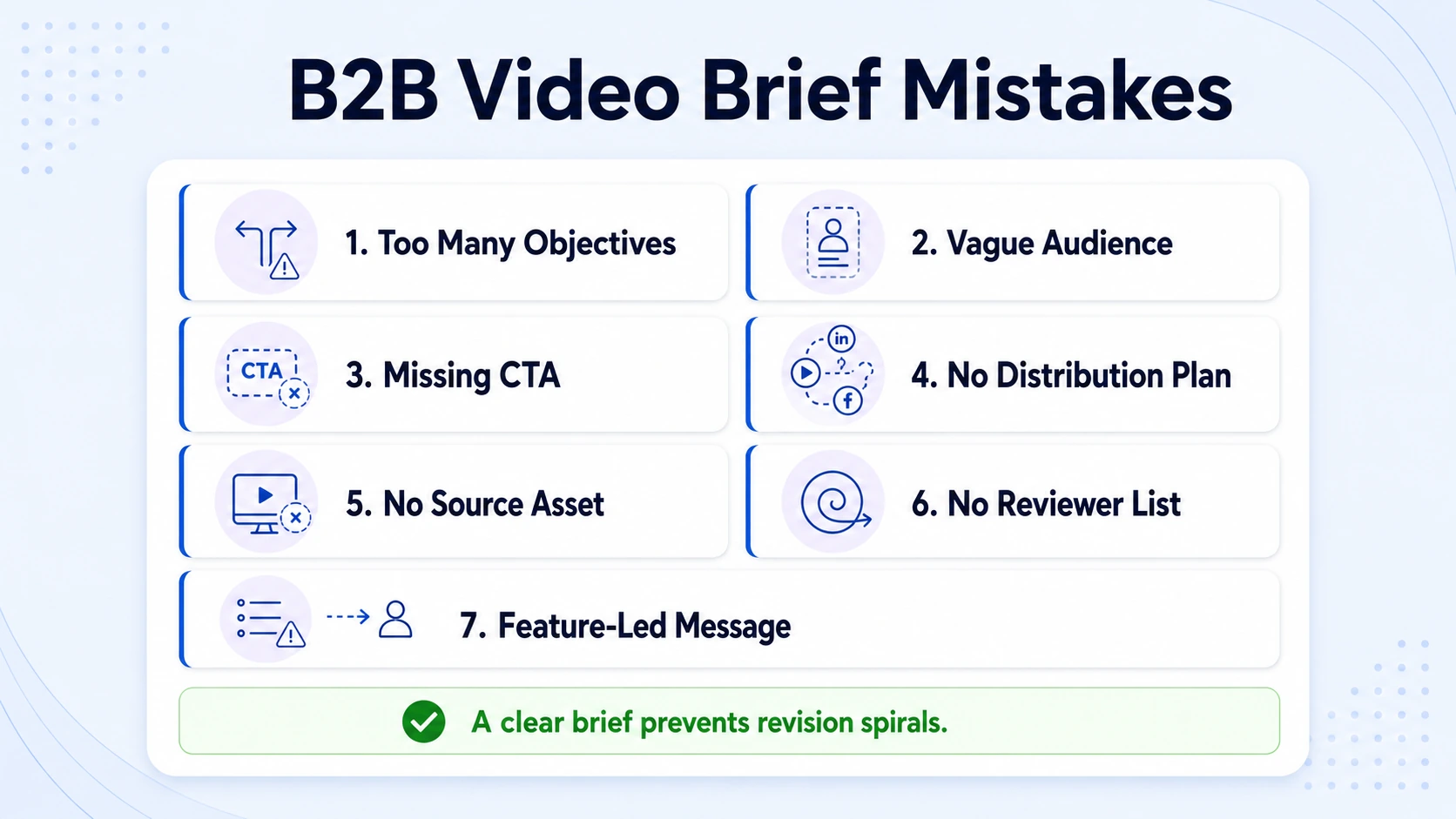
- Multiple primary objectives: "We want brand awareness AND demo requests AND sales enablement." Pick one. A video that tries to do three things does none of them well. Assign secondary objectives if needed, but one KPI must be primary.
- Vague audience definition: "Marketing professionals at mid-size companies" is not a persona. The brief must name the job title, the stage in the buying journey, and the specific pain this video addresses.
- Missing CTA at brief stage: Teams treat the CTA as an afterthought for the editor. B2B videos with clear calls-to-action generate 42% higher conversion rates than those without, which means the CTA must be specified in the brief, not improvised in post.
- No distribution plan in the brief: Writing "social media" as a distribution channel is not a plan. Specify LinkedIn feed vs. LinkedIn Stories vs. YouTube vs. email, because each requires a different aspect ratio, caption style, and length.
- Skipping the source asset field for repurposed content: If you are pulling clips from a recorded webinar, the brief must link to the exact recording, the timestamp range, and the approved speakers. Without this, editors waste hours searching.
- No approved reviewer list: Feedback from five people who were never designated as approvers creates revision spirals. Name reviewers in the brief before production starts.
- Key message written as a feature, not a buyer outcome: "Our platform integrates with Salesforce" is a feature. "Your reps stop manually logging activity and get 3 hours back per week" is a buyer outcome. The brief must enforce outcome-framed messaging.
Endless revision cycles drain resources. Feedback arrives scattered across email threads and Slack messages. The final product misses the mark, mostly because the mark was never defined. Every mistake above is solvable with a well-structured brief.
Video Brief Template for B2B SaaS: Pipeline and Sales Enablement Use Cases
The reusable video brief template for B2B is not a one-size document. For SaaS teams, the brief adapts by use case. Below are the most common ones with the fields that differ:
52% of B2B buyers say they prefer concise videos that "get to the point quickly." The brief enforces that constraint by specifying maximum length before the editor begins, not after the first cut runs 4 minutes. For teams working with us on video editing services or building a full video marketing system, the use-case table above becomes a library of brief variants, one master template, six saved configurations.
How to Write a Video Brief That Works Across Multiple Campaigns
The test of a great brief is not whether it works once, it is whether a new team member can pick it up six months from now and produce a video that sounds and performs like your brand. That requires three structural choices:
- Separate permanent brand context from campaign variables. The buyer persona, brand voice, visual standards, and distribution rules belong in a locked "Brand Context" section at the top. Campaign-specific fields (topic, CTA, source asset, deadline) live in the "Campaign Variables" section below. Only the second section changes per project.
- Write the key message as a fill-in-the-blank sentence. Example: "This video shows [ICP job title] how [your product] helps them [specific outcome] without [common objection]." A templated sentence structure forces strategic clarity and makes the brief faster to complete.
- Attach a KPI benchmark per video type. Include a reference row in the brief that states what "good" looks like for that video type on that platform. LinkedIn video engagement is up 44% year over year, with B2B videos performing the strongest. If your LinkedIn clips are not hitting that benchmark, the brief tells the team which variable to test next, CTA, hook, or length.
A brief that works across multiple campaigns is not a longer document. It is a smarter one, built with reuse as the default, not an afterthought.
Conclusion
A reusable video brief template for B2B is the highest-leverage document in a SaaS team's video production workflow. Done right, it eliminates misalignment, accelerates output, and makes content repurposing systematic.
- Build one master brief with a locked brand context layer and a swappable campaign layer.
- Specify CTA, distribution channels, and KPIs before production starts, not after.
- Adapt the brief per use case using the SaaS-specific configurations above.
- Treat the brief as a living document: version-control it, run a quick alignment call, and improve it after every project.
Ready to build a video system that runs without the briefing chaos? Talk to us at Komet Media about what that looks like for your team.
Frequently Asked Questions
Q1: What is a reusable video brief template for B2B?
It is a structured document that captures every production and strategic decision for a B2B video, audience, objective, key message, CTA, distribution, and approval workflow, in a format designed to be cloned and adapted per campaign rather than rewritten from scratch each time.
Q2: How is a video brief different from a creative brief?
A video brief is production-specific: it covers aspect ratios, CTA timestamps, source assets, and caption requirements. A creative brief is campaign-wide and conceptual. For B2B SaaS teams, you ideally use both, the creative brief for strategic direction, the video brief for execution clarity.
Q3: What should a B2B video production brief always include?
At minimum: one primary campaign objective, a defined buyer persona, a single-sentence key message, exact CTA text and destination, distribution channels with platform specs, a production timeline, a KPI, and a named approval workflow. Missing any of these creates revision cycles.
Q4: How do I make a video brief reusable across multiple campaigns?
Separate permanent fields (brand voice, persona, visual standards) from campaign-variable fields (topic, CTA, source asset). Pre-fill defaults for your most common video type and store the template in your team's primary project management tool so it is cloned, not recreated.
Q5: What are the most common mistakes in B2B video briefs?
The biggest failures: multiple primary objectives, vague audience definitions, no CTA specified at brief stage, "social media" listed instead of specific platform specs, no named reviewers, and key messages written as features rather than buyer outcomes. Each one is fixed by a well-structured brief field.
Q6: Does Komet Media provide a video brief as part of its service?
Yes. Every project we run starts with a completed brief. For teams building an internal video system from scratch, we help establish the brief structure, the repurposing workflow, and the distribution strategy as part of our B2B video services. Reach out via the contact page to start the conversation.

