
How to Repurpose Podcast Content: Step-by-Step Guide
Most B2B teams record a podcast, hit publish, and move on. That single episode, which probably cost real time, money, and preparation, gets listened to once and forgotten. Learning how to repurpose podcast content changes that math entirely. One episode becomes a blog post, a short-form video clip, a newsletter, a LinkedIn thought leadership post, and a sales enablement asset. This guide walks through exactly how to do that, from transcription to multi-platform distribution, in a system any founder, marketing head, or growth team can run.
TL;DR
- One podcast episode can generate 10–15 repurposed assets across video, text, and social channels.
- Transcription is the foundation, every other asset flows from it.
- Short-form video clips are the highest-ROI output for B2B SaaS and funded teams.
- A repeatable content calendar turns repurposing from a one-off task into a compounding growth system.
Why Knowing How to Repurpose Podcast Content Is Non-Negotiable for B2B Teams
Most marketing teams treat podcasting as a top-of-funnel awareness play and leave it there. That's a waste. 61% of branded podcast listeners say an episode made them more favorable toward a brand , and yet the overwhelming majority of shows never activate that trust into the pipeline because the content sits on one feed and goes nowhere.
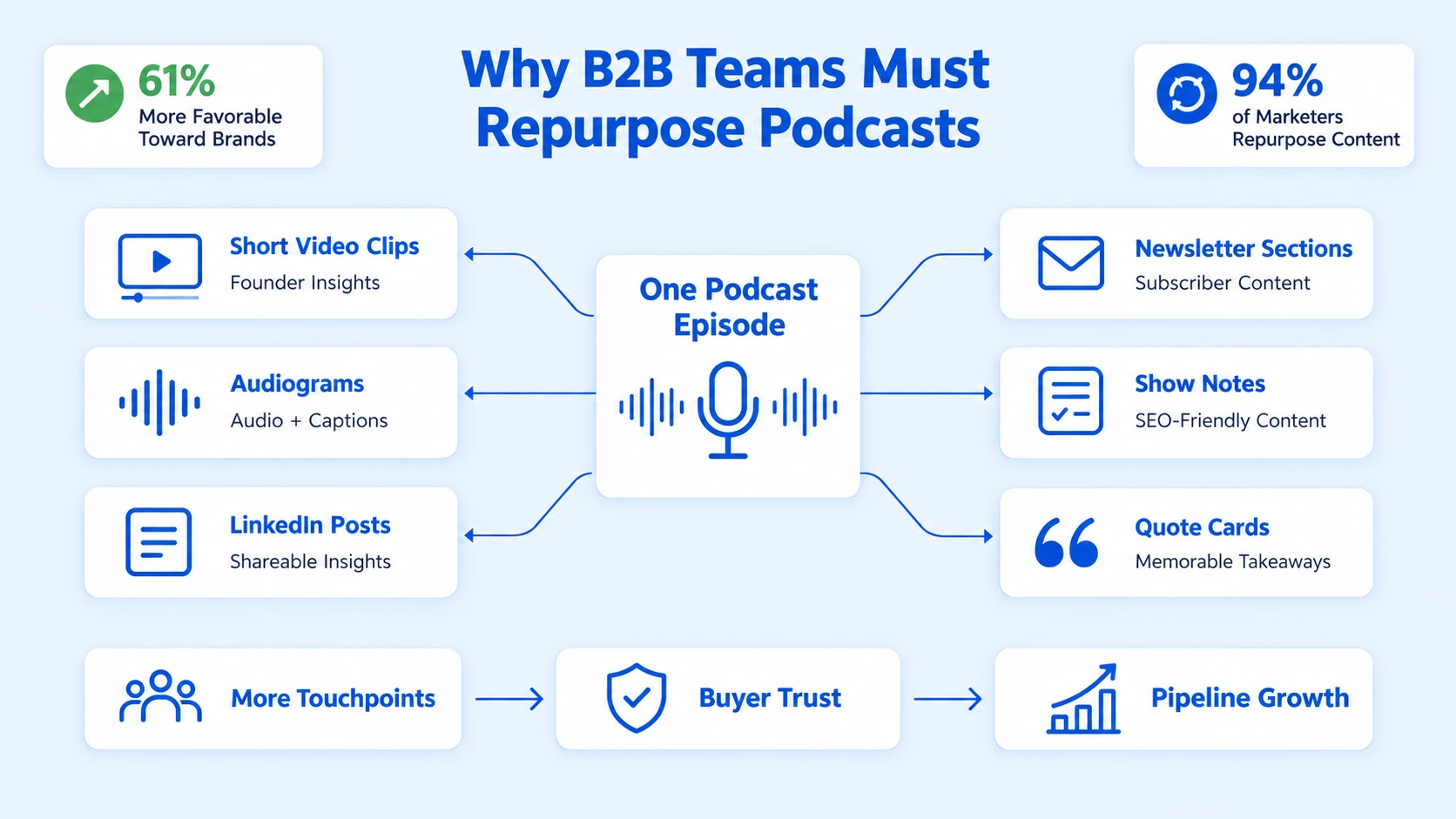
The opportunity cost is significant. 58% of Americans are now monthly podcast consumers, an all-time high, and Americans are spending an average of seven hours a week with their favorite shows. Your buyers are already in the habit. The question is whether your content meets them on the platforms they use every day.
This is where content atomisation comes in. Gary Vaynerchuk popularized the concept of treating one long-form piece as pillar content and slicing it into micro-content. The podcast episode is your pillar. Everything else, the audiogram, the clip, the show notes, the newsletter section, the LinkedIn post, is a derivative asset. Content repurposing is a powerful strategy that extends reach across different platforms, and 94% of marketers repurpose their content.
For B2B SaaS and funded AI teams specifically, the stakes are higher. Buyers need to trust the product, trust the founder, and trust that the team understands their problem. Podcast-derived content does all three. A 60-second clip of your founder explaining your core insight builds more credibility than a feature comparison page. A short video breaking down a guest's framework gets shared in Slack channels your paid ads will never reach. This is what founder-led growth actually looks like at scale, and it starts with knowing how to repurpose podcast content systematically.
How to Convert Podcast Audio into Written Content Step by Step
This is the foundation. Every text-based asset, blog post, show notes, newsletter, LinkedIn thread, depends on an accurate transcript. Here's the exact process:
- Upload your audio or video file to a transcription tool: Descript and Otter.ai are the two most-used options. Descript gives you an editable text-based editor alongside the transcript; Otter.ai is faster for raw transcripts at scale. For high-accuracy transcription, Descript is the better pick for B2B teams.
- Clean the transcript: Remove filler words, false starts, and crosstalk. Aim for a readable document, not a verbatim record. This takes 20–30 minutes for a 45-minute episode.
- Identify three to five core themes: Read the cleaned transcript and highlight distinct argument clusters, a framework the guest introduced, a market insight, a counterintuitive take. Each theme is a separate asset.
- Write show notes from the cleaned transcript: Good show notes include a two-paragraph episode summary, a bulleted list of key takeaways, timestamps, and a CTA. These serve both reader experience and SEO.
- Expand one theme into a blog post: Take the strongest argument from the episode and build it into a standalone 800–1,200 word piece. Add context, supporting data, and a clear structure. This is evergreen content that will drive search traffic for months.
- Pull quote blocks for social: Extract two to four direct quotes from the transcript, specific, opinionated, or counterintuitive statements work best. These become standalone LinkedIn posts, X threads, or audiogram text overlays.
The transcript is not the end product. It is the raw material. Every minute spent cleaning it pays dividends across six to eight derivative assets. Our podcast transcription service handles this step for teams who want to hand it off entirely.
How to Make Short Video Clips from Podcast Recordings
This is where B2B repurposing generates the most pipeline-relevant reach. According to HubSpot's 2026 State of Marketing data, short-form video ranks as the #1 highest-ROI content format, with 49% of marketers citing it as their top-performing channel. For B2B SaaS teams, that number is not abstract. A 60–90 second clip of a founder explaining a pain point their product solves will outperform a product page in a LinkedIn feed. Here's how to extract those clips well:
- Scan the transcript for "clip-worthy" moments: Look for a clear point made in under 90 seconds, a bold claim, a counterintuitive stat, a defined framework. If it needs setup to make sense, it's not a standalone clip.
- Export the segment from Descript or your editing tool: Cut tight. Remove silence gaps, filler words, and any lead-in that doesn't add context.
- Format for vertical (9:16) and square (1:1): Vertical video (9:16 aspect ratio) is the dominant format, built for mobile viewing. Square works for LinkedIn. Deliver both.
- Add captions: Non-negotiable. 80% of LinkedIn videos are watched without sound. Burn-in captions using Descript's caption tool or your video editing service.
- Add a visual hook in the first three seconds: A text overlay of the key claim, a bold stat, or a question. This determines whether the clip stops the scroll.
- Distribute to YouTube Shorts, LinkedIn, and Instagram Reels: 88% of podcast-intent users who repurpose clips include YouTube in their distribution, far ahead of Instagram (23%) and TikTok (14%).
Each episode should generate three to five clips. That is three to five separate pieces of content from a single recording session. This is what a real content repurposing strategy looks like in practice.
Best Ways to Repurpose Podcast Episodes into Blog Posts and Newsletters
A cleaned transcript is an unstructured blog post waiting to be shaped. The mistake most teams make is treating the transcript as a first draft. It isn't. It's source material.
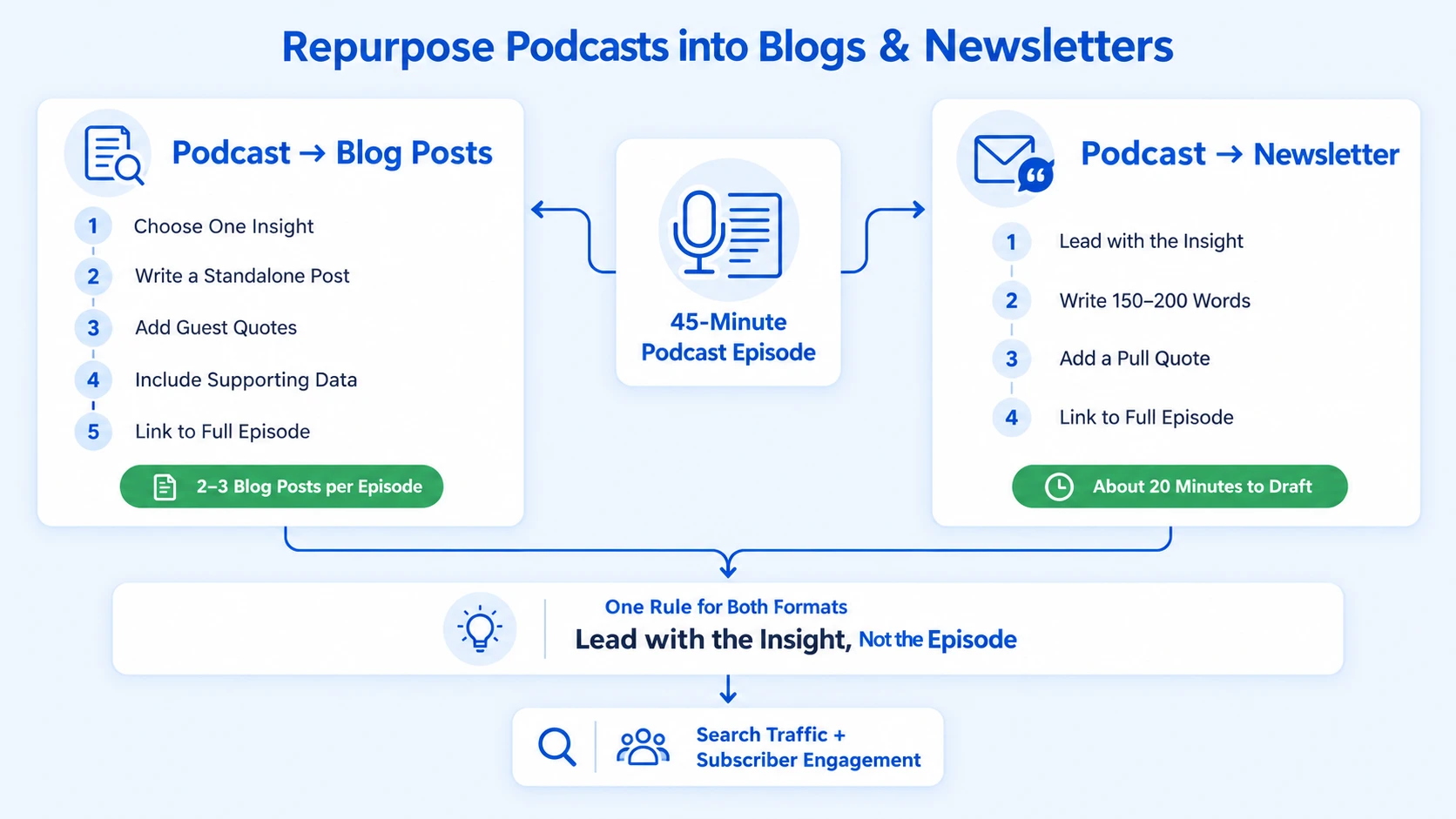
Turning an episode into a blog post:
- Pick one specific argument or framework from the episode, not the whole episode.
- Write the post as a standalone piece a reader could understand without having listened.
- Use the guest's exact language where it is quotable and specific.
- Add one or two supporting data points from current sources to give the piece credibility.
- Include a link to the full episode for readers who want more depth.
The result is a piece of evergreen content with genuine search potential. One 45-minute interview can produce two or three distinct posts, each targeting a different search query and each driving traffic back to the podcast feed.
Turning an episode into a newsletter section:
Newsletters are the most underused output in podcast repurposing. A 150–200 word summary of the episode's sharpest insight, with a pull quote and a link to the full episode, takes 20 minutes to write and gives your subscriber list a reason to stay engaged between episodes. For B2B teams using newsletter marketing as part of a sales enablement flow, this creates a direct path from content consumption to conversation. See how Komet Media supports podcast marketing as part of a broader distribution strategy.
The key rule for both: lead with the insight, not the episode. Nobody opens a newsletter to hear "we dropped a new episode." They open it because the subject line promised them something useful.
Tools for Repurposing Podcast Content in 2026
The right stack removes friction from every step of the repurposing workflow. AI has changed how podcasts are made, with tools for voice editing, transcription, and content repurposing now standard.
For teams that want automation, Castmagic and Opus Clip handle the heaviest lifting: Castmagic generates show notes, social captions, and email copy from your transcript; Opus Clip identifies the best moments for short-form video and formats them automatically.
A practical note on AI tools: use them to generate drafts and first cuts, not final deliverables. Every asset going out under your brand should pass a human edit. AI will catch the moments; it will not add the strategic framing that makes a clip relevant to your specific buyers.
For teams that want a fully managed repurposing system, from raw recording to published clips and posts, Komet Media's video editing and content repurposing service is built exactly for this workflow.
Building a Content Calendar for Multi-Platform Podcast Distribution
Knowing how to repurpose podcast content is only half the system. The other half is a content calendar that turns repurposing from a reactive scramble into a predictable, compounding engine. Here's a proven distribution timeline for a single episode:
- Day 1 (launch day): Publish the full episode to all podcast directories. Post one short-form video clip on LinkedIn and YouTube Shorts. Send the newsletter section to your subscriber list.
- Day 2–3: Publish the SEO blog post derived from the episode's primary theme. Share a quote card or audiogram on LinkedIn and Instagram.
- Day 4–5: Post a second short-form clip, a different moment from the same episode, on LinkedIn and YouTube Shorts. Add internal links from the blog post to relevant service pages.
- Day 7: Publish a second blog post on a different theme from the episode. Drop a text-only LinkedIn post framing the episode's core argument.
- Days 14 and 21: Recycle the best-performing clip with a fresh caption. Reference the episode in an existing pillar content piece where the topic is relevant.
One episode, published once, becomes 10–12 touchpoints over three weeks. For a team publishing weekly, this creates a dense, always-on content presence built entirely from existing intellectual property. The most efficient strategy involves repurposing one piece of long-form content into multiple short video assets for different channels.
The content calendar also creates accountability. When every team member knows that Thursday is clip day and Monday is newsletter day, repurposing stops being optional and becomes operational. That discipline is what separates teams that consistently appear in their buyers' feeds from teams that post sporadically and wonder why inbound is flat.
Conclusion
Knowing how to repurpose podcast content is the highest-leverage content investment a B2B SaaS or funded team can make. One episode, properly atomised, produces assets that educate buyers, build founder credibility, support sales conversations, and drive inbound, for weeks after publication.
Key takeaways:
- Transcription is the foundation; every asset flows from a clean, structured transcript.
- Short-form video clips are your highest-ROI output for LinkedIn, YouTube Shorts, and Instagram Reels.
- Blog posts and newsletters extend episode reach into search and direct channels.
- A repeatable content calendar turns repurposing from a task into a system.
If you want this running without building it yourself, talk to the Komet Media team.
Frequently Asked Questions
Q1: How many assets can I get from one podcast episode?
A single 45-minute episode can realistically produce 10–15 assets: three to five short video clips, one to two blog posts, one newsletter section, three to five social quote cards or audiograms, and a structured show notes page. The exact number depends on how content-dense the episode is.
Q2: What is the best tool to automatically repurpose podcast content in 2026?
Castmagic and Opus Clip are the leading AI tools for automated repurposing. Castmagic generates text assets (show notes, social captions, email copy) from your transcript. Opus Clip identifies and formats the strongest video moments. Use both as first-draft generators, then apply a human edit before publishing.
Q3: Do I need video recordings to create short-form clips from a podcast?
Not necessarily, but video recordings produce significantly more versatile clips. If you only have audio, you can create audiograms (static or animated visuals with the audio waveform). If you have video, you can produce true short-form clips for YouTube Shorts, LinkedIn, and Instagram Reels, the formats with the highest engagement in B2B feeds.
Q4: How long does it take to repurpose one episode?
With a good tool stack, a skilled editor can turn one episode into a full asset set in three to five hours. That includes transcription cleanup, blog drafting, clip selection and editing, and caption and graphic creation. Teams using managed services like Komet Media's podcast editing workflow can reduce this to near-zero internal time.
Q5: Can I repurpose old podcast episodes to drive new traffic?
Yes, and this is one of the highest-ROI moves for any team sitting on a back catalog. Older episodes that covered evergreen topics, frameworks, buyer pain points, product philosophy, are often more relevant today than when they were recorded. Treat them as new content with fresh social captions, updated blog posts, and newly edited clips.
Q6: What makes podcast repurposing different for B2B versus B2C teams?
In B2B, repurposed content serves two audiences simultaneously: external buyers and internal sales teams. A clip that educates a buyer can also become a sales enablement asset your reps share in outreach. Blog posts built from episode transcripts support SEO and feed into demand generation. The goal is not just reach, it is pipeline contribution at every stage of the funnel.

