
Repurpose a Podcast into Quote Cards and Carousels: Step-by-Step Guide
Most podcast episodes never reach half your potential audience. The people most likely to buy from you are scrolling LinkedIn during a 10-minute break, not queuing up a 45-minute episode. Learning to repurpose a podcast into quote cards and carousels is how you close that gap. This guide walks you through the exact workflow we use at Komet Media to turn a single episode into a week of high-performance visual content that educates buyers, builds founder authority, and feeds the pipeline.
TL;DR
- Transcribe first, then scan for pull quotes that are surprising, counterintuitive, or immediately actionable.
- Use Descript or Riverside.fm for transcription, and Canva or Adobe Express for design.
- Build a locked brand template so every asset looks consistent without starting from scratch.
- Batch your entire episode in one session: quote cards, carousel slides, and audiograms together.
Why LinkedIn Carousels and Quote Cards Are Your Highest-ROI Podcast Assets
Before touching any tool, understand why this format deserves your attention. Multi-image carousels currently achieve an average engagement rate of 6.60% on LinkedIn, establishing them as the highest-performing content format on the platform. Compare that to what most SaaS founders are posting.
Carousels generate 278% more engagement than video posts and outperform text-only content by 596%. The reason is mechanical. LinkedIn's algorithm prioritizes content that increases user dwell time and generates meaningful engagement. Carousels naturally excel in both areas by encouraging users to spend more time viewing content and providing multiple touchpoints for interaction. The algorithm also values "knowledge and advice" content, making educational carousels particularly effective for organic reach.
For B2B teams, the "save" metric matters most. According to research from Socialinsider (2025), carousels are the most saved post type on LinkedIn. Saves are a high-intent metric that tells LinkedIn your content is worth revisiting. For B2B brands, a "save" is often a precursor to a lead. Quote cards work differently but complement the same strategy. Quote graphics are static images with a memorable quote overlaid in bold, readable text. They are best for quick consumption on LinkedIn or X, and can be easily adapted to carousels on Instagram, focusing primarily on intellectual takeaways.
Gary Vaynerchuk popularized the idea of treating every long-form piece as a content atom. A single 45-minute episode contains enough raw material for quote cards, carousel slides, audiograms, and short-form video clips, all from one recording. The question is execution. When you repurpose a podcast into quote cards and carousels systematically, you stop producing one-off posts and start running a content distribution machine.
One episode. One week of LinkedIn content. Zero new recording time. The teams that do this consistently win on visibility because they show up where buyers already scroll, in the format the algorithm rewards most.
How to Extract the Best Quotes from a Long Podcast Episode
The quality of your visual assets depends entirely on the quality of the pull quotes you select. Not every minute of a podcast episode is worth repurposing. Use clear criteria to identify high-value segments. If someone would screenshot a quote from the transcript and share it, that moment is worth repurposing. Look for lines that are surprising, counterintuitive, or actionable. Guest soundbites that challenge conventional wisdom are particularly shareable.
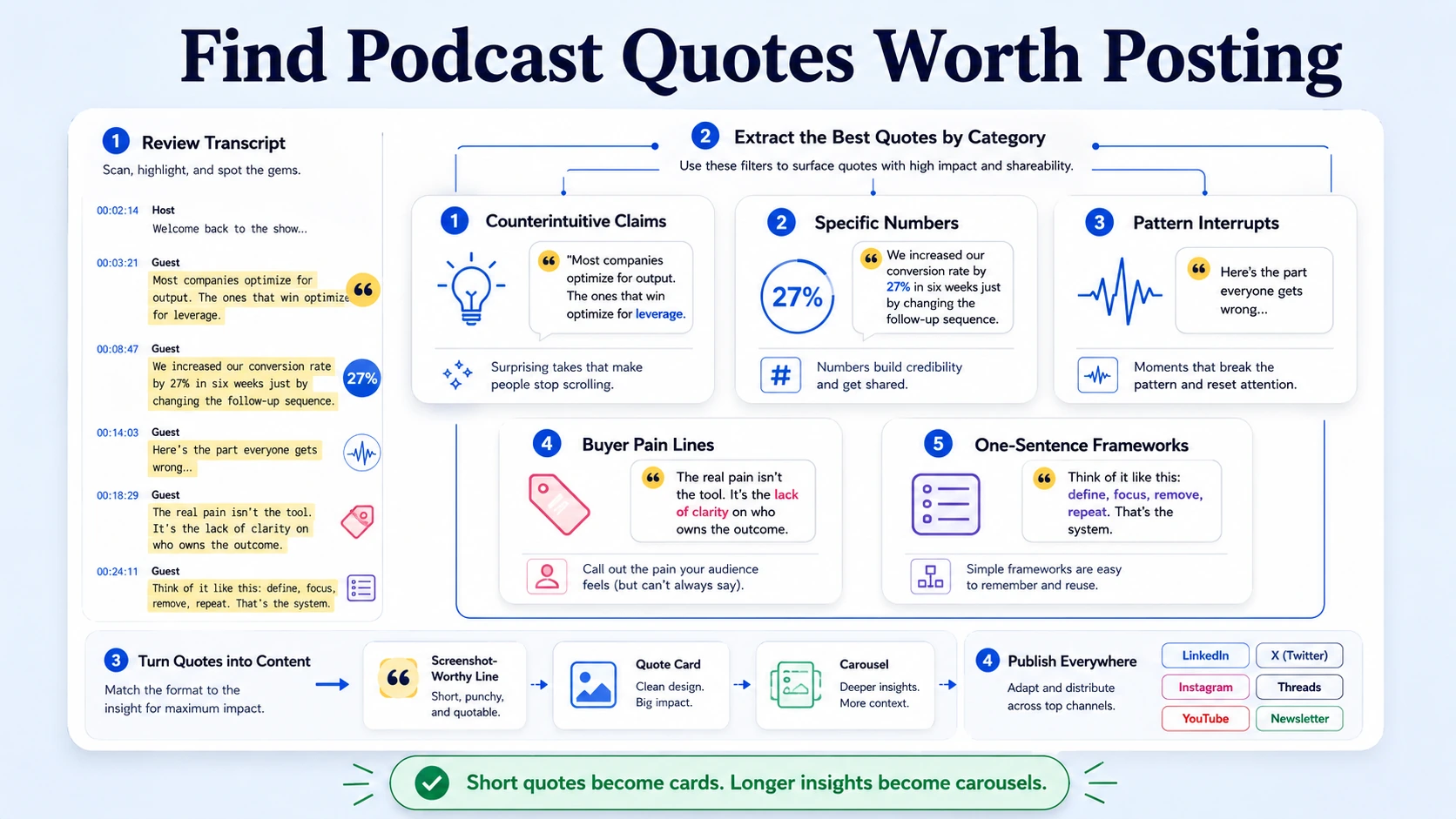
Here is the scanning framework I use at Komet Media when reviewing a transcript for visual assets:
- Counterintuitive claims: Any statement that contradicts common advice in your space.
- Specific numbers or results: Percentages, timeframes, and named outcomes make quotes credible and shareable.
- Pattern interrupts: Moments where the speaker's energy or phrasing noticeably shifts.
- Buyer-relevant pain: Lines that name the exact frustration your ICP feels right now.
- One-sentence frameworks: Any idea that can be expressed as a clean "X is Y" or "Stop doing X, start doing Y."
Three to five static images per episode featuring the guest's most memorable lines tend to work well. They serve as scroll-stopping assets with near-zero production cost using Canva templates. Once you have your shortlist, sort quotes by format fit. Short, punchy lines (under 20 words) go on standalone quote cards. Longer multi-part insights with a logical sequence become carousel slides, where each slide extends the idea. A quote that starts a story but needs context becomes the hook slide of a carousel with the payoff on slide 3 or 4.
Tag each quote with a destination: LinkedIn quote card, Instagram carousel slide, audiogram caption, or sales enablement one-pager. This tagging step takes five minutes and saves 30 minutes of indecision at the design stage. You can also extract key statistics, client quotes, or frameworks from the episode and package them into one-pagers, talk tracks, or slide deck content for the sales team , which doubles your quote card production ROI.
Best Tools to Transcribe a Podcast and Pull Out Key Moments
Transcription is the foundation of this workflow. No transcript means manual scrubbing through audio, slow, inconsistent, and unscalable.
Riverside.fm provides remote audio/video recording with local capturing, separate tracks, cloud backup, AI transcription, text-based editing, Magic Clips creation, teleprompter, noise cleanup, multi-track editing, branding, and live streaming, all within one platform.
For teams that already record on Riverside, Riverside FM's AI scans the transcript and identifies key moments or highlights based on keywords, sentiment analysis, and speaker energy levels. These moments are marked on the video transcript as suggested clips. Users can review the suggestions, modify the start and end points, and select which ones they want to turn into clips.
For editing existing recordings, Descript's transcription is highly accurate and fully editable (currently rated 9.0 by G2 user reviews). You can correct any mistakes in the transcript, which automatically fixes the corresponding audio.
Our podcast transcription service handles this step for teams that want clean, timestamped transcripts without touching a tool. Once you have a formatted transcript, the quote identification process above takes under 20 minutes per episode.
Step-by-Step: How to Repurpose a Podcast into Quote Cards and Carousels
This is the exact production sequence we run at Komet Media.
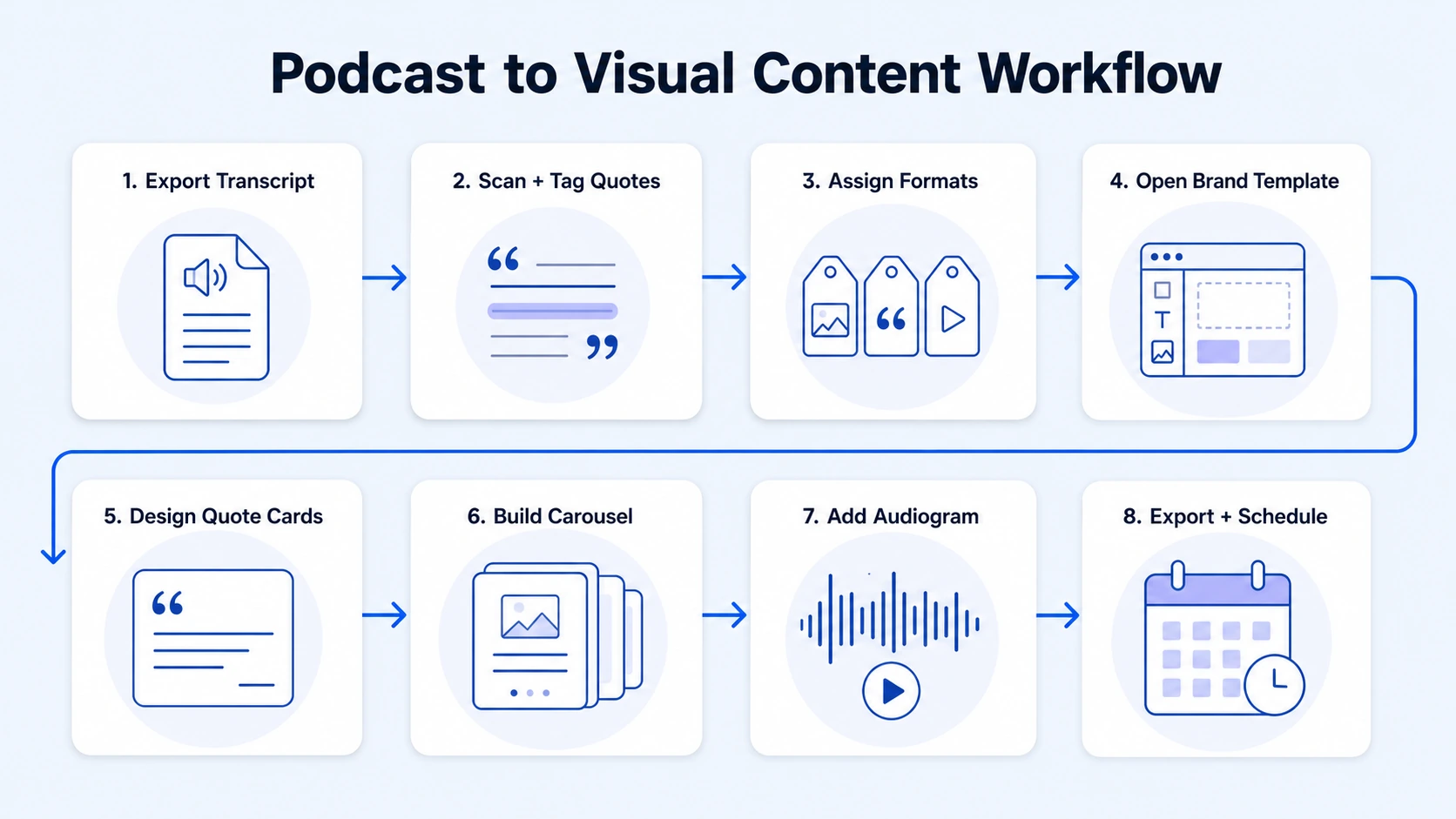
- Export your transcript: From Riverside.fm, Descript, or our podcast editing workflow, always export with speaker labels and timestamps.
- Scan and tag quotes: Use the criteria from Section 2 above. Highlight 8–12 candidates, then cut to 5–7 final selections.
- Assign formats: Sort each quote as a standalone card, carousel hook, interior slide, or audiogram caption.
- Open your brand template in Canva: If you do not have one, create a master template with your brand colors, locked fonts, and logo placement. Pull the most memorable, insightful, or provocative quotes from each episode and design branded quote cards. Use your podcast's brand colors and fonts for instant recognition.
- Design quote cards first: One quote per card. Keep it under 20 words on screen. Use high contrast between text and background.
- Build the carousel: Lead with a hook slide that states the episode's single biggest insight as a provocative question or bold claim. Slides 2–6 expand on the idea, one point per slide. Posts with 5 to 10 slides see the highest median engagement rates. Close with a CTA slide.
- Add your audiogram: Use Headliner's free tier to pair the best 30–60 second audio clip with an animated waveform and the speaker's quote as a subtitle.
- Export and schedule: Download all assets in a single batch. Schedule across LinkedIn and Instagram in the same session.
When atomizing a podcast or webinar, use timestamps to identify the most impactful 30–60 second clips. These can be turned into audiograms for audio-focused platforms or short video reels for channels like LinkedIn, YouTube Shorts, and TikTok.
How to Design Branded Quote Cards and Carousel Slides in Canva
Canva is the right tool for most B2B teams because it combines speed with brand control. Whether you're working on a digital marketing campaign or want to share insights online, Canva makes it easy to create stunning quote graphics. With thousands of free, customizable, and designer-made templates, you can create quote graphics to match your brand aesthetic.
The mistake most teams make is starting from a blank template every session. Build one locked master template and duplicate it for every episode. Here is what that template should include:
- Locked brand elements: Logo position, brand colors as the default palette, primary and secondary fonts set and not changeable by non-designers.
- Quote text zone: A defined text box with max character count visible, ideally 100–140 characters for readability on mobile.
- Speaker attribution layer: Name, title, and episode number below the quote in a smaller, lighter font.
- Background system: Two or three approved background variants (solid brand color, subtle texture, and speaker headshot with overlay) so every card looks related without being identical.
For carousels, design slide 1 (hook), slide 2–5 (content), and slide 6 (CTA) as separate pages in the same Canva file. Use the same color logic across all slides.
Use each slide to highlight a takeaway, quote, or actionable tip for the audience. End the carousel with a call to action, such as "Listen to the full episode here" and provide a link in the comments.
Adobe Express is a viable alternative if your team is already in the Adobe ecosystem. Its Brand Kit feature locks colors, fonts, and logos at the account level, preventing off-brand outputs from junior team members.
Visual storytelling in B2B is not decoration, it is clarity. A well-designed quote card communicates expertise faster than a paragraph of copy. Consistent brand design across your quote cards and carousels builds the visual recognition that makes thought leadership compound over time. Our short-form video editing service follows the same brand consistency principle for motion content.
Content Distribution: Where and How to Post Your Podcast Quote Cards and Carousels
Production without distribution is a waste. Here is the platform-specific posting strategy for each asset type.
LinkedIn (primary channel for B2B SaaS): Post your carousel as a native document upload (PDF), not as an image slideshow. Native document carousels receive algorithm preference for dwell time. A five-page PDF carousel titled "5 Lessons from [Guest] on [Topic]" consistently outperforms native video on LinkedIn. The format works because 66% of LinkedIn's audience consumes content on mobile, where video quality degrades and captions often fail to display. Carousels let buyers consume at their own pace, without an external click.
Instagram (secondary visual channel): Post quote cards as single-image posts and carousels as multi-image posts via the Instagram Carousel format. Carousel posts on Instagram encourage users to swipe through the slides. This interactive element increases engagement and allows users to control their experience, giving them the opportunity to digest each piece of information at their own pace.
Caption strategy for both platforms: Don't just post clips, create context. When sharing an audiogram or quote card, write a caption that elaborates on the point, asks a question to encourage engagement, and tags any guests or companies mentioned. This transforms a simple asset into a conversation starter.
Batching and sequencing: From one episode, aim for this weekly content sequence:
- Monday: Carousel (5–7 slides summarizing the episode's core framework)
- Wednesday: Quote card #1 (most provocative pull quote)
- Friday: Quote card #2 + audiogram
This gives you three LinkedIn posts per episode with zero new content creation. Visit our podcast marketing service page to see how we build this into a full distribution system for B2B teams.
The teams that batch and schedule in one session publish 3x more consistently than those who design post-by-post.
Conclusion
Here is what matters when you repurpose a podcast into quote cards and carousels for B2B growth:
- Transcribe first: No clean transcript means no scalable quote extraction. Use Descript or Riverside.fm.
- Quote selection is the real work: Prioritize counterintuitive, specific, and buyer-relevant lines over generic insights.
- Lock your brand template: One Canva master file eliminates design inconsistency across every episode.
- Distribute with intent: LinkedIn carousels as native PDFs, quote cards as single images, audiograms for Instagram and X, each format mapped to the right platform.
One episode, executed well, drives visibility for weeks. That is what content atomization actually looks like in practice.
Frequently Asked Questions
Q1: How many quote cards should I create from one podcast episode?
Aim for 3–5 quote cards per episode. Fewer than three leaves potential content on the table; more than five starts diluting your best material. Focus on lines that are specific, counterintuitive, or directly relevant to a buyer's pain point.
Q2: Can I use Canva to make podcast quote cards without design experience?
Yes. You do not need to be a designer, Canva offers podcast-friendly templates that require no technical design skill. Start with a template in your brand colors, lock the layout, and swap in your quote text. The design work for a single quote card takes under five minutes once your master template is set.
Q3: What is the ideal slide count for a podcast carousel on LinkedIn?
Posts with 5 to 10 slides see the highest median engagement rates on LinkedIn. For a podcast recap carousel, 6–8 slides tends to be the sweet spot: one hook slide, four to five content slides, and one CTA slide. Fewer than five feel thin; more than ten loses most mobile readers.
Q4: How do I transcribe a podcast episode quickly?
Riverside.fm provides AI transcription, text-based editing, and Magic Clips creation within one platform, making it the fastest option if you recorded there. For existing audio files, upload to Descript and receive a timestamped, speaker-labeled transcript in minutes. Our podcast transcription service handles this for teams that want it done for them.
Q5: What makes a podcast quote worth turning into a visual card?
If someone would screenshot a quote from the transcript and share it, that moment is worth repurposing. Look for lines that are surprising, counterintuitive, or immediately actionable. Avoid generic statements, "great communication is important" has no visual impact. Specific claims, named results, and bold contrarian takes do.
Q6: How is repurposing a podcast into carousels different from just posting a clip?
A clip asks the viewer to watch and listen. A carousel or quote card asks them to read and swipe, lower friction, higher save rate, and better algorithm performance for text-heavy professional platforms like LinkedIn. You can pull standout quotes or key insights from your episode transcript and turn them into text posts or carousel slides. This format reaches people who prefer reading over watching and adds variety to your content mix. Both formats belong in your distribution stack, they serve different consumption habits.

