
Turning a Talking-Head Clip into a Carousel: Step-by-Step Guide
Turning a Talking-Head Clip into a Carousel: Step-by-Step Guide
Most B2B SaaS, AI, and tech startups & teams record a great founder explanation, a product walkthrough, or a webinar session, and then let it sit in a Google Drive folder. This guide on turning a talking-head clip into a carousel fixes that. I'm Rajan Soni, Founder at Komet Media, and this is the exact workflow we use to produce video content from scratch or convert existing video into a swipeable post that educates buyers, builds authority, and drives pipeline on LinkedIn and Instagram.
TL;DR
- Transcribe your video, extract the sharpest ideas, and map them to slides before touching any design tool.
- Use Descript or Repurpose.io for transcription and caption extraction, then Canva or Adobe Express for slide design.
- Document carousels average 7.00% engagement on LinkedIn, roughly 35% above the platform baseline, and that gap widened 14% year-over-year.
- Whether creating videos from scratch or starting with a single 10-minute talking-head recording, this system yields 2 to 3 complete carousels.
How to Turn a Talking-Head Video into a Carousel Post
The core process has six stages. Move through them in order and you will not waste time backtracking.
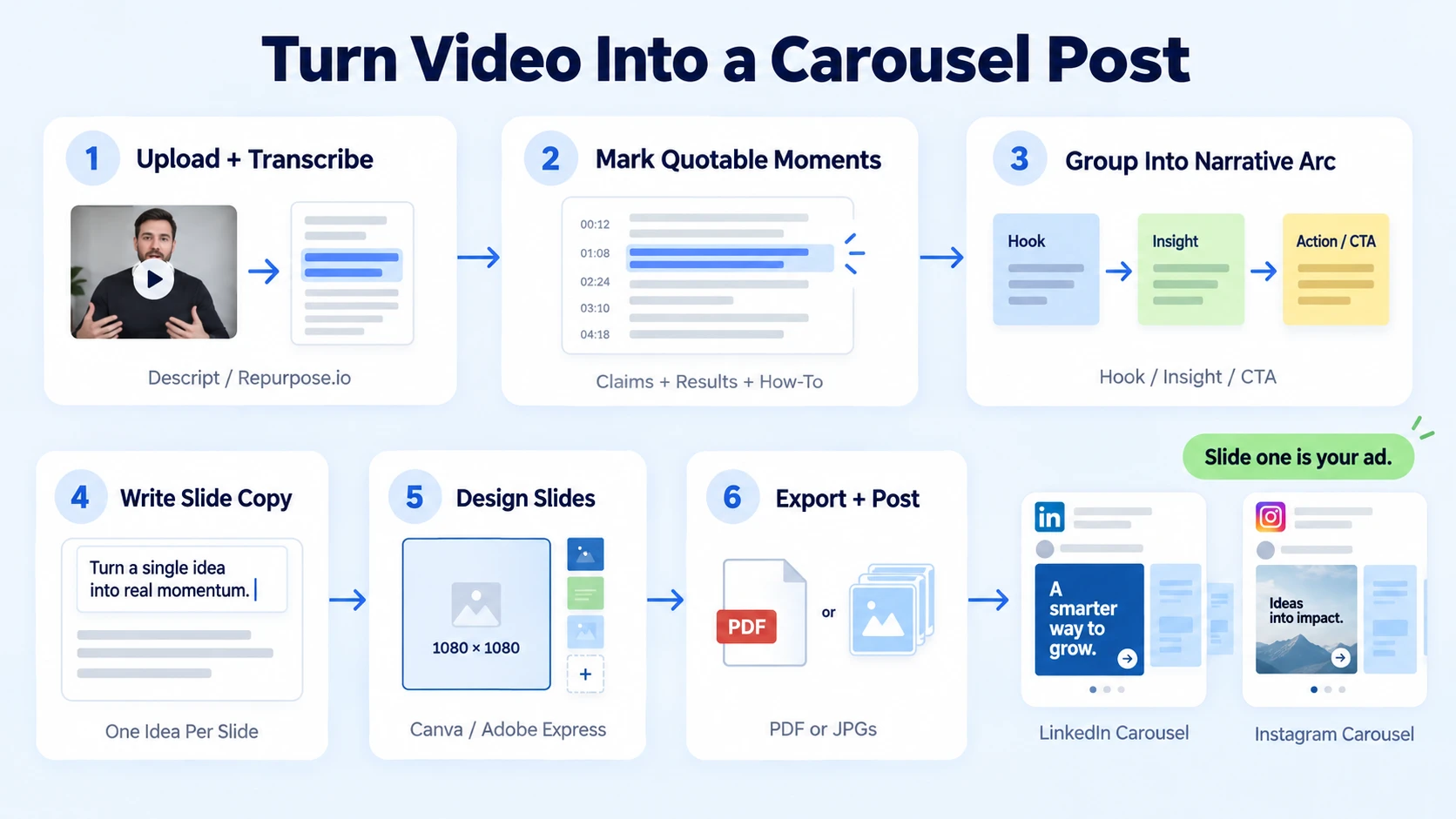
- Upload and transcribe: Drop your video into Descript or Repurpose.io. Both generate a word-for-word transcript automatically. Repurpose.io transforms one master video into 20+ formatted pieces across social platforms without manual intervention, so it is useful if you are running this at volume. For single-video workflows, Descript's transcript editor is faster to navigate.
- Highlight the quotable moments: Read the transcript and mark any sentence that is a strong standalone claim, a counter-intuitive insight, a specific result, or a clear how-to instruction. These are your candidate slides.
- Group the highlights into a narrative arc: A strong LinkedIn carousel or Instagram carousel needs a beginning (the hook or problem), a middle (the insight or process), and an end (the result or CTA). Aim for 6 to 10 slides. Posts with 5 to 10 slides see the highest median engagement rates, and depth of content correlates directly with how much the algorithm trusts your profile.
- Write slide copy from the transcript: Each slide should carry one idea only. Pull the exact language from the speaker where possible, because the original phrasing is almost always tighter than a paraphrase. Cut anything that needs a second sentence to make sense.
- Design in Canva or Adobe Express: Use a branded slide template at 1080×1080px for Instagram or 1920×1080px for LinkedIn. Lock your font, color, and logo in the Brand Kit so every slide is consistent. Canva's Brand Kit lets you match every version of the design using colors, fonts, and logos.
- Export and post: Export as a PDF for a native LinkedIn carousel (document post), or as individual JPGs for an Instagram carousel. Add your hook copy in the post caption and a clear CTA on the final slide.
Rule: Slide one is your ad. If it does not stop the scroll, the rest of the carousel does not exist.
Talking-Head Clip to Carousel: Why the Format Wins for B2B
The format is not a nice-to-have for B2B SaaS, AI, and tech startups & teams. It is a pipeline tool. Carousels generate 596% more engagement than text-only posts and 278% more than native video on LinkedIn. That stat alone justifies the workflow. But the mechanism behind it matters more than the number.
In 2026, the LinkedIn algorithm prioritizes "dwell time" above almost every other metric. When a user stops to click through a carousel, they signal to the platform that your content is high-value, prompting the system to show it to a wider audience.
For B2B SaaS, AI, and tech startups & teams, that dwell time has a direct commercial function. A buyer who swipes through your 8-slide breakdown of a workflow problem is not passively consuming content. They are self-qualifying. Each slide they read is a micro-commitment. By the time they hit your CTA slide, they have already spent 45 to 90 seconds with your thinking.
This is exactly why Gary Vaynerchuk's content atomisation framework put carousels at the centre of B2B social strategy. A single talking-head recording is a content pillar. The carousel is one of the most efficient derivatives you can extract from it, because the conversion from transcript to slide copy is direct, and the visual storytelling layer is minimal compared to a short-form video edit.
According to Socialinsider research, carousels are the most saved post type on LinkedIn. Saves are a high-intent metric that tells the platform your content is worth revisiting. For B2B brands, a save is often a precursor to a lead. Founder-led content in carousel form also builds personal branding at a rate that company page posts cannot match, because individual creators still hold a distribution advantage on LinkedIn.
How to Repurpose a Video into a LinkedIn Carousel (Format and Specs)
LinkedIn treats uploaded PDFs as document posts, and document posts are functionally carousels. Getting the specs right determines whether your design looks sharp or blurry in-feed.
A few non-negotiable rules for LinkedIn carousel design in 2026:
- Slide 1 is your cover: Include the core promise, not a logo-only title card. Treat it like an ad creative.
- Slide 2 frames the problem: Buyers need to see themselves in it before they care about your solution.
- Every slide = one idea: If a slide needs two sentences to make sense, split it into two slides.
- Final slide = CTA: Tell them exactly what to do: "Save this," "Comment your question," or "Book a call at [URL]."
- Consistent visual rhythm: Use the same layout grid across all slides. Inconsistency reads as low production quality and signals low trust.
For thought leadership content from a founder, the square format (1080×1080px) works on both platforms and cuts design time in half.
What App Converts Video to Carousel Slides Automatically?
No single tool handles the full pipeline from raw video to a publish-ready carousel, but three tools cover most of it when combined:
Descript leads for transcript-based editing, while Veed.io and Kapwing provide template-rich workflows with more creative flexibility.
The practical workflow: use Descript to pull the transcript and clean the captions, paste the key points into a Canva slide deck built on your brand template, export as PDF, and post directly to LinkedIn as a document post.
A content repurposing tool helps you turn one asset into many formats without rebuilding everything from scratch. Repurposing can save 60 to 80% of creation time, increase total output by 40%, and reduce production costs by up to 65% when AI is used.
For teams running short-form video editing at scale, pairing Repurpose.io with a dedicated design template library cuts the per-carousel production time significantly.
Talking-Head Video to Carousel Workflow for Social Media Teams
If you are doing this once, the manual steps above work fine. If you are doing this weekly across multiple founders or executives, you need a repeatable system, not just a process.
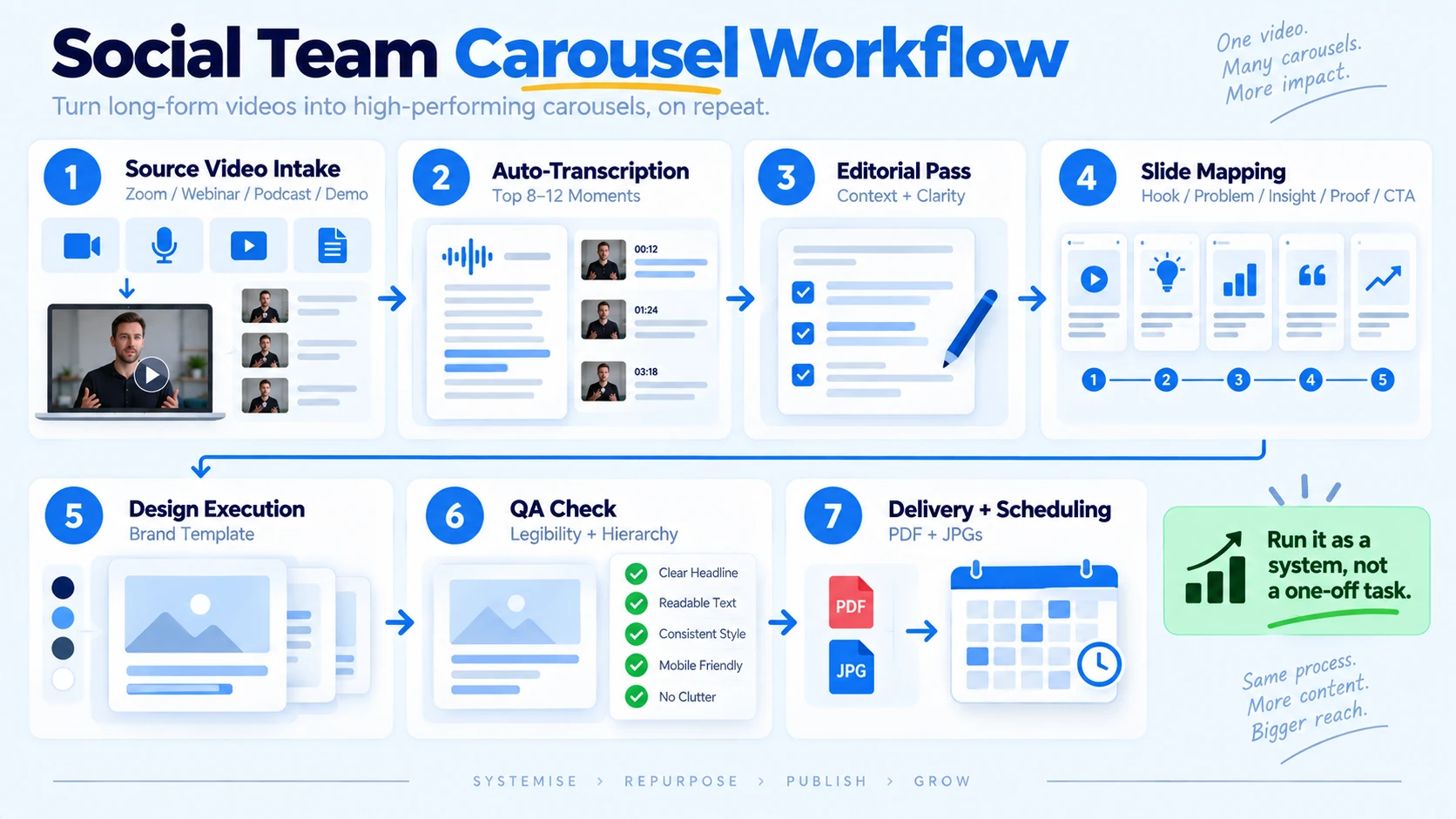
Here is the production workflow we run at Komet Media for B2B SaaS, AI, and tech startups & teams:
- Source video intake or creation from scratch: Receive raw talking-head recordings (Zoom calls, webinar replays, podcast clips, or recorded demos) or collaborate with Komet Media to script and record brand-new video assets from scratch. Minimum usable length: 3 minutes.
- Auto-transcription: Run through Descript. Flag the top 8 to 12 quote-worthy moments using the highlight function.
- Editorial pass: A human editor (not AI alone) reviews the flagged moments, checks for context gaps, and rewrites any slide copy that reads as jargon.
- Slide mapping: Assign each flagged moment to a slide position in the narrative arc: hook (1), problem (2–3), insight (4–7), proof (8), CTA (9–10).
- Design execution: Drop copy into the brand template in Canva. One template per client, locked to their brand kit.
- QA check: Review every slide at 100% zoom for font legibility, hierarchy clarity, and brand compliance.
- Delivery and scheduling: Export PDF for LinkedIn, JPGs for Instagram. Schedule via Buffer or LinkedIn's native scheduler.
This system converts one raw video into a complete carousel in under 90 minutes for an experienced operator. At scale, a single video editing services team can run 15 to 20 carousels per month from existing video libraries.
Sales-led teams benefit most from this workflow because each carousel can map directly to a sales stage: awareness (problem slides), consideration (comparison or how-to slides), and decision (proof and CTA slides). That is sales enablement built into the content format itself.
How to Extract Key Points from a Video and Make a Carousel That Converts
Extraction is where most teams fail. They pull quotes that sound interesting but do not structure them for buyer psychology. Here is the extraction framework I use:
The 5-Point Filter: Before a quote makes it onto a slide, it must pass at least two of these tests:
- Does it name a specific problem a buyer recognises?
- Does it challenge a common assumption in the buyer's industry?
- Does it show a result, number, or outcome?
- Does it teach a single actionable step?
- Does it create a knowledge gap that the next slide fills?
Once you have 7 to 10 points that pass the filter, structure them using the "Problem, Agitate, Solve" arc. Slide 1 names the problem. Slides 2 and 3 make the cost of inaction vivid. Slides 4 through 7 deliver the insight or process. Slides 8 and 9 show proof or outcome. Slide 10 closes with a CTA.
The hook slide deserves its own attention. For a LinkedIn carousel, the cover text should be provocative enough to earn a click but clear enough to set accurate expectations. Vague hooks generate swipes from the wrong audience. Sharp, specific hooks attract buyers who already feel the problem.
For video marketing teams working with founders, the best hooks come directly from the transcript. Founders speak in direct, unfiltered language that sounds nothing like polished marketing copy, and that is exactly why it performs. Find the moment in the recording where the founder says something a buyer would screenshot and send to a colleague. That is your cover slide. Text posts are what people say they want to see, but carousels are what they actually swipe through and act on. Build your hook for the behaviour, not the stated preference.
Conclusion
Turning a talking-head clip into a carousel is not a content hack. It is a distribution system built on one idea: your best thinking already exists in recorded form, and carousels are the most efficient way to get that thinking in front of buyers.
Key takeaways:
- Transcribe first, design last. Extraction and structure determine whether the carousel converts.
- 6 to 10 slides, one idea per slide, and a specific CTA on the final frame.
- Document carousels average 7.00% engagement on LinkedIn, the highest of any format.
- Run the workflow as a system, not a one-off task, whether creating content from scratch or repurposing existing footage, so one video becomes a consistent pipeline asset.
Want this done for you? See how Komet Media builds these systems for B2B SaaS, AI, and tech startups & teams.
Frequently Asked Questions
Q1: How long should my talking-head video be to make a good carousel?
Three minutes is the practical minimum. A 3-minute video yields enough distinct ideas for a 6 to 8 slide carousel. Longer videos (10 to 20 minutes) can produce 2 to 3 separate carousels from different topic threads within the same recording.
Q2: Do I need design skills to turn a video into a carousel?
No. Canva's pre-built carousel templates require no design background. Set your brand colors, fonts, and logo in the Brand Kit once, then drop your slide copy into the layout. Adobe Express works similarly for teams needing tighter brand control.
Q3: Is a LinkedIn carousel the same as a PDF document post?
Yes. LinkedIn does not have a native carousel format. You upload a multi-page PDF, and LinkedIn renders it as a swipeable document post. That format is what the platform's algorithm treats as a carousel and rewards with higher dwell time and distribution.
Q4: Can I turn a YouTube video into a carousel post?
Yes. Download the video or pull the auto-generated transcript from YouTube Studio, clean it in Descript, extract your key points, and follow the same slide-mapping workflow. The source platform does not change the process.
Q5: How many slides should a LinkedIn carousel have for B2B?
Posts with 5 to 10 slides see the highest median engagement rates for accounts with fewer than 50,000 followers. For B2B audiences, 8 to 10 slides is the sweet spot: enough depth to demonstrate expertise, short enough to hold attention through the final CTA.
Q6: What is the difference between content repurposing and content atomisation?
Content repurposing converts one format into another (video to carousel). Content atomisation, popularised by Gary Vaynerchuk, breaks one pillar piece into every possible derivative: clips, carousels, quotes, threads, blog posts, and email sequences. The carousel workflow in this guide is one atom of that larger system.

