
How to Start a Podcast: Step-by-Step Guide
If you're a founder or executive sitting on hours of conversations, interviews, and expertise, you're already sitting on a podcast. The question isn't whether you should launch one, it's whether you can afford not to. Learning how to start a podcast is genuinely simpler than most people assume, and the upside (trust, authority, buyer confidence) compounds over time. This guide walks you through every step, from your first mic purchase to your first live episode on Apple Podcasts and Spotify.
TL;DR
- You need a decent microphone, a media host, and a clear show concept, the rest follows from consistency.
- Choose Buzzsprout or Spotify for Creators to host your RSS feed and distribute to every major directory automatically.
- Submit to Apple Podcasts Connect and Spotify for Podcasters to reach the vast majority of listeners.
- Treat each episode as a content asset: clip it, repurpose it, and make it work harder than a single listen.
Why Podcasting Belongs in Your Growth Strategy Right Now
The number of podcast listeners worldwide reached 619.2 million in 2026, showing a 6.83% year-over-year increase. That is not a niche channel. It is mainstream media, and the business case for B2B podcasting has never been sharper. Two-thirds of podcast listeners stated that they had researched a product or service, or even made a purchase, after coming across it on a podcast episode. For founders trying to move buyers and investors, that kind of trust signal is extraordinarily difficult to replicate in a LinkedIn post or a cold email.
80% of people in the US have listened to or watched a podcast at least once, and 31% of creators are already publishing full video episodes alongside their audio content. The shift toward video-native podcasting means your show is also a content engine for short-form video clips, social proof, and repurposed assets your team can use for months. Only around 436,000 podcasts out of 4.64 million are actively producing new content. Consistency is the real barrier, not technology, not budget. The founders who publish regularly own the conversation in their niche. That is the opportunity knowing how to start a podcast actually unlocks.
What Equipment Do You Need to Start a Podcast?
You do not need a studio. You need a quiet room and three things: a microphone, a way to monitor audio, and a cable or interface. That's the whole hardware list for a beginner setup.
Microphone type matters more than brand. For most beginners, a dynamic mic is the safer bet as it will hide imperfections in your room, like reverb or background noise. A condenser mic will sound amazing if you have a reasonably quiet space.
Here is a practical gear table by budget:
If you're just starting out, grab a Samson Q2U or Audio-Technica ATR2100x. These budget-friendly options deliver quality that surprises most new podcasters. You can always upgrade later once you've validated your show concept and built recording experience. If you go the XLR route, you will need an audio interface, the Focusrite Scarlett Solo (~$120) is the standard entry point. If you buy an XLR mic you'll need some additional kit (like a USB Audio Interface, Mixer, or Podcast Recorder) to run it into, whilst USB mics work right out of the box. Also budget for a boom arm (~$25–$50) and a pop filter (~$10). Both have an outsized impact on recorded sound quality relative to their cost.
How to Record and Edit a Podcast Episode
Recording quality comes down to room treatment before it comes down to gear. Beyond equipment, record in the quietest space available, at the quietest times. Turn off fans, air conditioning, and appliances. Close windows and doors.
Your recording workflow, step by step:
- Set your input levels so peaks hit around -12 dB to -6 dB, loud enough to capture warmth, quiet enough to avoid clipping.
- Record a 30-second test clip on Riverside or Zoom,. Listen back on headphones before recording the full episode.
- Use Audacity (free) or Adobe Audition (paid) for editing. Both handle noise reduction, EQ, and compression.
- Apply noise reduction first, then a gentle high-pass filter (roll off below ~80 Hz) to remove rumble.
- Normalize loudness to -16 LUFS for stereo or -19 LUFS for mono, the standard for podcast platforms.
- Export as a 128 kbps MP3 file. This is the universal format accepted by every audio hosting platform.
- Add ID3 tags (title, episode number, show name, artwork) before uploading. Most hosting platforms prompt you for this data, but setting ID3 tags in the file itself ensures metadata travels with the audio wherever it lands.
For episode structure, keep it simple: a short hook (30–60 seconds), your main content, and a clear call to action. Write show notes that summarize key points and include timestamps, they serve double duty as SEO content and listener utility.
If professional podcast editing is not in your current workflow, that is a meaningful bottleneck. A single rough episode can erode the trust you are trying to build.
Where to Host Your Podcast for Free (and When to Pay)
Your media host stores your audio files, generates your RSS feed, and pushes new episodes to directories automatically. Choosing the right audio hosting platform matters because migrating later disrupts subscriber counts.
Podcast hosting platforms are online services that store and distribute audio files for podcasts. They provide essential features like storage, bandwidth, RSS feed generation, analytics, and distribution to various podcast directories such as Apple Podcasts, Amazon, and Spotify.
Here is how the main platforms compare:
For most beginners, Spotify for Podcasters or Buzzsprout are excellent starting points. Podcast hosting can be free, but many creators eventually pay for it (usually around $10–$20 per month).
The paid upgrade signal: Once you hit 10+ episodes and a consistent publishing cadence, move to a paid host. You will want listener analytics, dynamic ad insertion capability, and full control over your RSS feed before you pitch sponsors. Libsyn and Buzzsprout both support dynamic ad insertion, which lets you swap or update ad spots across your entire back catalog without re-editing files, critical for podcast monetisation at scale.
How to Get Your Podcast on Spotify and Apple Podcasts
Once your first episode is uploaded to your host and your RSS feed is live, distribution is a one-time process for each directory. Pick a podcast host, upload your episode, submit your RSS feed to Spotify and Apple Podcasts, and wait 24–72 hours for approval.
Submitting to Spotify for Podcasters:
- Go to podcasters.spotify.com and sign in.
- Click "Get Started" and paste your RSS feed URL.
- Spotify fetches your show data, verifying that episode titles, artwork, and description are accurate.
- Spotify validates your feed and verifies ownership by emailing a code to the iTunes owner email.
- Submit. Spotify's review is usually faster than Apple's, typically an hour.
Submitting to Apple Podcasts Connect:
- Go to podcastsconnect.apple.com and sign in with your Apple ID.
- In Apple Podcasts Connect, click the Add (+) button and select New Show.
- Enter your RSS feed URL.
- Review your show details on the Show Information page to ensure everything looks correct. Set the Content Rights and confirm that your show has rights to any third-party content it may contain. Provide contact information for the show.
- Submit and wait. Approval typically takes 1–5 business days.
Cover art requirements to pass both validators: Square image, 1400×1400 to 3000×3000 pixels, JPEG or PNG, under 512 KB. Test your cover art at 150×150 pixels, that is roughly how it appears in podcast apps. If you cannot read the title at that size, simplify the design. Bold text, high contrast, and minimal elements work best at thumbnail scale.
Once approved by Apple, apps like Overcast, Pocket Casts, Castro, Podcast Addict, and AntennaPod read Apple's public feed catalog. Once Apple has approved you, most of them index you within a day or two automatically.
The Most Common Mistakes New Podcasters Make
Most shows that fail do not fail because of bad audio or bad ideas. They fail because of avoidable structural mistakes made in the first six weeks.

- No episode structure: Winging it sounds like winging it. Map a repeatable episode format before you record episode one, intro, core content, guest Q&A or solo take, CTA. Consistency in structure builds listener habits.
- Inconsistent publishing: 72% of podcasters report discoverability and growing an audience as their major challenge. Algorithms reward consistency. Publish on the same day each week, even if episodes are shorter.
- Treating audio as the only asset: Every episode should generate show notes, a transcription, and at minimum two short-form clips. If you are recording conversations anyway, you are leaving significant distribution on the table.
- Ignoring listener analytics: Your host's dashboard shows you drop-off points, listener locations, and devices. Use that data after episode five to adjust episode length and structure.
- Wrong mic for your room: A condenser microphone in an untreated home office picks up every keyboard click, HVAC rumble, and passing car. The Blue Yeti is a condenser microphone and tends to pick up a lot of room noise, especially in untreated environments. For podcasters without acoustic treatment, dynamic mics like the Q2U or ATR-2005USB are a better choice.
- Skipping podcast artwork: First impressions in a directory happen in under a second. Poor artwork directly suppresses click-through rates before a single second of audio plays.
- No growth plan post-launch: Publishing and waiting is not a podcast marketing strategy. Build your launch week distribution list, cross-promote with guests, and plan your podcast production cadence at least eight weeks in advance.
Conclusion
Here is what actually matters when you figure out how to start a podcast:
- Pick one mic, one host, one format and publish. Perfection is the enemy of episode one.
- Your RSS feed is the backbone, protect it by choosing a reliable media host from the start.
- Distribution takes one afternoon, submitting to Apple Podcasts Connect and Spotify for Podcasters covers the majority of the market.
- Treat each episode as a system, not a one-time event. Every conversation you record should produce show notes, clips, and repurposed content that builds trust long after the episode drops.
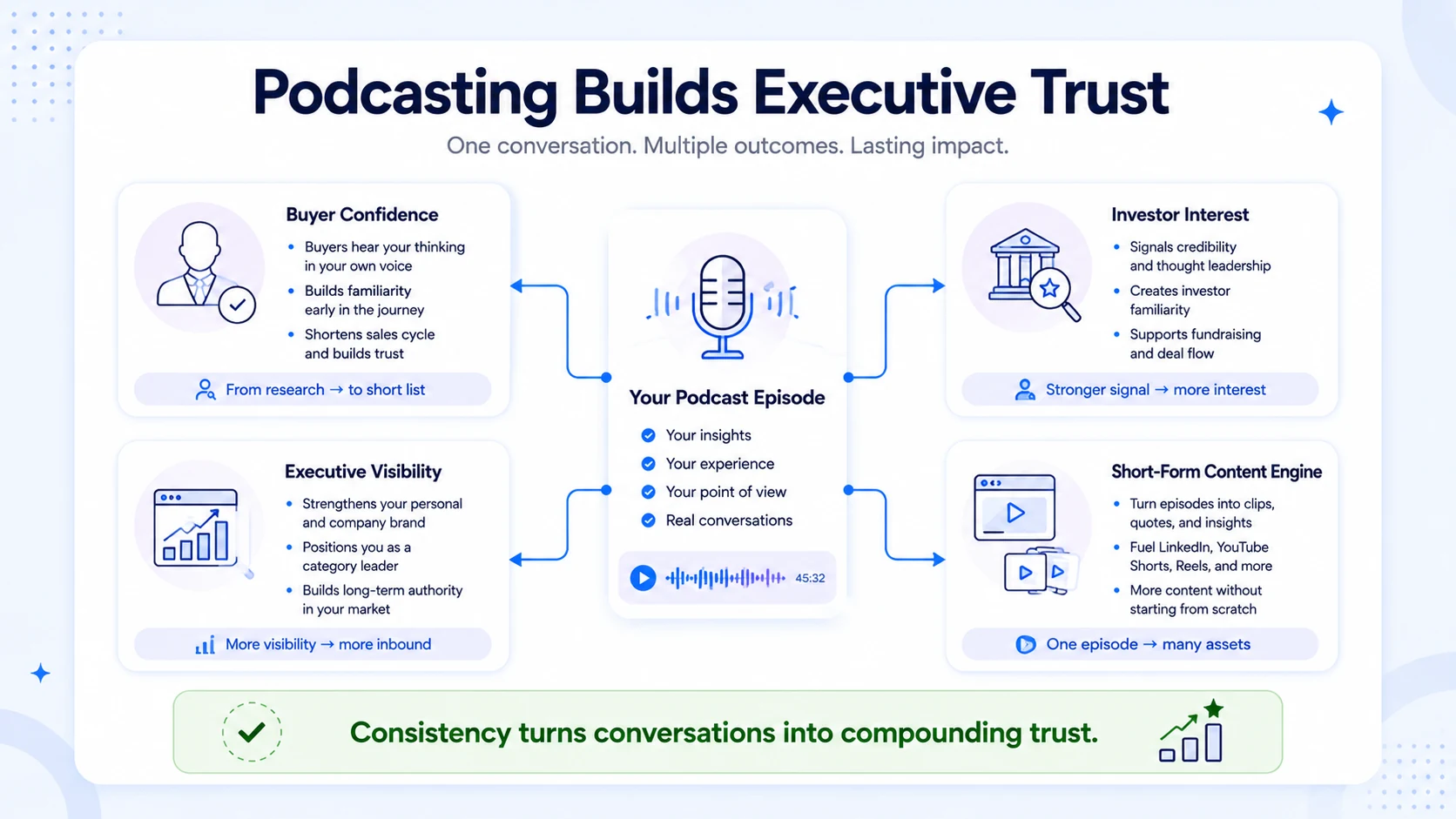
If you want your podcast to drive real business outcomes, buyer confidence, investor interest, executive visibility, the production quality and content strategy behind it need to match that ambition. That is exactly what we build at Komet Media.
Frequently Asked Questions
Q1: How long should my first podcast episode be?
Aim for 20–35 minutes for your debut episode. Long enough to deliver genuine value, short enough that a first-time listener can finish it during a commute. Nail the structure first. You can experiment with length once you have listener data from your analytics dashboard.
Q2: Do I need a website to start a podcast?
No, you can launch with a host like Buzzsprout or Spotify for Creators that provides a basic show page. That said, a dedicated site adds SEO value through show notes and transcriptions, and gives you a destination for listener analytics you actually own.
Q3: Can I record a podcast with just my phone?
Yes, as a temporary measure. Modern smartphones record usable audio in a pinch. Use a quiet room, hold the phone at microphone distance (6–8 inches from your mouth), and use a free app like Voice Memos or Anchor. Upgrade to a dedicated condenser microphone or dynamic microphone once you've validated the concept.
Q4: How much does it cost to start a podcast from scratch?
A solid beginner setup runs $70–$150 for a Samson Q2U or Blue Yeti, plus $0–$20/month for hosting. Total first-year cost can be under $300 if you use a free host and edit with Audacity. Professional-grade production with an audio interface, acoustic treatment, and paid hosting typically runs $500–$800 to set up.
Q5: What is an RSS feed and why does it matter?
An RSS feed is the structured file your media host generates automatically. It contains all your episode metadata, titles, descriptions, audio file URLs, ID3 tags, and artwork. Directories like Apple Podcasts and Spotify read your RSS feed URL to import and update your show. It is the backbone of how podcast distribution works, and choosing a host that generates a clean, valid feed is non-negotiable.
Q6: How do I monetize a podcast once it is live?
The main paths are sponsorships (direct or via your host's marketplace), dynamic ad insertion across your back catalog, listener support via Patreon or Apple Podcasts Subscriptions, and premium content tiers. Most hosts unlock monetization tools once you reach a listenership threshold. Before chasing ad revenue, focus on using your podcast as a trust-building asset that drives inbound leads, investor conversations, and hiring, the indirect ROI often exceeds ad income significantly.

